Brand: Carrozzeria
Category: Car Audio
Document Type: Manual
Language: EN
Brand: Carrozzeria
Category: Car Audio
Document Type: Manual
Language: EN
Uploaded: Nov. 21, 2025, 8:48 p.m.
The warranty period for this product is one year from the date of purchase.
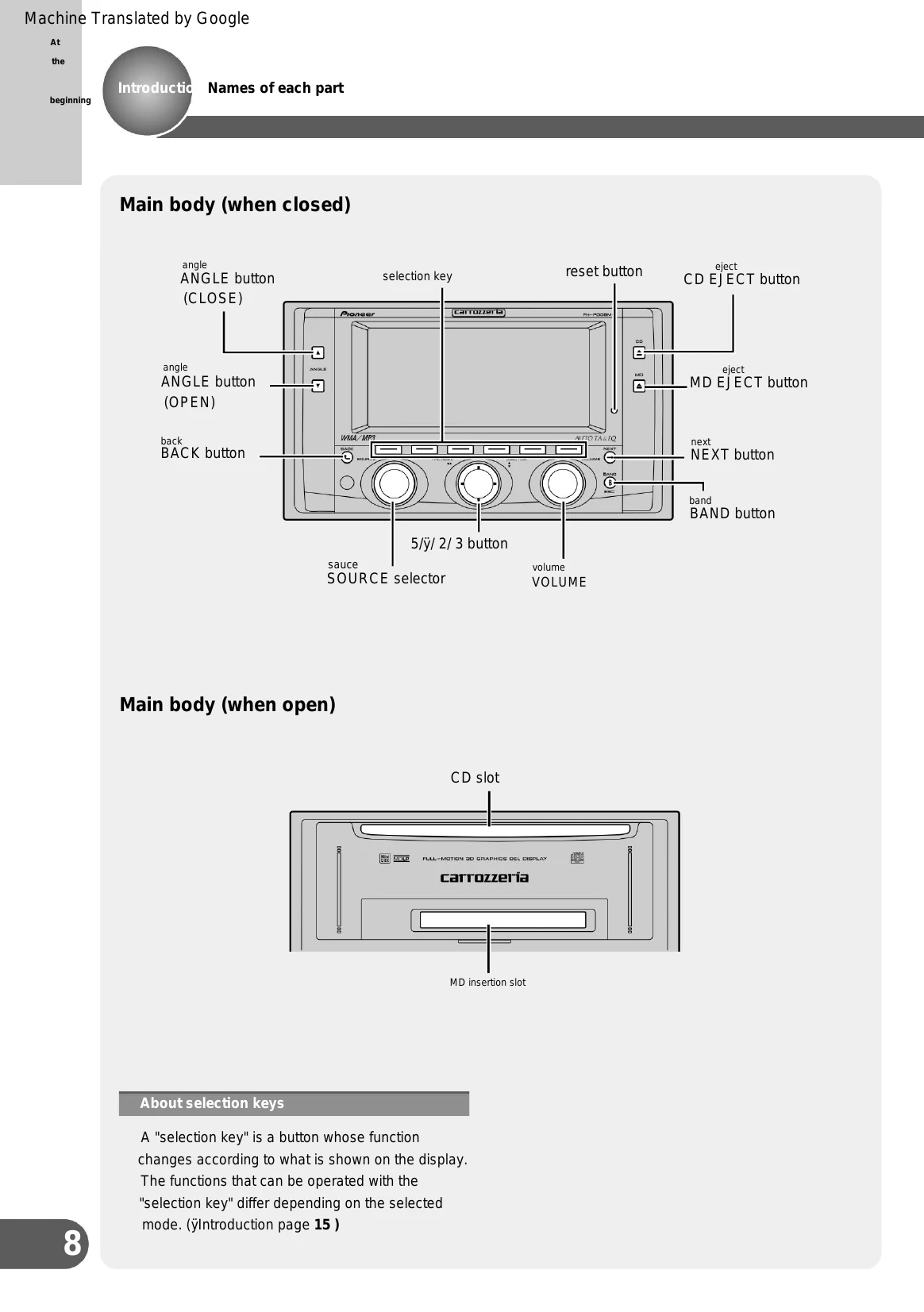
This manual provides operating instructions for the Carrozzeria FH-P009MD audio unit. It covers basic operations such as selecting sources, playing CDs, WMA/MP3 files, and MDs. It also details how to adjust settings like DSP mode, panel angle, and remote control functions.
Source Selection: Use the SOURCE selector to switch between audio sources like built-in CD, WMA/MP3, MD, radio, TV, and external inputs.
CD Playback: Insert CD into the slot after opening the front panel. Use the 2/3 buttons to select songs or fast forward/reverse. Use the VOLUME control to adjust sound level. Eject CD using the CD EJECT button.
WMA/MP3 Playback: Similar to CD playback, insert the CD-ROM. Use 5/ÿ buttons to select folders and 2/3 buttons to select songs.
MD Playback: The unit supports MDLP for longer recording times. Operations involve selecting groups and songs.
DSP Mode: Switch between 3-way network mode (NW) and standard mode (STD).
Panel Angle: Adjust the front panel angle for better visibility.
Remote Control: Insert batteries and use the remote for various operations.
Troubleshooting: Refer to common issues and their solutions, including error messages.
| Symptom | Cause | Treatment |
|---|---|---|
| Power does not turn on. Do not work. | Not connected properly. | Check to see if each lead wire and connector are connected correctly and securely. Check once. (ÿInstallation manual) |
| The fuse is blown. | Solve the cause of the blown fuse and remove the blown fuse. Please replace it with one of the same capacity. (ÿInstallation manual) | |
| There is no sound. | Turning down the volume. | Please turn up the volume. (ÿ Just here lol pages 20-29) |
| The sound is small. | The attenuator is turned on. | Release the attenuator. (ÿUseful functions q page 90) |
| Adjust the front and rear volume balance correctly. not appropriate. | Please adjust the front and rear volume balance correctly. (ÿSound adjustment page 74) | |
| There is no sound. | (ÿSound adjustment page 74) | |
| Is it the left or right speaker? | Adjust the left and right volume balance correctly. | Adjust the left and right volume balance correctly. (ÿSound adjustmentppageiate) |
| There is no sound. | (ÿSound adjustmentppageiate) | |
| Display is reversed | Reverse mode is turned on | Please cancel reverse mode. (ÿUseful functions! Page 3101) |
| Symptom: While receiving radio, the frequency of the broadcasting station is incorrect. | Treatment | |
|---|---|---|
| Please tune the frequency correctly. (ÿOnly here t page 27) | ||
| There is no "Gee, zaza". There is a lot of noise. The radio waves from the broadcasting station are weak. | Try selecting another station. (ÿOnly here t page 27) | |
| If the reception conditions improve, such as when there are obstacles nearby, the noise will decrease. My faith is not good. | Broadcasting station signal is weak. | Please select the station manually. (ÿOnly here t page 27) |
| Symptom: When playing a CD, there is a loud noise. The CD has large scratches or warping. | Treatment | |
|---|---|---|
| Please replace with another CD. If it gets better, CD Get out. It is defective. | ||
| CD playback stops midway. | The CD is extremely dirty. | Wipe any dirt off the CD. (ÿOther q page 105) |
| The CD is cloudy or has water droplets on it. | Wipe off the cloudy weather or water droplets on the CD. There is. (ÿOther q page 105) | |
| Place the CD upside down, with the title side facing up. ing. Sai. (ÿ Just here w page 20) |
| Symptom Treatment | cause | |
|---|---|---|
| There is a loud noise during playback. | The MD is extremely dirty. | Please replace the MD. |
| MD playback stops midway. | There is cloudiness or water droplets on the MD. | There is. |
| Insert an unrecorded MD | ||
| did. | The MD is inserted in the correct direction. Remove the MD and insert it in the correct direction. | |
| Not yet. | stomach. (ÿ Page 24 only here) |