Brand: CASIO
Category: Digital Camera
Document Type:
Language: EN
Brand: CASIO
Category: Digital Camera
Document Type:
Language: EN
Uploaded: Aug. 9, 2025, 11:38 p.m.
Contact your retailer or CASIO authorized service center for warranty information.
Refer to the manual for detailed instructions on each function.
| Problem | Possible Cause and Recommended Action |
|---|---|
| A recorded image was not saved. | 1) Camera power may have been turned off before the save operation was complete. If the battery indicator shows 2) You may have removed the memory card from the camera before the save operation was complete. Do not remove the memory card before the save operation is complete. |
| Though available lighting is bright, the faces of people in the image are dark. | Not enough light is reaching the subjects. Change the flash mode setting to |
| Night shots come out bad. | Use the following BEST SHOT scenes (page 93) when shooting at night. • HS Night Scene (for shooting night scenery only) • HS Night Scene and Portrait (for shooting people against night scenery) |
| Subjects are too dark when shooting images in a seashore or ski area. | Sunlight reflected by water, sand, or snow, can cause underexposure of images. Change the flash mode setting to |
| Digital zoom will not go up to the maximum value. | 1)The digital zoom setting may be turned off. Turn on digital zoom (page 131). 2)Zoom will not go up to the maximum value if the “Zoom (SR)” setting is "Single". Change the setting to "Off” (page 63). 3)Zoom will not go up to the maximum value if the snapshot size setting is something other than “3M”. Change to a different setting (page 126). |
| The image is out of focus during movie recording. | 1)Focusing may not be possible because the subject is outside the focus range. Shoot within the allowable range. 2) The lens may be dirty. Clean the lens (page 212). 3)During High Speed Movie recording, focus is fixed at the position where it was when recording started. To focus an image, half-press the shutter button for Auto Focus or focus manually before you press |
| Movie recording suddenly stops. | The camera's protection function may have activated because camera temperature is too high. Wait until the camera temperature drops to normal levels. |
| The monitor screen goes blank and camera operation becomes disabled. | Selecting S or M for the recording mode and using a slow shutter speed will cause the monitor screen to go blank during the period from when the shutter button is pressed until image recording is complete. Camera operations are disabled during this time. Wait until the back lamp goes out and an image appears on the monitor screen again. |
| I can't change the settings of menu items. Menu items for some settings are not displayed on the menu. | Some menu items may not be available, depending on the recording mode in use. While Premium Auto Pro is in use, only the menu items whose settings can be configured will be displayed on the menus. |
| The color of the playback image is different from what appears on the monitor screen when shooting. | Sunlight or light from another source may be shining directly into the lens when you are shooting. Position the camera so sunlight does not shine directly into the lens. |
| Images are not displayed. | This camera cannot display non-DCF images recorded onto a memory card using another digital camera. |
| Images cannot be edited (with White Balance, Brightness, Resize, Trimming, Rotation). | Note that you cannot edit the following types of snapshots. • Snapshots created using MOTION PRINT • CS, interval shot and bracketing group snapshots • Movies • Panorama Image • Snapshots recorded with another camera |
| A file cannot be deleted. | 1)The file may be protected. Unprotect the file (page 161). 2)"Delete Key" setting may be "Disabled”. Change the setting to "Enabled" (page 196). |
| I can't establish a wireless LAN connection. The wireless LAN connection is broken. | 1)The camera cannot connect with a smartphone if they are too far apart from each other. 2) The smartphone may be connected with another wireless LAN. Check the smartphone's Wi-Fi settings and confirm that the camera is selected for wireless LAN connection (page 170). 3)Connection may have been lost due to interference caused by a nearby microwave oven, cordless phone, or other wireless LAN device. Move the camera away from the device causing the problem. |
| The wrong date and time are displayed, or the wrong date and time are being stored along with image data. | The date and time setting is off. Set the correct date and time (page 198). |
| The messages on the display are in the wrong language. | The wrong display language is selected. Change the display language setting (page 199). |
| Images cannot be transferred over a USB connection. | 1)The USB cable may not be connected securely. Check all connections. 2) If the camera is not turned on, turn it on. 3) Your computer may not be able to recognize the camera if you connect via a USB hub. Always connect directly to the computer's USB port. 4)USB communication may not be possible when the battery level indicator is |
| Language selection screen appears when the camera is turned on. | 1)You did not configure initial settings after purchasing the camera or the camera may have been left with a dead battery. Configure the correct settings (pages 27, 199). 2)There may be a problem with the camera's memory data. If this is the case, perform the reset operation to initialize the camera's setup (page 201). After that, configure each setting. If the language selection screen does not re-appear when you turn the camera on, it means that the camera's memory management data has been restored. If the same message appears after you turn power back on, contact your retailer or a CASIO authorized service center. |
| There are various indicators and values on the monitor screen. | The monitor screen shows indicators and other information about shooting conditions and the image you are recording. You can use |
| The time and date settings configured the first time after purchasing the camera are reset to their factory defaults when I remove the camera's battery. | Load the camera's battery and reconfigure the time and date settings (page 27). Do not remove the battery from the camera for at least 24 hours after configuring time and date settings. After that, the settings will not be reset if you remove the battery. • If the time and date are reset to their factory default settings when you remove the battery after it has been loaded for more than 24 hours, it could mean that the camera's setting memory is defective. Contact your retailer or a CASIO authorized service center. |
| Buttons are not responsive right after the power has been turned on. | With large capacity memory cards there is a delay after the power has been turned on before the buttons become responsive. |
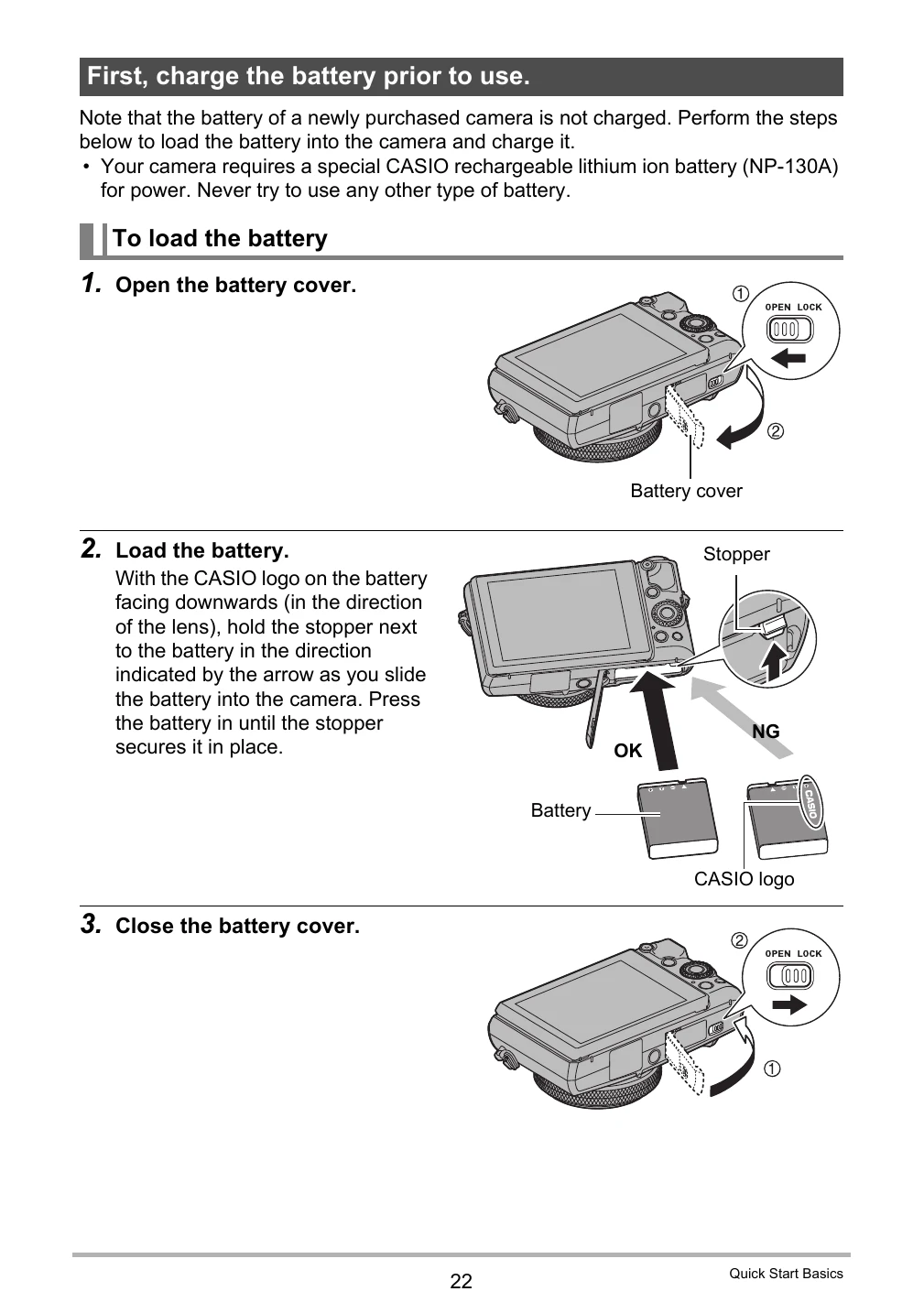
| Battery is low. | Battery power is low. |
| Can not find the file. | The image you specified with the slideshow “Images” setting cannot be found. Change the “Images” setting (page 152) and try again. |
| Card ERROR | There is something wrong with the memory card. Turn off the camera, remove the memory card and then reload it into the camera. If this message re-appears when you turn the camera back on, format the memory card (page 201). • IMPORTANT! Formatting a memory card deletes all its files. Before formatting, try transferring recoverable files to a computer or some other storage device. |
| Communication stopped. | This message appears when the wireless LAN connection is broken for some reason during data communication between the camera and smartphone. |
| File could not be saved because battery is low. | Battery power is low, so an image file could not be saved. |
| Folder cannot be created. | You are trying to record a file while there are already 9999 files stored in the 999th folder. If you want to record more, delete files you no longer need (page 39). |
| LENS ERROR | This message appears and the camera turns off whenever the lens performs some unexpected operation. If the same message appears after you turn power back on, contact a CASIO authorized service center or your original retailer. |
| LENS ERROR 2 | The Anti Shake unit of the camera may be malfunctioning. If the same message appears after you turn power back on, contact your retailer or a CASIO authorized service center. |
| Memory Full | Memory is full with images you recorded and/or files saved by editing operations. When shooting with Prerecord CS, this message indicates that there is not enough memory capacity to record all of the pre-recorded images. Delete files you no longer need (page 39). |
| Overheating. Power will turn off. | The camera's protection function may have activated because camera temperature is too high. Turn off the camera and wait until it cools down before trying to use it again. |
| Record Error | Image compression could not be performed for some reason during image data recording. Perform a zoom operation to change the composition of the image and shoot it again. |
| RETRY POWER ON | The lens came into contact with an obstruction while moving. The camera will turn off automatically when this message appears. Remove the obstruction and turn power back on again. |
| The card is locked. | The LOCK switch of the SD, SDHC, or SDXC memory card loaded in the camera is in the locked position. You cannot store images to or delete images from a memory card that is locked. |
| There are no files. | There are no files in built-in memory or on the memory card. |
| There is no image to register. | The setup you are trying to save is for an image that cannot be saved as a user "Custom Shot" scene. |
| This card is not formatted. | The memory card loaded in the camera is not formatted. Format the memory card (page 201). |
| This file cannot be played. | The file you are trying to access is corrupted or is a type that cannot be displayed by this camera. |
| This function cannot be used. | This message will appear part way through an operation when you attempt to use a function that is not allowed in combination with another function. |