Brand: CASIO
Category: Digital Camera
Document Type:
Language: EN
Brand: CASIO
Category: Digital Camera
Document Type:
Language: EN
Uploaded: Aug. 9, 2025, 11:43 p.m.
A variety of shooting styles: The CASIO EX-TR150 allows you to open the frame and rotate the LCD monitor for comfortable long-term shooting and easy self-portraits.
Simple touch panel operation: The monitor screen is a touch panel, enabling intuitive operation by touching icons and menu items.
Simple self-shooting: The monitor screen can be rotated to face the same direction as the lens, greatly simplifying self-portraits.
Make-Up feature: Smooths skin texture and softens shadows for better portraits.
HDR Art: Combines multiple exposures to create artistic images.
Extract and insert subjects: Allows you to extract a person or object from one photo and insert it into another.
| Problem | Possible Cause and Recommended Action |
|---|---|
| Power does not turn on. | 1)The battery of new camera is not charged. Charge the battery before using the camera. 2) The camera battery may be dead. Charge the battery (page 18). If this does not resolve the problem, contact your retailer or a CASIO authorized service center. |
| The camera suddenly powers down. | 1)The camera is designed to turn off automatically after no operation is performed for about five minutes. Turn power back on. 2)The battery may be dead. Charge the battery (page 18). 3) The camera's protection function may have activated because camera temperature is too high. Turn off the camera and wait until it cools down before trying to use it again. |
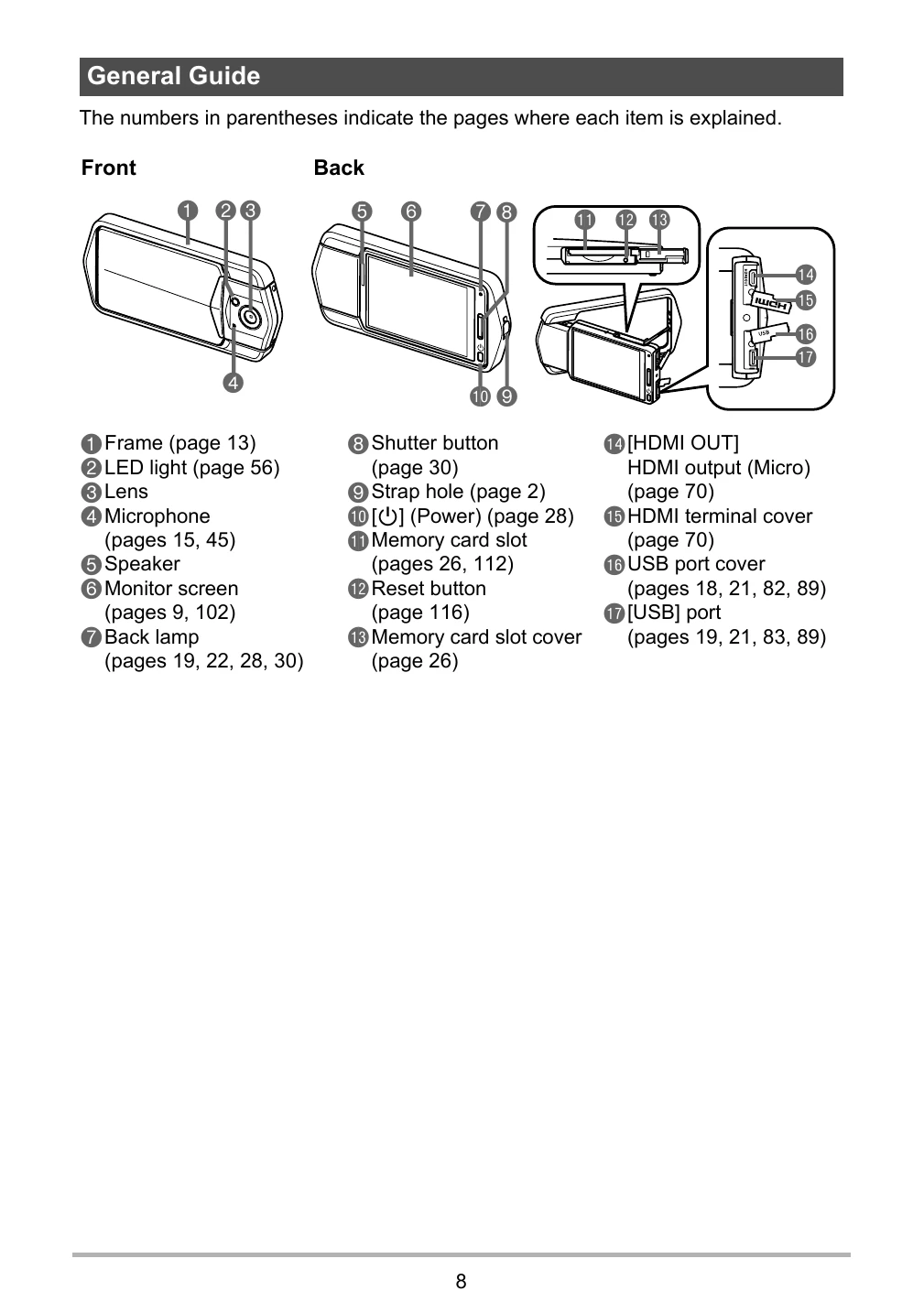
| Power will not turn off. Nothing happens when a button is pressed. | Use a thin object to press the reset button (page 8) near the memory card slot to turn the camera off and then turn on the camera again. Unlike the reset operation (page 101), pressing the reset button near the memory card slot does not initialize camera settings. |
| Image is not recorded when the shutter button is pressed. | 1)If the camera is in the PLAY mode, touch "[REC]" to enter the REC mode. 2) If the message "Memory Full" appears, transfer images to your computer, delete images you no longer need, or use a different memory card. |
| Auto Focus does not focus properly. | 1)If the lens is dirty, clean it off. 2)The subject may not be in the center of the focus frame when you compose the image. 3)You may be moving the camera when shooting. Try shooting with the "High Speed Anti Shake" BEST SHOT scene, place the camera on a tabletop or some other stable surface, or find some way to fix the camera in place. 4) You may be pressing the shutter button all the way without waiting for Auto Focus. Half-press the shutter button and allow enough time for Auto Focus to focus. |
| The subject is out of focus in the recorded image. | The image may not be focused properly. When composing the image, make sure the subject is located inside the focus frame. |
| The LED light does not light. | 1) If the battery is dead, charge it (page 18). 2)LED light operation is disabled automatically whenever you are shooting with a BEST SHOT scene and HDR Art. Select a different recording mode (page 36). |
| Camera powers down during Self-timer countdown. | The battery may be dead. Charge the battery (page 18). |
| The monitor screen image is out of focus. | 1) You may be using "Macro" for scenery or portraits. Use Auto Focus for scenery and portrait shots (page 62). 2) You may be trying to use Auto Focus or "Infinity" when shooting a close-up shot. Use the "Macro" for close ups (page 62). |
| There is digital noise in images. | 1)Sensitivity may have been increased automatically for a dark subject, which increases the chance of digital noise. Use a light or some other means to illuminate the subject. 2)Shooting with a snapshot with a high ISO sensitivity setting can increase digital noise in the image. If digital noise becomes a problem, try changing the ISO sensitivity setting to a lower value. |
| A recorded image was not saved. | 1)Camera power may have been turned off before the save operation was complete, which will result in the image not being saved. If the battery indicator shows "", charge the battery as soon as possible (page 18). 2)You may have removed the memory card from the camera before the save operation was complete, which will result in the image not being saved. Do not remove the memory card before the save operation is complete. |
| Though available lighting is bright, the faces of people in the image are dark. | Not enough light is reaching the subjects. Adjust EV shift to the + side (page 59). |
| Night shots come out bad. | Use the "High Speed Night Scene" BEST SHOT scene (page 46) when shooting at night. |
| Subjects are too dark when shooting images in a seashore or ski area. | Sunlight reflected by water, sand, or snow, can cause underexposure of images. Adjust EV shift to the + side (page 59). |
| The image is out of focus during movie recording. | 1)Focusing may not be possible because the subject is outside the focus range. Shoot within the allowable range. 2)The lens may be dirty. Clean the lens (page 107). 3)During High Speed Movie recording, focus is fixed at the position where it was when recording started. To focus an image, half-press the shutter button for Auto Focus before you touch "(Movie)" to start recording. |
| The color of the playback image is different from what appears on the monitor screen when shooting. | Sunlight or light from another source may be shining directly into the lens when you are shooting. Position the camera so sunlight does not shine directly into the lens. |
| Images are not displayed. | This camera cannot display non-DCF images recorded onto a memory card using another digital camera. |
| Images cannot be rotated. | Note that you cannot edit the following types of snapshots. • Panorama images • Snapshots recorded with another camera • Extracted subjects |
| A file cannot be deleted. | The file may be protected. Unprotect the file (page 75). |
| The wrong date and time are displayed, or the wrong date and time are being stored along with image data. | The date and time setting is off. Set the correct date and time (page 98). |
| The messages on the display are in the wrong language. | The wrong display language is selected. Change the display language setting (page 99). |
| Images cannot be transferred over a USB connection. | 1)The USB cable may not be connected securely. Check all connections. 2)If the camera is not turned on, turn it on. 3) Your computer may not be able to recognize the camera if you connect via a USB hub. Always connect directly to the computer's USB port. |
| Language selection screen appears when the camera is turned on. | 1)You did not configure initial settings after purchasing the camera or the camera may have been left with a dead battery. Check the camera setup (pages 24, 98). 2)There may be a problem with the camera's memory data. If this is the case, perform the reset operation to initialize the camera's setup (page 101). After that, configure each setting. If the language selection screen does not re-appear when you turn the camera on, it means that the camera's memory management data has been restored. If the same message appears after you turn power back on, contact your retailer or a CASIO authorized service center. |
| Buttons are not responsive right after the power has been turned on. | With large capacity memory cards there is a delay after the power has been turned on before the buttons become responsive. |