Quick Start Basics
What is a digital camera?
A digital camera stores images on a memory card, allowing for countless recordings and deletions.
- Images can be recorded and deleted.
- Images can be stored on a computer, printed, or attached to emails.
What you can do with your CASIO camera
- Premium Auto: Automatically adjusts settings for optimal image quality based on the scene.
See page 23 for more information.
- Advanced Dynamic Photo: Allows you to extract subjects from images and insert them into other snapshots or movies, even creating moving subjects.
See page 104 for more information.
- BEST SHOT: Select a scene, and the camera automatically sets up for perfect images.
See page 55 for more information.
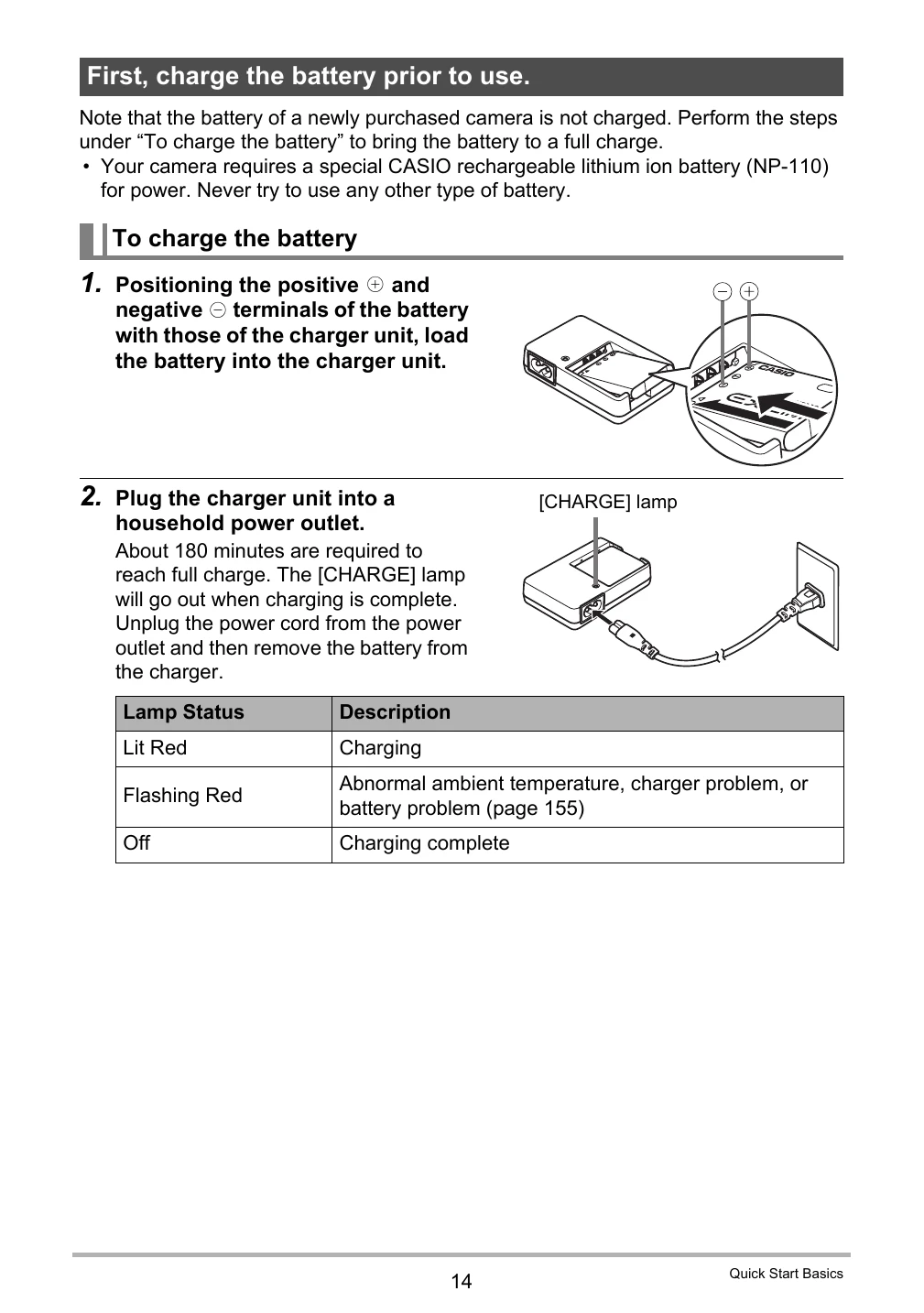
First, charge the battery prior to use.
- Charge the included NP-110 battery fully before first use.
- Use only the provided charger unit (BC-110L).
- Charging takes approximately 180 minutes. The [CHARGE] lamp goes out when charging is complete.
To load the battery
- Open the battery cover.
- Load the battery with the EXILIM logo facing up, until it clicks into place.
- Close the battery cover and lock it.
Checking Remaining Battery Power
The battery indicator on the monitor screen shows remaining power with colors: Cyan (High) to Red (Low).
Battery Power Conservation Tips
- Turn off flash when not needed.
- Enable Auto Power Off and Sleep features.
Configuring Basic Settings the First Time You Turn On the Camera
Follow on-screen prompts to set language, date, and time. Ensure date and time are set correctly for accurate image data.
Preparing a Memory Card
- A memory card is recommended for greater capacity.
- Supported cards: SD Memory Card, SDHC Memory Card.
- To load a memory card: Turn off camera, open battery cover, insert card until it clicks, close cover.
- To format a new memory card: Turn on camera, press [MENU], select "Set Up" tab, select "Format", then confirm.
Turning the Camera On and Off
- To turn on: Press [ON/OFF] (Power) or [O] (REC).
- To turn off: Press [ON/OFF] (Power).
Holding the Camera Correctly
Hold the camera firmly with arms against sides when pressing the shutter button to avoid blur, especially in low light.