Manual for EX-Z5

Manual for EX-Z5

Brand: CASIO

Category: Digital Camera

Document Type:

Language: EN
Uploaded: Aug. 9, 2025, 11:40 p.m.

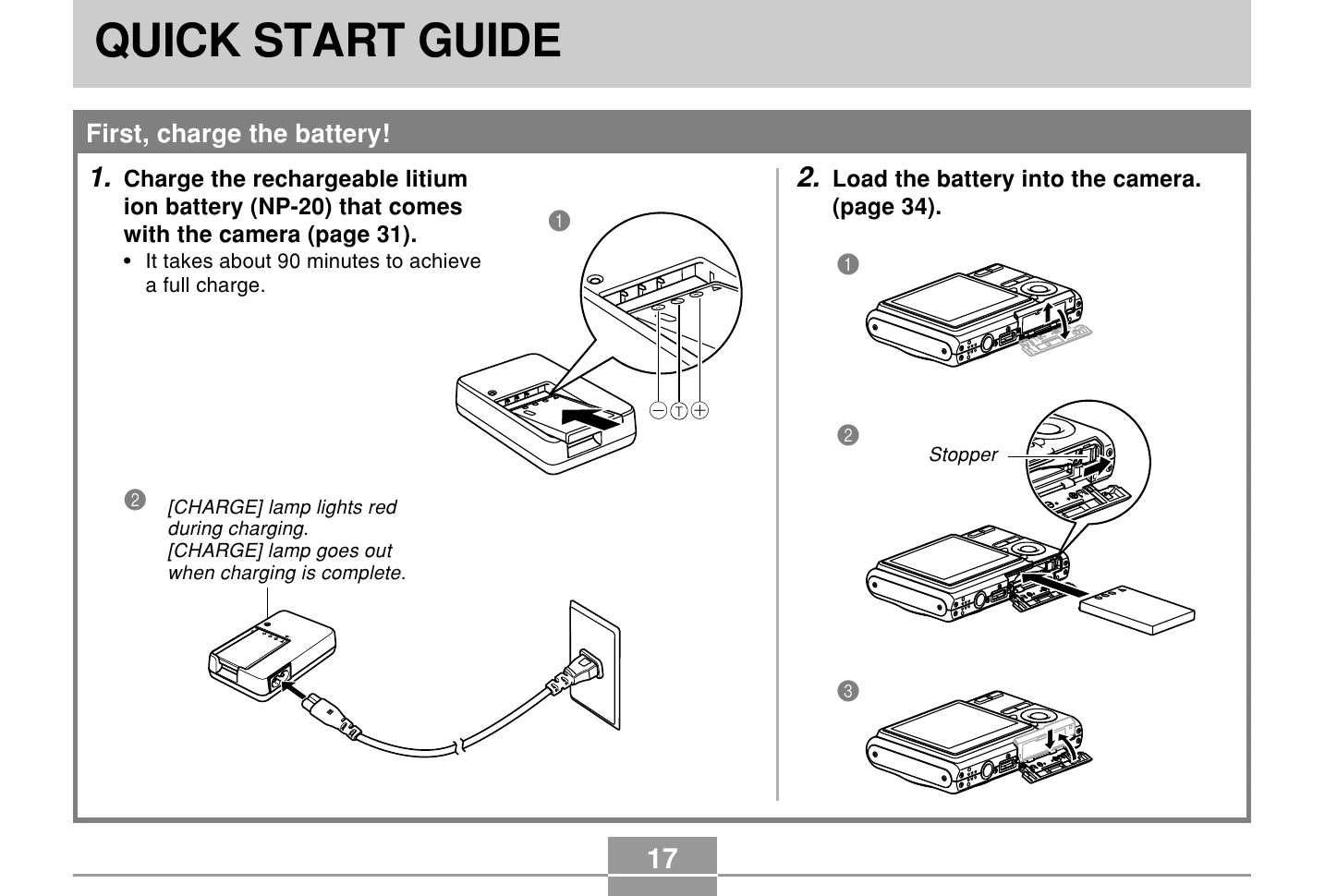
  • Charging the Battery: Connect the rechargeable lithium-ion battery (NP-20) to the charger. The charging lamp will light red and turn off when charging is complete (approx. 90 minutes).
  • Loading the Battery: Insert the charged battery into the camera, ensuring it is properly seated and secured.
  • Configuring Settings: Turn on the camera and follow the on-screen prompts to select language, geographical area, city, summer time (DST), date format, and set the date and time.
  • Recording an Image: Press the REC button, point the camera at the subject, compose the image on the monitor screen, and press the shutter button halfway to focus. Then, gently press the shutter button all the way down to capture the image.
  • Viewing Images: Press the PLAY button to enter playback mode, then use the arrow keys to scroll through recorded images.
  • Deleting Images: In playback mode, press the PLAY button, navigate to the image you want to delete, select 'Delete' from the options, and confirm.

Troubleshooting and error codes

Error Message Possible Cause Solution
"Low Battery" The battery is discharged. Replace the battery with a fully charged one or use the AC adapter.
"Memory Full" The built-in memory or memory card is full. Delete unwanted images or insert a memory card.
"Card Error" The memory card is not inserted properly or is damaged. Reinsert the memory card or use a different memory card. Format the memory card if necessary.
"Lens Error" The lens is dirty or obstructed. Clean the lens carefully with a soft cloth. Ensure nothing is blocking the lens.
"File Error" The file may be corrupted. Transfer the image to a computer and check if it can be opened. Try reformatting the memory card.
Privacy Policy