Brand: CASIO
Category: Digital Camera
Document Type:
Language: EN
Brand: CASIO
Category: Digital Camera
Document Type:
Language: EN
Uploaded: Aug. 9, 2025, 11:41 p.m.
| Symptom | Possible Cause | Action |
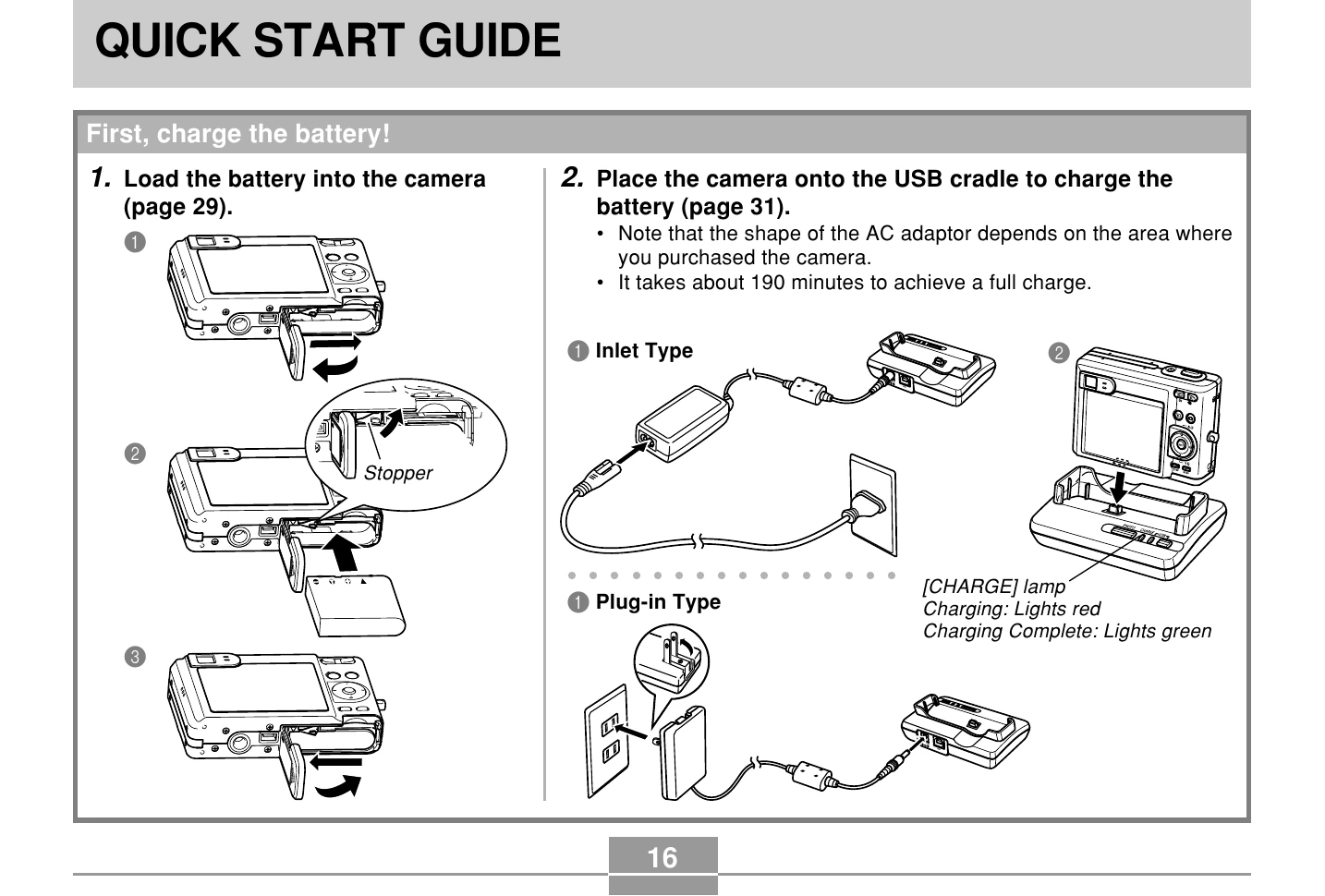
| Power does not turn on. | 1) The battery is not oriented correctly. 2) The battery is dead. | 1) Orient the battery correctly (page 29). 2) Charge the battery (page 31). If the battery goes dead soon after being charged, it means the battery has reached the end of its life and needs to be replaced. Purchase a separately available NP-40 rechargeable lithium ion battery. |
| Camera suddenly powers down. | 1) Auto Power Off activated (page 41). 2) The battery is dead. | 1) Turn power back on. 2) Charge the battery (page 31). |
| Image is not recorded when the shutter button is pressed. | 1) The camera is in the PLAY mode. 2) Flash unit is being charged. 3) Memory is full. | 1) Press [REC] to enter the currently selected recording mode. 2) Wait until the flash unit finishes charging. 3) Transfer files you want to keep to your computer and then delete files from image memory, or use a different memory card. |
| Auto Focus does not focus properly | 1) The lens is dirty. 2) The subject is not located in the center of the focus frame when you compose the image. 3) The subject you are shooting is a type that is not compatible with Auto Focus operation (page 53). 4) You are moving the camera. | 1) Clean the lens. 2) Make sure the subject is centered in the focus frame when composing the image. 3) Use manual focus (page 74). 4) Mount the camera on a tripod. |