Welcome to the Cat® B15Q Smartphone
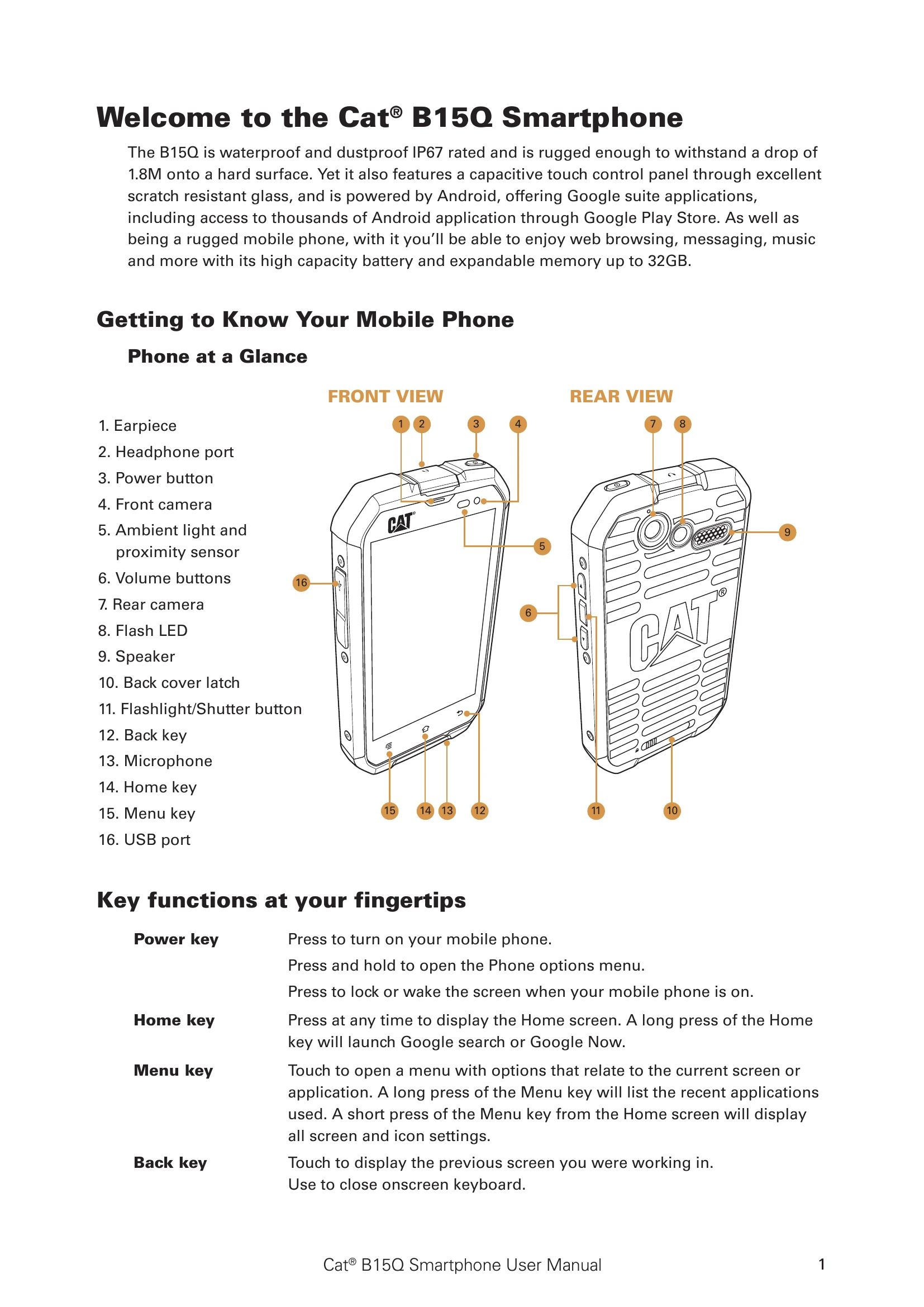
The B15Q is a rugged, waterproof, and dustproof smartphone with an IP67 rating, capable of withstanding drops of up to 1.8M. It runs on Android, offering access to Google Play Store for applications. Key functions include:
- Power key: Turns the phone on/off, locks/wakes the screen, and opens the phone options menu.
- Home key: Returns to the Home screen and can launch Google search or Google Now with a long press.
- Menu key: Opens context-specific menus or displays recent applications with a long press.
- Back key: Navigates to the previous screen or closes the on-screen keyboard.
Basic operations involve touching, touching and holding, swiping, and dragging on the touchscreen. The device can be powered on by pressing the power button and following the on-screen setup. The Home screen is the main interface for accessing all features. The manual also details removing and replacing the back cover, installing memory cards, SIM cards, and batteries, as well as charging the device. Safety precautions, specifications, and regulatory information are also provided.