Quick Start Guide for PVC2300 and WVC2300

Quick Start Guide for PVC2300 and WVC2300

Brand: Cisco

Category: Networking

Document Type: Quick Start Guide

Language: EN
Uploaded: Sept. 12, 2025, 4:16 a.m.

Warranty Information

None

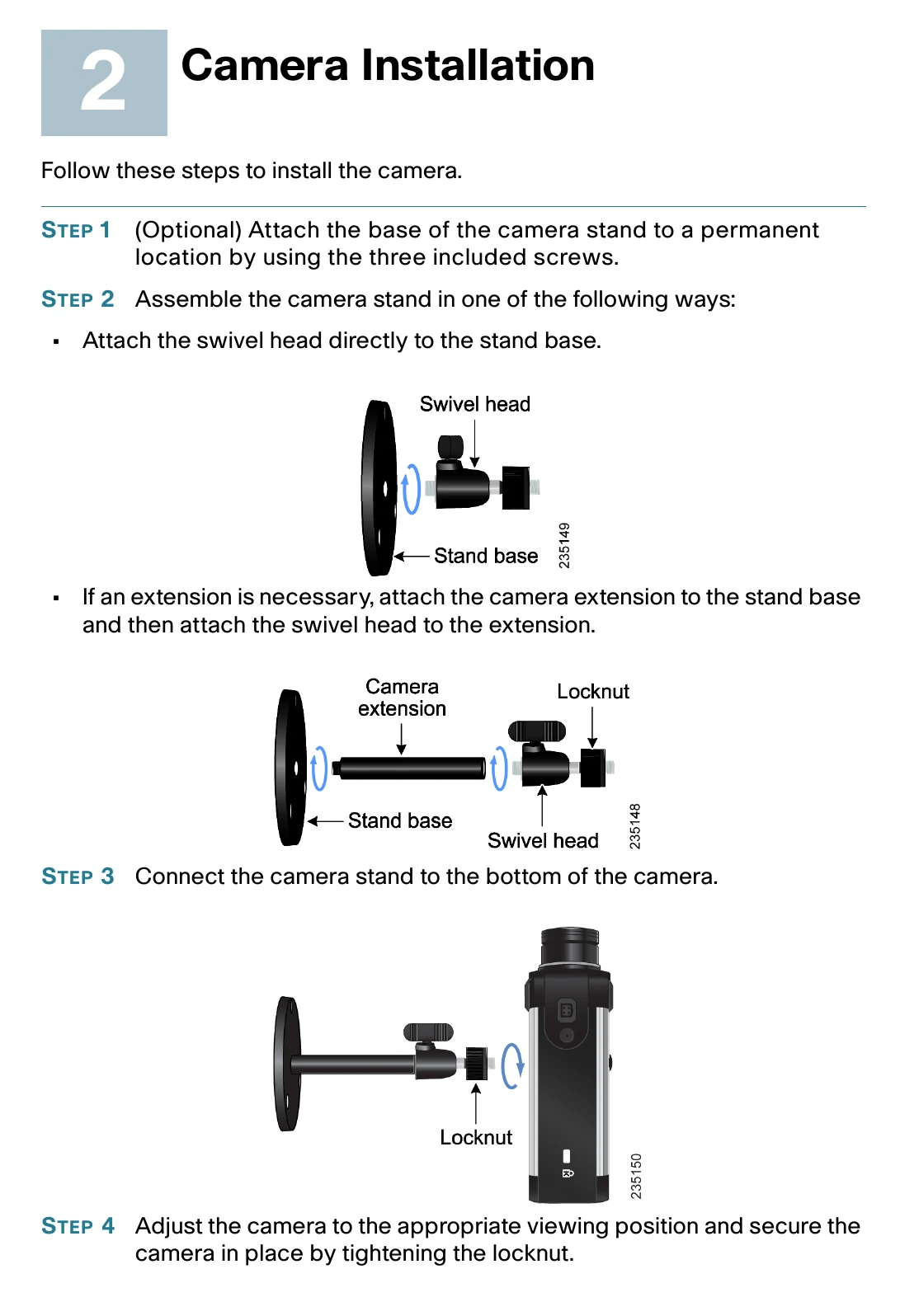
This guide provides instructions for installing and configuring Cisco Small Business PVC2300 and WVC2300 Internet Video Cameras with Audio. It covers unboxing, hardware installation steps including mounting and connecting the camera, and initial configuration using the provided CD-ROM and Setup Wizard. It also details how to switch between wired and wireless modes for the WVC2300 and how to adjust the lens focus. Finally, it directs users to further resources for product information, technical documentation, and support.

Troubleshooting and error codes

LED Color Activity Action
Ready Amber Off Camera is powered off.
On Camera is powered on.
Blink Camera is booting.
Network Green Off Network connection not detected.
On Network connection detected.
Blink Sending and receiving data.
Privacy Policy