Brand: Cisco
Category: Telephony
Document Type: Manual
Language: EN
Brand: Cisco
Category: Telephony
Document Type: Manual
Language: EN
Uploaded: Sept. 12, 2025, 4:25 a.m.
Manual Publish Date: 2013-01-30
None
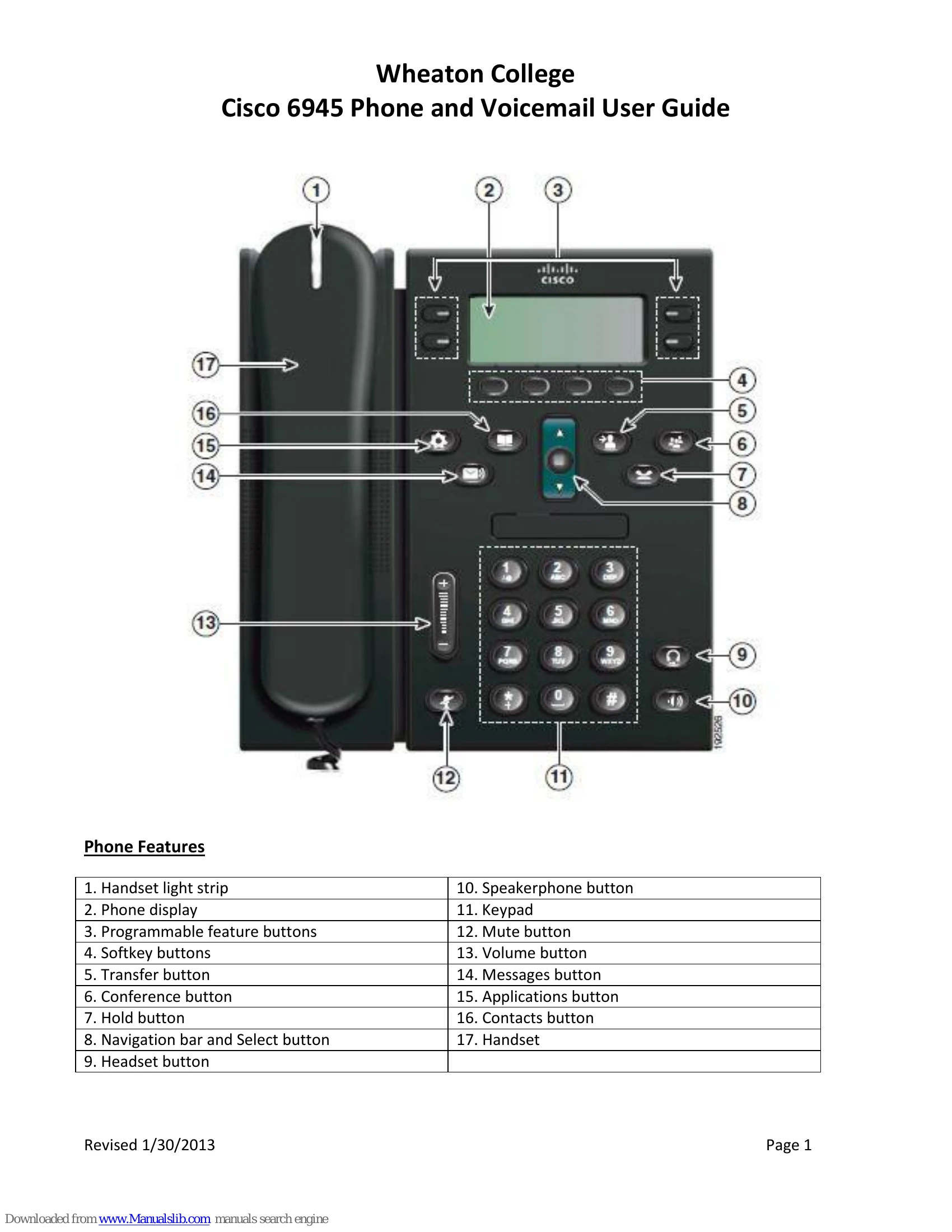
Placing and Answering Calls: Lift handset and dial, use speakerphone, or press softkeys like 'New Call' or 'Answer'.
Call Management: Use 'Hold' to pause a call, 'Transfer' to redirect it to another number or voicemail, and 'Conference' to add multiple participants.
Voicemail: Access messages by pressing the 'Messages' button. You can check messages, change greetings (Standard, Alternate, Busy, Closed, Internal), and send messages.
Advanced Features: Explore Call Back, Call Park, Call Pickup options, and Divert calls to voicemail. The 'Meet-Me' conference calling feature requires advance reservation.
Customization: Set up speed dials and personal contacts via the User Options Web Page. Customize ringtones and display contrast through Phone Applications.
| Problem | Solution |
| Misdialed 911 | Do not hang up. Wait for the operator and inform them it was a misdial. |
| Hold music interference during conference calls | Be aware that pressing 'Hold' on a conference call plays music for all participants. |
| Call Park retrieval issues | Park Number displays for 10 seconds. If not retrieved within 60 seconds, the originating phone rings. After 3 minutes, the call returns to the parker. |
| Meet-Me Conference access | Contact Joy O'Reagan (x7433) or Dan Taylor (x5211) in advance to reserve a Meet-Me extension. Participants may incur call charges. |
| Voicemail PIN | Initial PIN is 123456. Follow prompts to change PIN and record your name. |