Brand: Cisco
Category: Telephony
Document Type: Manual
Language: EN
Brand: Cisco
Category: Telephony
Document Type: Manual
Language: EN
Uploaded: Nov. 21, 2025, 7:17 p.m.
| Features | Descriptions |
|---|---|
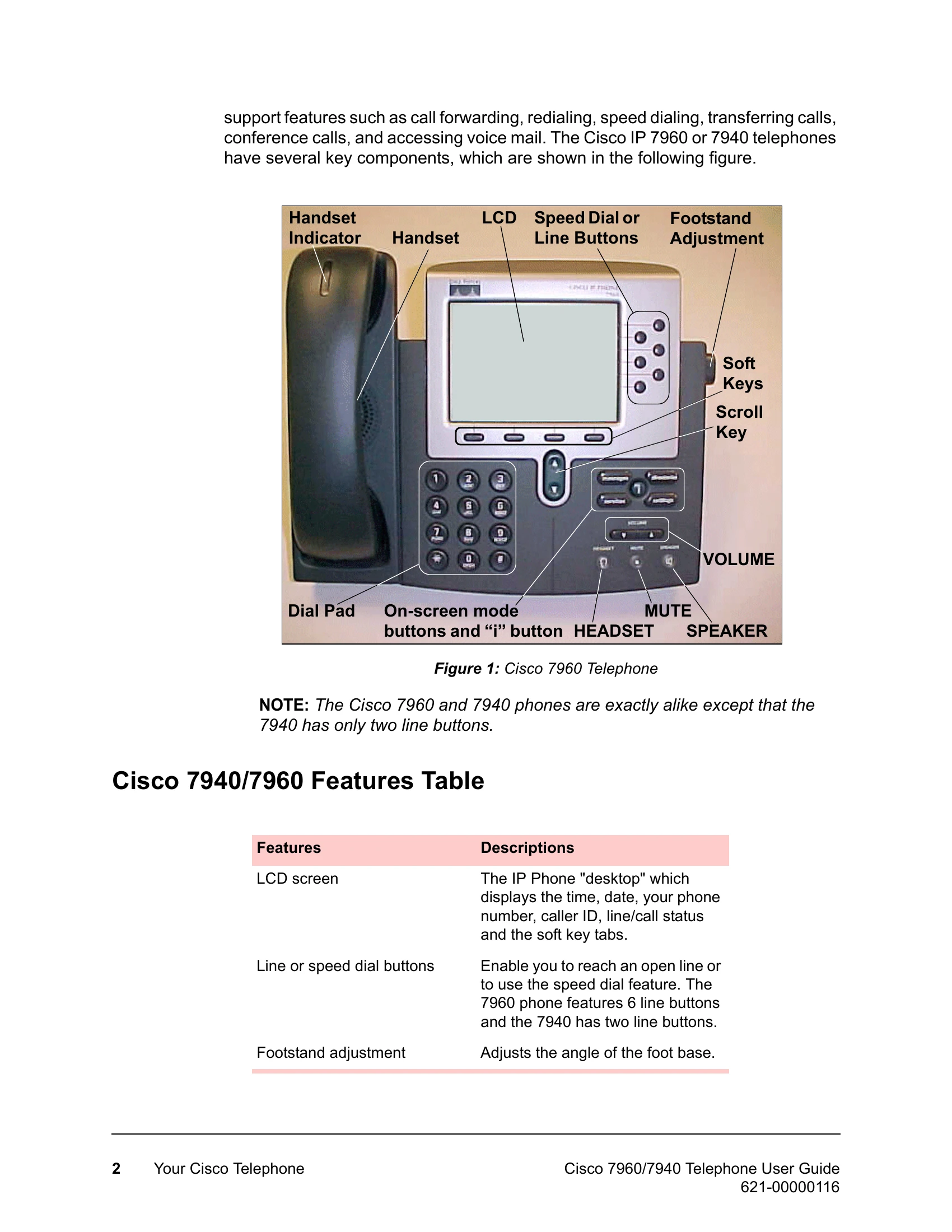
| Soft keys | Soft key functions change depending on the status of the phone. The key's current function is shown on the LCD screen. |
| messages button | Accesses the voice mail main menu for managing voice mail messages. |
| directories button | Accesses the Missed Calls, Received Calls and Placed Calls information. Does not work on the 7960 MGCP phone. |
| services button | Provides access to VOISS system company and personal directories, voice mail, call screening and forwarding and web services (such as weather or stock quotes) through a menu tree. |
| settings button | Accesses the LCD screen contrast, ringer type, network configuration and status controls. |
| i button | Displays online help for a phone key or function. |
| On-screen Mode buttons | Provide access to the voice mail system (when available), call histories, phone settings such as contrast and ring type, plus network configuration and status information. |
| VOLUME buttons | Increase or decrease the volume for the currently active voice receiver – handset, headset, or speakerphone. The volume buttons also control the ringer volume (if on-hook), and the contrast of the LCD via the settings button. |
| SPEAKER button | This button toggles the speakerphone function on and off. |
| MUTE button | This button toggles the microphone function on and off. Works with the speakerphone, handset, or headset microphone. |
| HEADSET button | This button toggles the headset function on and off. |
| Scroll key | Enables you to move among different soft key options displayed on the LCD. |
| Dialing pad | Press the dial pad buttons to dial a phone number. Dial pad buttons work exactly like those on a standard telephone. |
| Handset | Lift the handset and press the dial pad numbers to place a call, review voice mail messages, answer a call, etc. |
| Handset Indicator | Red LEDs in handset cradle that are visible through a window in the handset. They flash when the phone rings and light solid red when you have voice mail messages. |