Brand: Cisco
Category: Telephony
Document Type: Manual
Language: EN
Brand: Cisco
Category: Telephony
Document Type: Manual
Language: EN
Uploaded: Nov. 21, 2025, 6:41 p.m.
Manual Publish Date: 2021-10-01
None
Learn about the features of your Cisco DECT 6823 and 6825 Handset so you can initiate calls, transfer calls and much more.
The handset battery is shipped inside the handset but there's a plastic tab over the battery contacts. You need to remove the plastic tab.
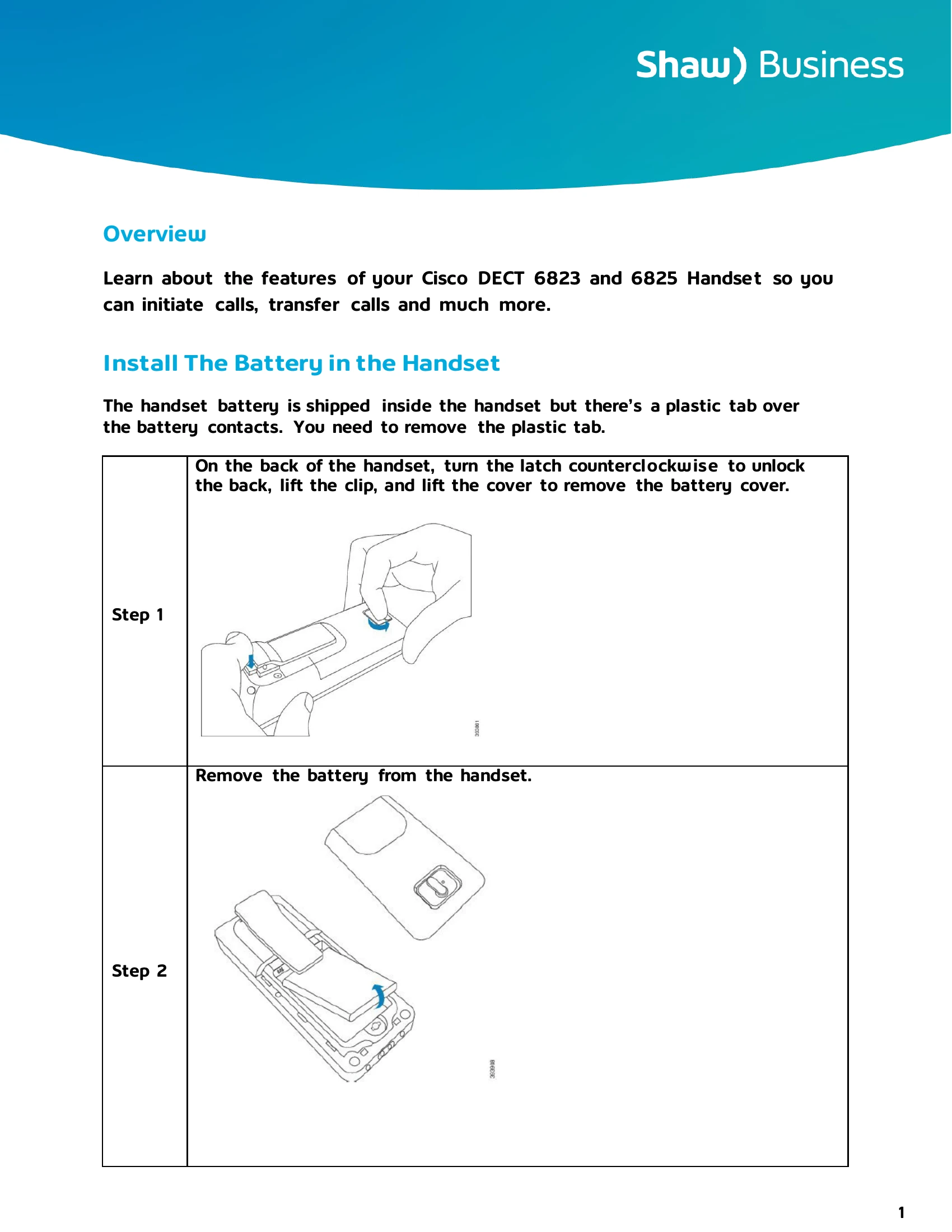
On the back of the handset, turn the latch counterclockwise to unlock the back, lift the clip, and lift the cover to remove the battery cover.
Remove the battery from the handset.
Remove the plastic over the contacts.
Place the battery under the clip and drop it into the compartment.
Ensure that the contacts meet and that the battery is seated in the compartment.
Note: The battery fits only one way in the compartment. Don't force the battery in the wrong way in the battery compartment.
Replace the battery cover, make sure that the cover is closed, and turn the latch clockwise to the locked position.
Don't force the cover closed. If it doesn't close easily, take it off and check that the battery is completely seated in the battery compartment.
Your handset has many buttons and hardware features that you'll use regularly. Use the following figure and table to identify the important button and hardware features. The figure above the 6823 Handset and 6825 Handset. The 6825 Ruggedized Handset is similar to 6825 Handset in appearance.