Quick Start Guide for MPP 8851

Quick Start Guide for MPP 8851

Brand: Cisco

Category: Telephony

Document Type: Quick Start Guide

Language: EN

Uploaded: Nov. 21, 2025, 8:24 p.m.
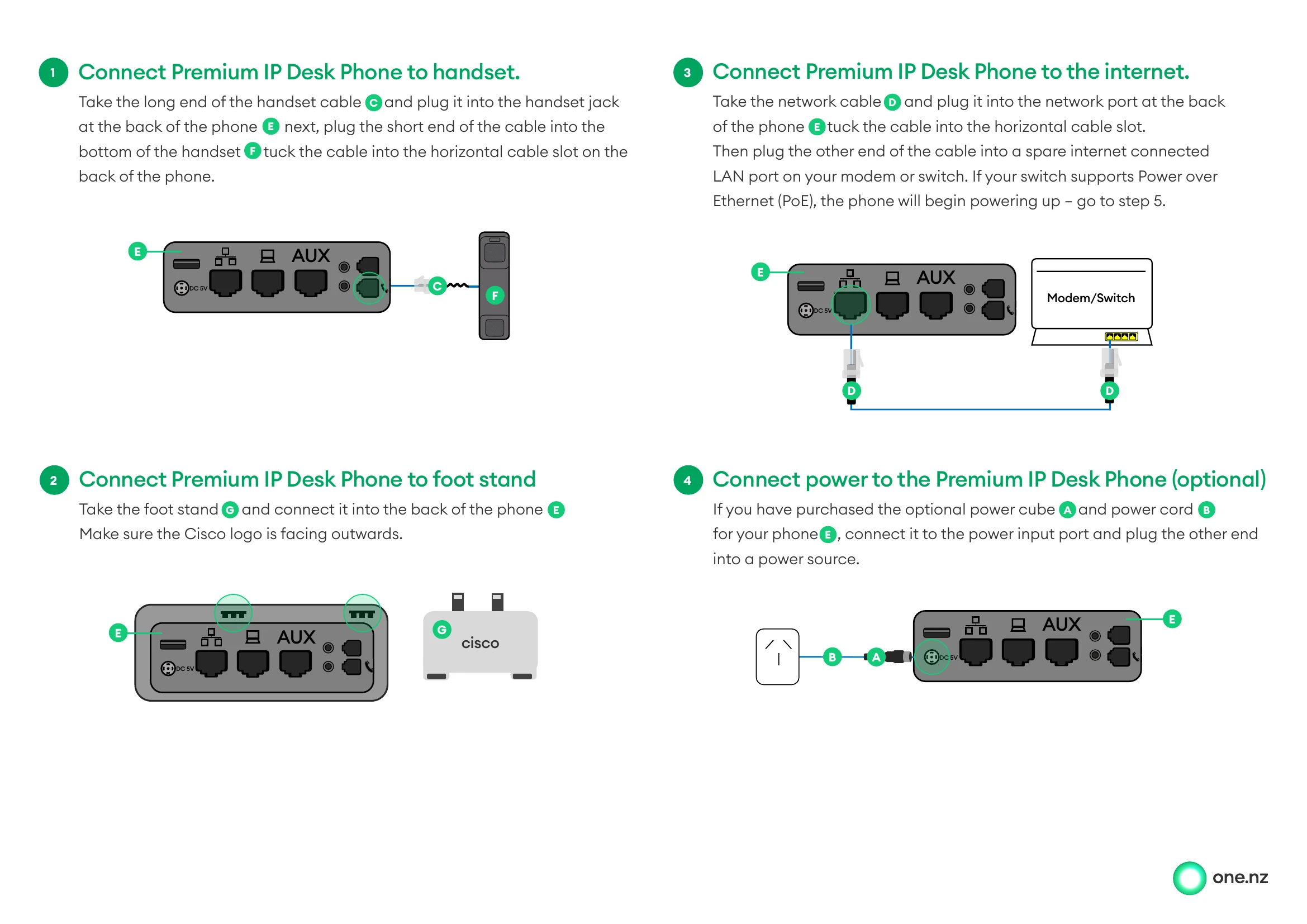
  1. Connect Handset: Connect the long end of the handset cable to the phone and the short end to the handset. Tuck the cable into the slot.
  2. Connect Foot Stand: Attach the foot stand to the back of the phone with the Cisco logo facing outwards.
  3. Connect to Internet: Plug one end of the network cable into the phone's network port and the other end into your modem or switch.
  4. Connect Power (Optional): If using the power cube and cord, connect them to the phone's power input port and a power source.
  5. Applying Configuration: Wait for the phone to apply its configuration and power up.
  6. Ready to Provision: When the account setup screen appears, proceed to the next step.
  7. Retrieve Credentials: Access the self-service portal or scan the QR code to get the device username and password.
  8. Enter Credentials: Input the retrieved username and password into the phone.
  9. Ready to Use: Once logged in, your phone is ready with your username, number, and menu options displayed.
Privacy Policy