Brand: Cisco
Category: Telephony
Document Type: Quick Start Guide
Language: EN
Brand: Cisco
Category: Telephony
Document Type: Quick Start Guide
Language: EN
Uploaded: Nov. 21, 2025, 6:50 p.m.
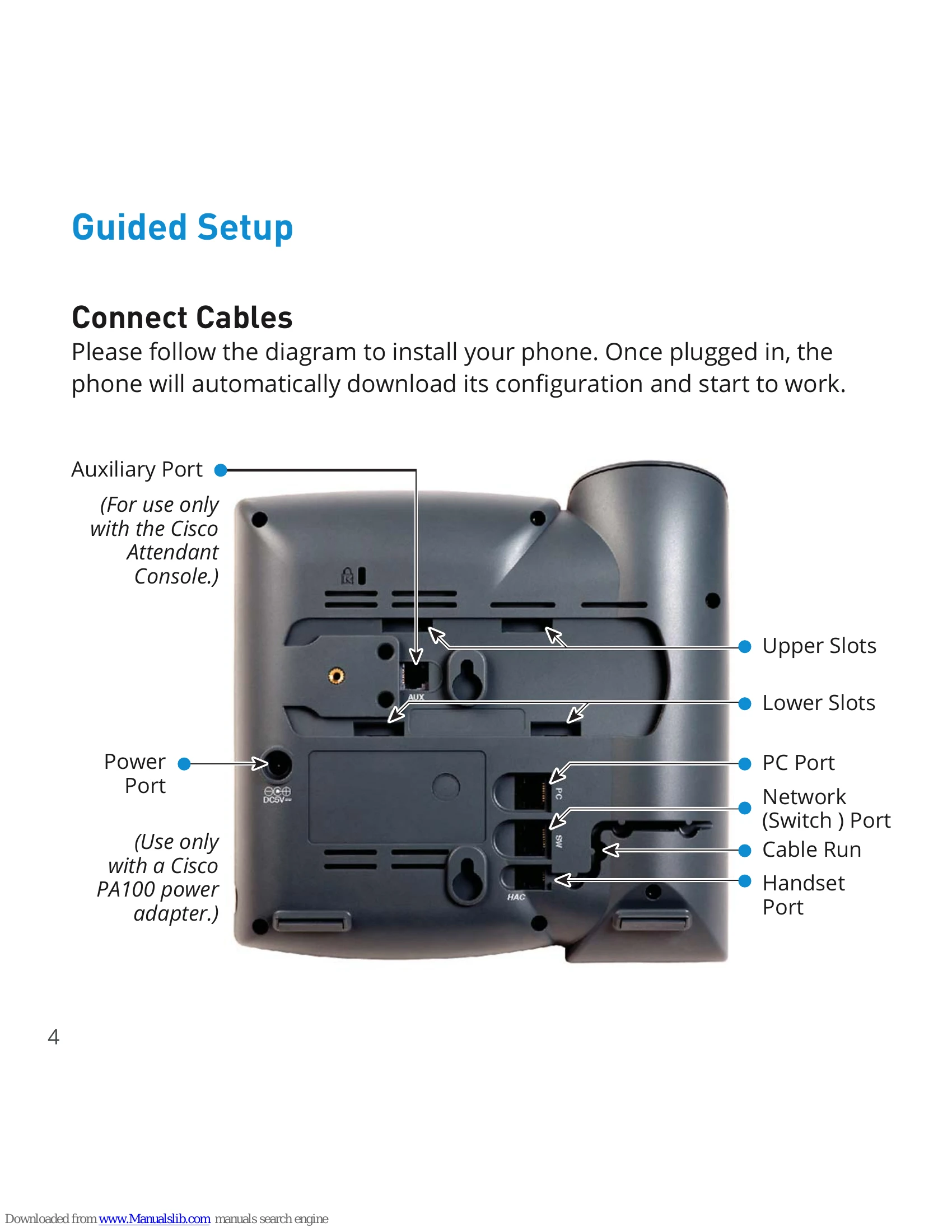
Please follow the diagram to install your phone. Once plugged in, the phone will automatically download its configuration and start to work.
Connect the Handset Cord to the Handset and the Phone Base.
Connect the Network Cable from the Network (Switch) Port to your network connection.
If using a power adapter, connect it to the Power Port.
When the phone is not in use: Pick up the Handset or press the “Speakerphone” button, then dial.
When you are already on a call: Press a Line Button, dial the second number, and press "Dial" Softkey.
On Handset: Pick up the handset.
On Headset: Press the “Headset” button or "Answer" Softkey.
On Speakerphone: Press the "Speaker" button or "Answer" Softkey.