Manual for Adventure HD 5200

Manual for Adventure HD 5200

Brand: COBRA

Category: Electronics

Document Type: Manual

Language: EN
Uploaded: Aug. 10, 2025, 12:38 a.m.

Warranty Information

Contact Cobra Electronics for product support if the product or accessories are not working properly.

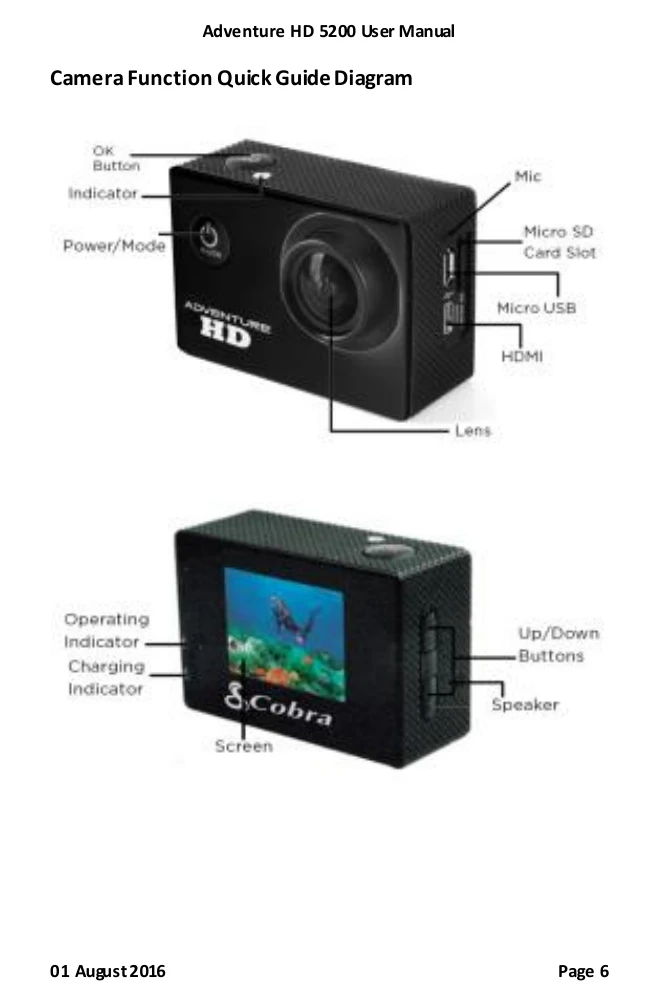
  • Powering On/Off: Press and hold the Power/Mode button for 3 seconds.
  • Mode Switching: Press the Power/Mode button to cycle through Video, Photo, and Playback modes, and the settings menu.
  • Video Recording: In Video mode, press OK to start recording; press OK again to stop.
  • Taking Photos: In Photo mode, press OK to capture a photo.
  • Playback: In Playback mode, use Up/Down to navigate files, press OK to play video/photo. Adjust volume with Up/Down during playback.
  • Settings: Navigate the settings menu using Up/Down and confirm selections with OK. Press Mode to exit the menu.
  • Connecting to PC/TV: Use the USB cable to connect to a computer for file transfer or webcam use. Use an HDMI cable to connect to a TV for playback.
Privacy Policy