Brand: COBRA
Category: Electronics
Document Type: Quick Start Guide
Language: EN
Brand: COBRA
Category: Electronics
Document Type: Quick Start Guide
Language: EN
Uploaded: Aug. 10, 2025, 12:38 a.m.
None
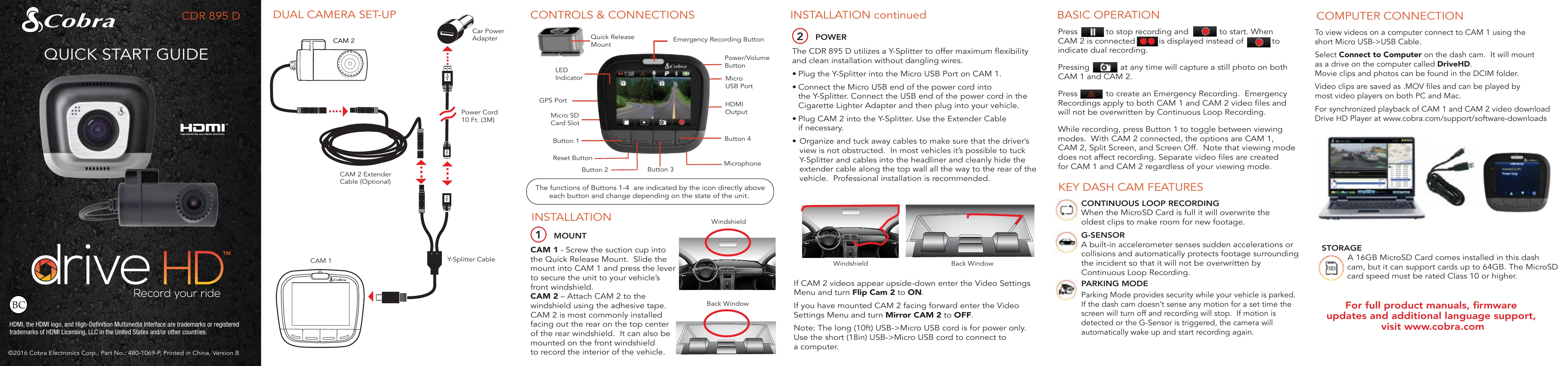
Press to stop recording and
to start. When CAM 2 is connected,
is displayed instead of
to indicate dual recording.
Pressing at any time will capture a still photo on both CAM 1 and CAM 2.
Press to create an Emergency Recording. Emergency Recordings apply to both CAM 1 and CAM 2 video files and will not be overwritten by Continuous Loop Recording.
While recording, press Button 1 to toggle between viewing modes. With CAM 2 connected, the options are CAM 1, CAM 2, Split Screen, and Screen Off. Note that viewing mode does not affect recording. Separate video files are created for CAM 1 and CAM 2 regardless of your viewing mode.