Brand: Contax
Category: Camera
Document Type:
Language: EN
Brand: Contax
Category: Camera
Document Type:
Language: EN
Uploaded: Aug. 9, 2025, 11:34 p.m.
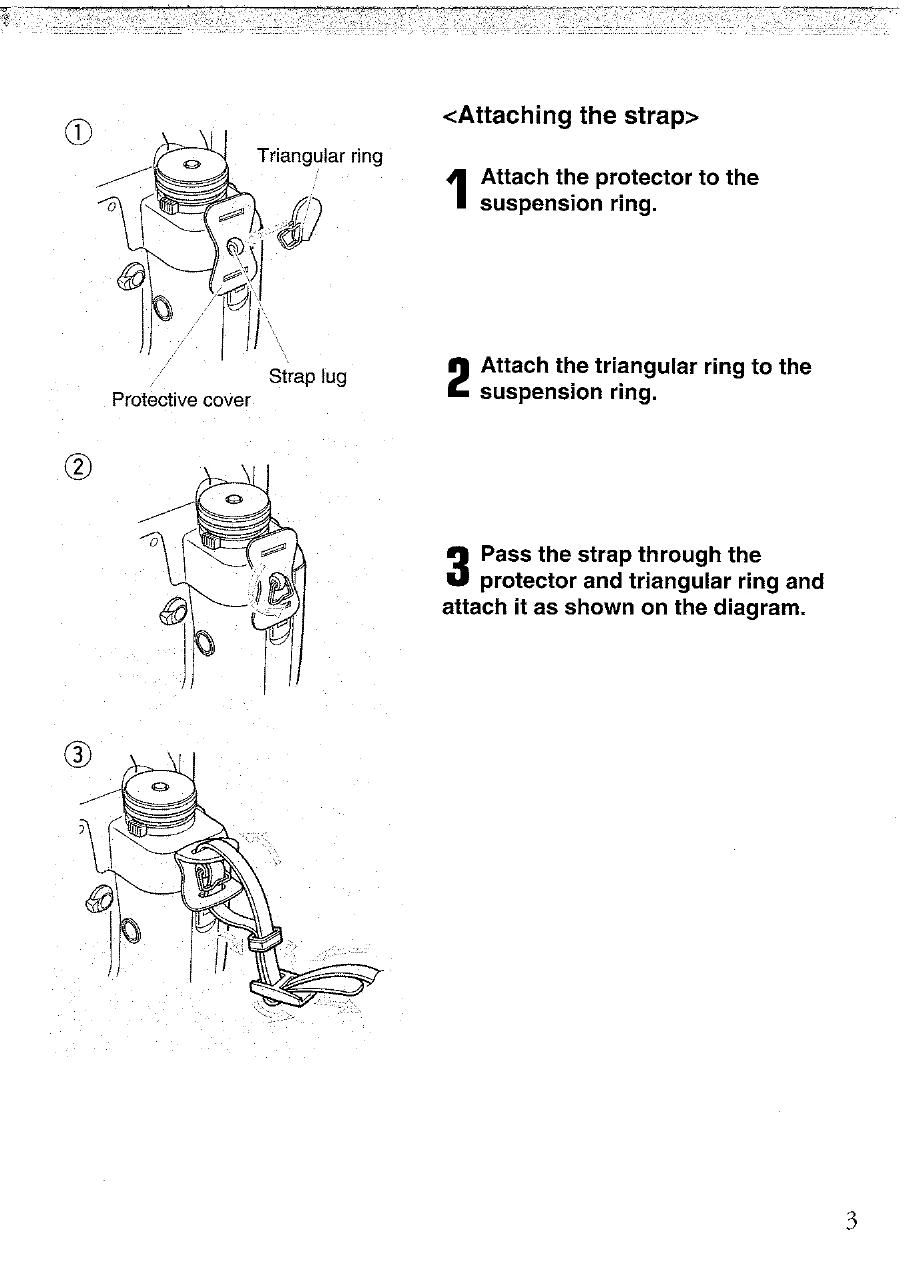
Attaching the Strap: Connect the strap lug, triangular ring, and protective cover to the camera's suspension ring.
Inserting Battery: Turn the main switch off. Lift and turn the battery compartment release knob, then slide out the compartment. Insert a 6V lithium battery (2CR5), matching the contacts. Slide the compartment back in and turn the knob clockwise to secure.
Checking Battery Power: The display panel shows battery status with a battery mark. If it flashes, replace the battery.
Mounting Lenses: Remove caps. Align lens mount mark with camera's lens mark and turn clockwise until it clicks.
Removing Lenses: Press the lens release button and turn the lens counterclockwise.
Adjusting Diopter: Turn the diopter adjustment dial to match your vision.
Main Switch: Use to turn power on/off and activate AE lock.
Shutter Release Button: Half-press to activate autofocus and metering; full press to take the photo.
Holding the Camera: Tuck elbows, hold breath, keep arms relaxed, and press gently for sharp photos.
Loading Film: Open camera back, insert film at an angle, pull film to the spool, ensure it's flush, and close the back. Turn the main switch on and press the shutter release to advance to the first frame.