Manual for E560

Manual for E560

Brand: Coolpad

Category: Mobile Phone

Document Type:

Language: EN
Uploaded: Aug. 10, 2025, 12:09 a.m.

Manual Publish Date: 2015-06-23

Warranty Information

This limited warranty covers hardware defects for 2 years for the phone and 6 months for accessories.

Getting Started:
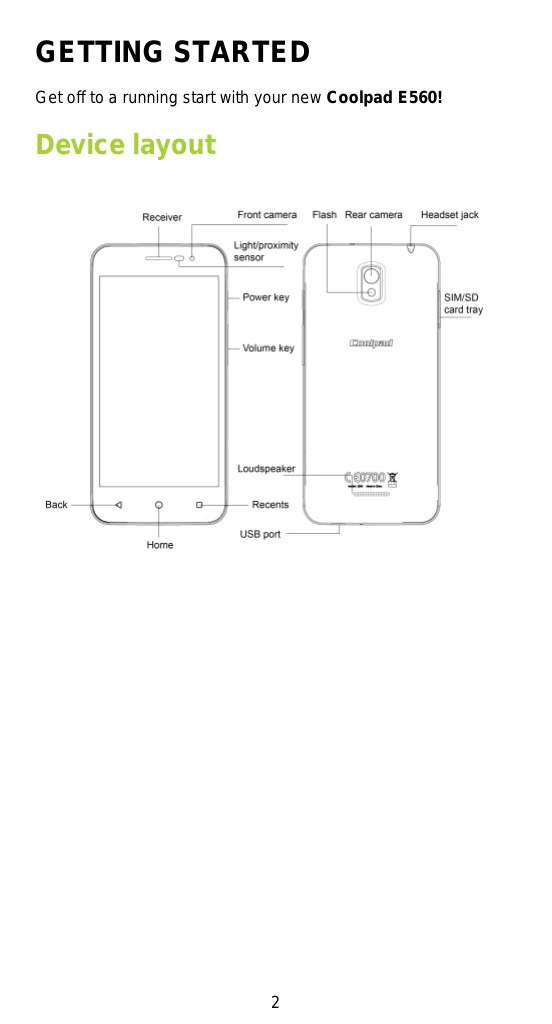
  • Device Layout: Familiarize yourself with the device's physical buttons and ports.
  • Main Keys: Learn the functions of the Power, Recents, Home, and Back keys.
  • Charging the Battery: Connect the provided adapter and cable to charge the phone.
  • SIM and Micro SD Card: Insert cards into the designated tray.
  • Power Operations: Turn the phone on/off, restart, or enable airplane mode using the power key.
  • Screen Lock: Lock and unlock the screen for security.
  • Touch Screen Gestures: Understand tapping, tapping and holding, dragging, double-tapping, swiping, and pinching.
  • Home Screen: Navigate and customize your home screen with apps, widgets, and folders.
  • Notifications and Quick Settings: Access notifications and quick settings by swiping down from the top.
  • Entering Text: Use the on-screen keyboard and learn how to switch input methods and edit text.
  • Taking Screenshots: Press the Power and Volume Down keys simultaneously.

Troubleshooting and error codes

Problem Possible Cause Solution
Phone does not power on Battery is depleted. Charge the battery.
Call quality is poor Obstruction of receiver or speaker. Do not cover the receiver or speaker during calls.
Cannot connect to Wi-Fi Wi-Fi is turned off or network issue. Ensure Wi-Fi is on and check network settings.
Cannot send or receive messages Messaging app issue or network problem. Check messaging app settings and network connection.
Apps not responding App error or low memory. Restart the app or the phone. Clear app cache or uninstall and reinstall the app.
Privacy Policy