Manual for Vision 2

Manual for Vision 2

Brand: Cricket

Category: Mobile Phone

Document Type:

Language: EN
Uploaded: Aug. 10, 2025, 12:03 a.m.

Warranty Information

Manufacturer guarantees the product against defects for 24 months for the phone, 12 months for accessories.

  • Getting Started: Covers initial setup, parts identification, and basic phone operations like powering on/off, using the touchscreen (tap, touch and hold, swipe, drag), and navigating the home screen.
  • Making Connections: Details how to make and receive calls, manage contacts, send messages (text and multimedia), and use the Gmail app and Chrome browser for internet access.
  • Apps and Entertainment: Explains how to use the camera for photos and videos, and introduces productivity apps like Calendar and navigation apps, along with Google Search, Calculator, and Clock. It also covers entertainment apps like Google Play Music and YouTube.
  • Settings: Guides users through basic settings, network and internet configurations (Wi-Fi, data usage, hotspot), apps and notifications management, battery, display, sound, storage, security, accounts, and accessibility features.

Troubleshooting and error codes

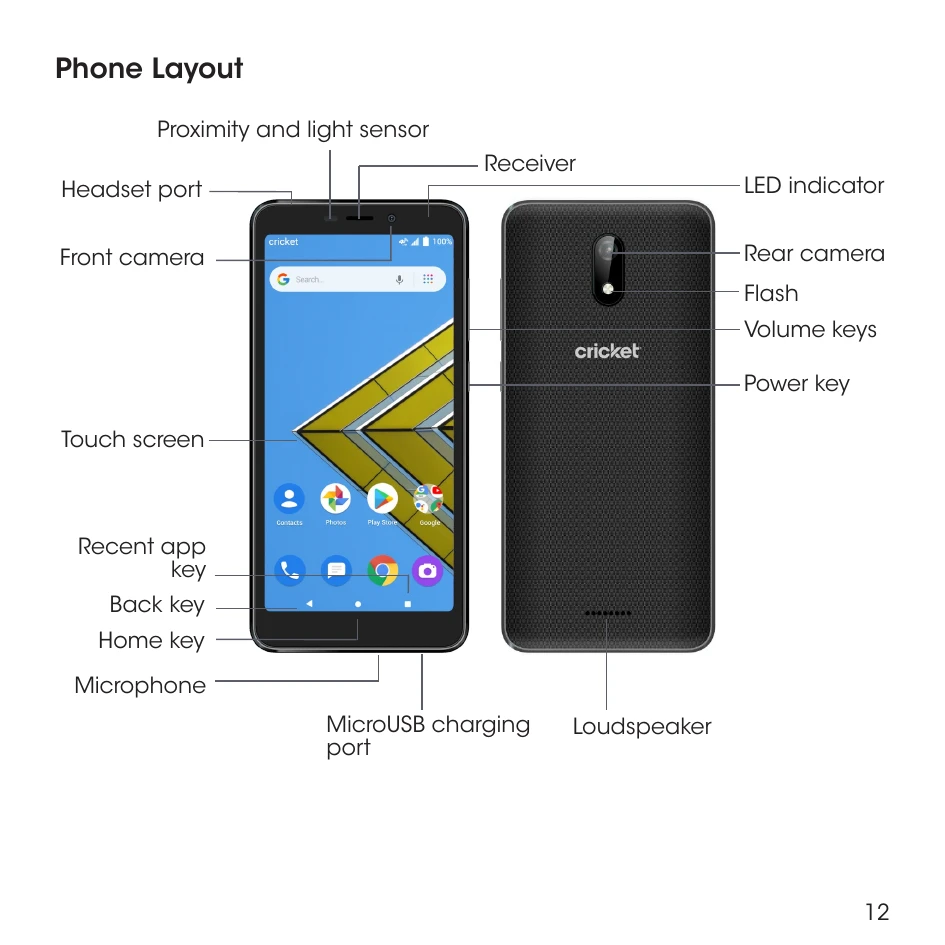
Part Description
Front camera
  • Take selfies and record videos while facing the screen.
  • Allows you to have video calls and participate in video conferencing.
Receiver Hear the caller and automated prompts.
Touchscreen
  • Display all the information needed to operate your phone, such as the call status, the Contacts list, and the date and time.
  • Provides one-tap access to all of your features and applications.
Power key
  • Press to turn the screen on or off.
  • Press and hold to turn the phone on or off, to restart it, or to take a screenshot on the current screen.
MicroUSB charging port/Accessory jack Connect the USB cable (included) for charging or connect other accessories.
Volume keys Adjust the volume for ringtones, media, notifications, and system sounds.
Headset port Plug in a headset (sold separately) for convenient, hands-free conversations.
Microphone Used for transmitting your voice electronically for a call, voice recording, video recording, or Google Assistant.
Proximity sensor To detect nearby objects without any physical contact. Detects light levels to automatically brighten or dim the screen and save battery during a call.
Privacy Policy