Manual for DUAL

Manual for DUAL

Brand: CUHD

Category: Action Camera

Document Type: Manual

Language: EN
Uploaded: Aug. 10, 2025, 12:53 a.m.

Warranty Information

STOREX offers a 1-year guarantee on the product and 3 months on accessories against manufacturing or assembling faults.

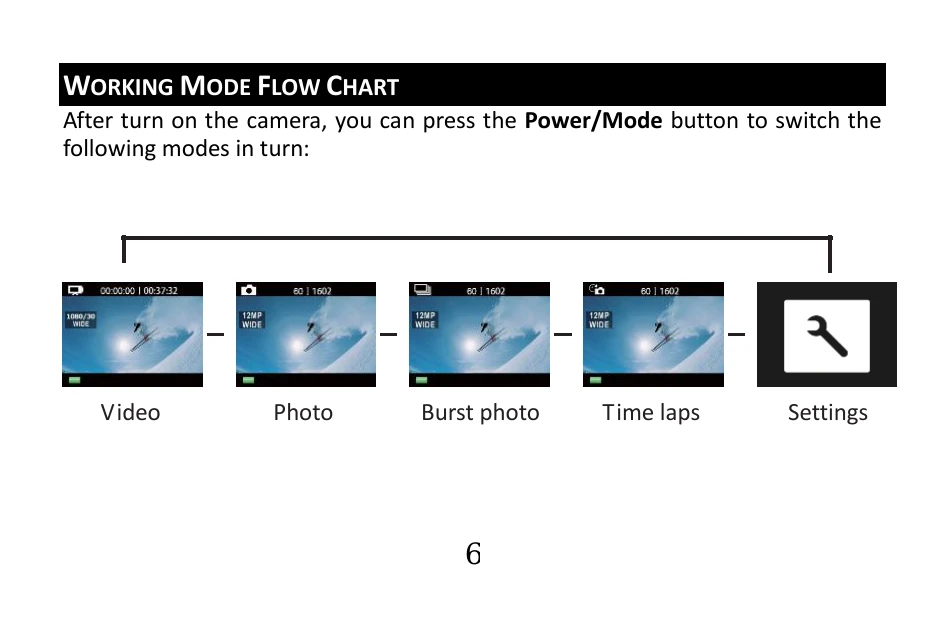
WORKING MODE FLOW CHART

After turning on the camera, press the Power/Mode button to switch between modes:

  • Video: Record video.
  • Photo: Capture a single photo.
  • Burst photo: Capture photo bursts (3 photos in 1.5 seconds).
  • Time lapse: Shoot a series of photos at set intervals (2, 3, 5, 10, 20, 30, or 60 seconds).
  • Settings: Adjust camera settings, resolution, and more.

USE YOUR CAMERA

  1. Insert a micro SD or micro SDHC card: High-speed cards (Class 4 or higher) are recommended. Class 10 is required for time-delay functions or professional mode. Turn off the camera before inserting/removing the card.
  2. Charging the battery: Connect the camera to a PC via USB cable when it's off. The blue status indicator will light up during charging and turn off when complete. The camera will not charge when it's on.
  3. Turn on/off: Press and hold the Power/Mode button for about 3 seconds. The LCD will display "ON" or "OFF" and a beep will be heard. The camera will automatically turn off after 5 minutes of inactivity.
  4. Start to Use (Video): Ensure the camera is in Video mode. Press the Shutter/Select Button to start recording. The camera will beep and status lights will flash.
  5. To stop recording: Press the Shutter/Select Button. Status lights will stop flashing and the camera will beep.
  6. Photo Mode: Ensure the camera is in Photo mode. Press the Shutter/Select Button to take a photo; the camera will emit a shutter sound.
  7. Burst Photo Mode: Ensure the camera is in Burst Photo mode. Your camera takes 3 photos in 1.5 seconds.
  8. Time Lapse: Ensure Continuous Lapse is ON and the camera is in Time Lapse mode. Press the Shutter/Select Button to initiate countdown and capture photos at set intervals.
  9. Enable/disable Wi-Fi: Press and hold the Down/Wi-Fi Button for three seconds to turn Wi-Fi OFF.

Troubleshooting and error codes

Issue Solution
Appliance damaged (plug, cord, liquid spill, foreign object, moisture, malfunction, drop) Refer all troubleshooting to qualified personnel.
Privacy Policy