Brand: D-Link
Category: Network Storage
Document Type: Manual
Language: EN
Brand: D-Link
Category: Network Storage
Document Type: Manual
Language: EN
Uploaded: Nov. 21, 2025, 6:27 p.m.
Manual Publish Date: 2009-01-27
This document contains proprietary information and makes no warranty of any kind regarding the material.
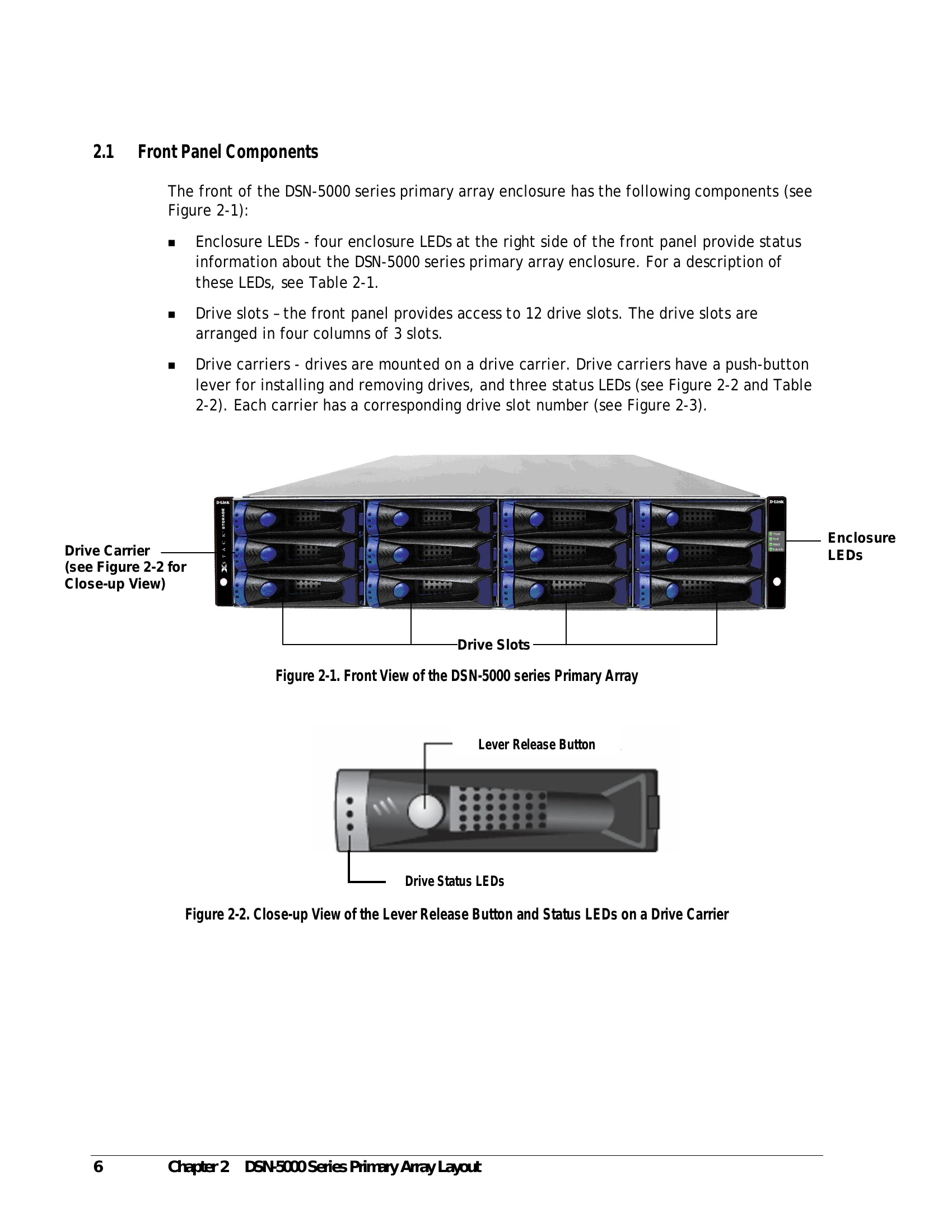
| LED | Color | Description |
|---|---|---|
| Power | Green | ON = DSN-5000 series primary array is powered on. OFF = power is not being received. |
| Fault | Amber | ON = a fault occurred with the power supply, fan, over temperature, internal module, or controllers. OFF = normal operation. |
| Ready | Green | ON = normal operation. OFF = normal while DSN-5000 series primary array is booting. After initialization, this status indicates a problem with the DSN-5000 series primary array. |
| Identify | Blue | Blink = used to visually identify the enclosure. OFF = no intent of identification is being performed. |
| LED | Color | Description |
|---|---|---|
| LED 1 | Green | This LED is reserved for future use. |
| LED 2 | Green | OFF = no drive is installed (drive slot is empty). ON = drive is online, ready for operation. Slow Flash = drive is being prepared for removal or is being rebuilt. Fast Flash = drive is being identified. |
| LED 3 | Amber | Fast Flash = drive failed and should be replaced (see Appendix A for information about installing or replacing drives) |
| Green | Flash = drive activity is occurring. |
| Switch / LED | Description |
|---|---|
| Power | Applies power to the DSN-5000 series primary array. The DSN-5000 series primary array has two power switches. Both must be turned on. |
| Reset | Resets the system. This switch is recessed to prevent against accidental resets. Note: This switch simply reboots the system without changing your configuration. |
| Restart | This switch is reserved for future use. |
| Switch / LED | Color | Description |
|---|---|---|
| Ready/Fault | OFF Red Green |
Primary array is powered off or performing its Power On Self Test. ON = a fault has occurred. Please contact D-Link Technical Support. ON = normal operation. |
| OFF Green |
Battery is fully charged and not sustaining cache. ON = battery is good or being charged. |
|
| "A" and "B" LEDs | Yellow | Flash = contents of system cache memory is being preserved by the battery subsystem after an unexpected loss of power or system failure has occurred. These LEDs are reserved for future use. |