Manual for DSL-225

Manual for DSL-225

Brand: D-Link

Category: Networking

Document Type: Manual

Language: EN
Uploaded: Sept. 12, 2025, 4:25 a.m.

Warranty Information

Warranty information is not explicitly detailed in the provided pages.

The D-Link DSL-225 11N VDSL2+ Router User Manual provides comprehensive guidance for setting up and managing the device. It covers initial hardware installation, connecting to the web interface, and configuring various network settings. Key sections include product overview, system requirements, hardware details, basic and advanced setup, maintenance, status monitoring, and troubleshooting. Users can learn about WAN service configuration, wireless settings, local network setup, and security features. The manual also details how to access route information, WAN info, and ARP info, along with a knowledge base for networking basics and frequently asked questions.

Troubleshooting and error codes

Issue Solution
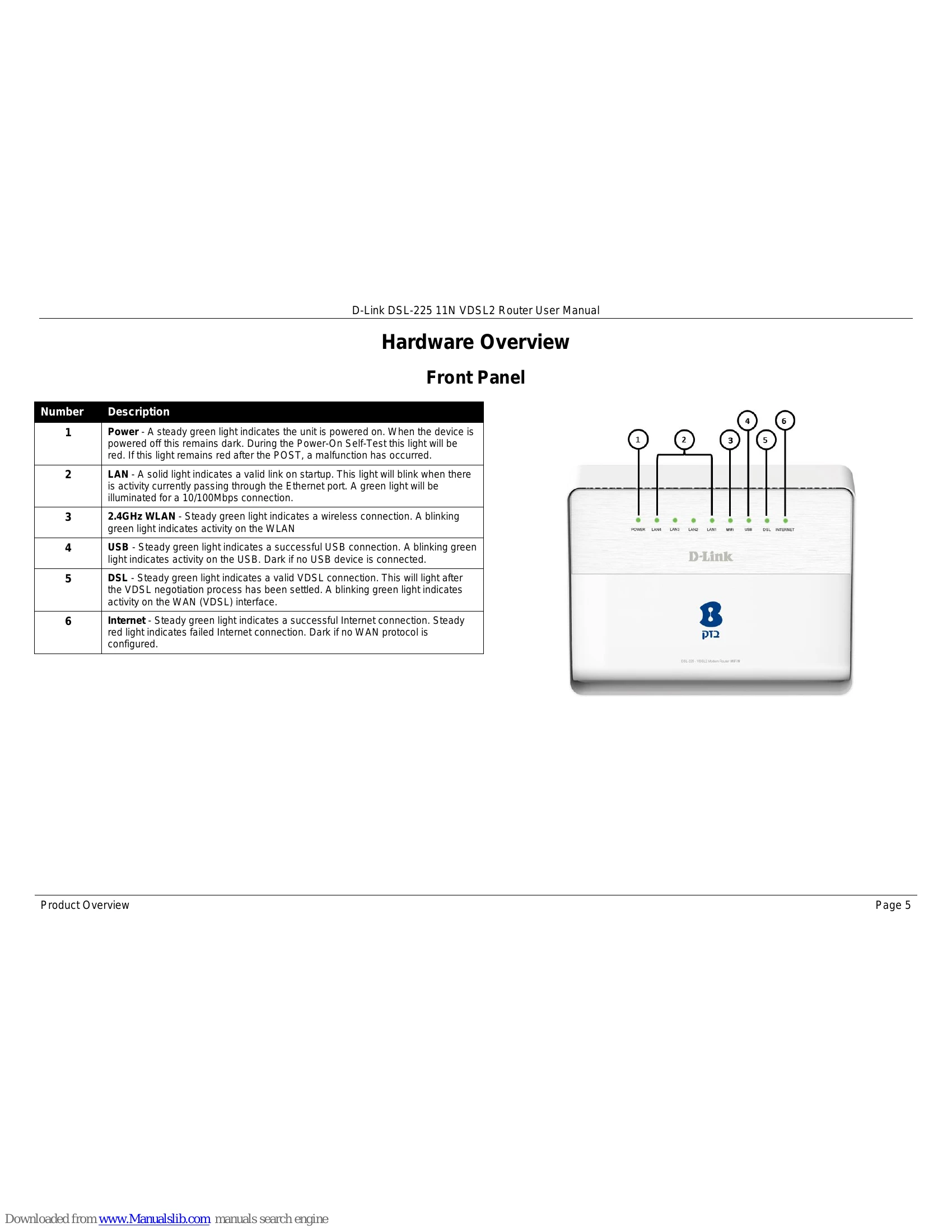
Router not working correctly Check cables, LED indicators (Power, DSL, LAN), and WAN settings against ISP information.
No Internet connection Contact ISP to confirm service enablement, and verify ISP username and password.
Forgot web UI login password Reset the router to factory defaults using the reset button. Default IP is 10.0.0.138, username 'Admin', password 'Admin'.
Privacy Policy