Getting to Know Your Mi-Fi
Familiarize yourself with the keys and ports of your DWR-930M Mi-Fi device.
- Power Key: Press and hold for 2 seconds to turn the device on/off.
- WPS Key: Press and hold for 3 seconds to activate WPS function.
- Reset: Use a pin to press the reset hole for 1 second to reset the device.
- Micro USB Port: For charging and connecting as a 4G modem.
LED Indicators
- Network: Indicates network status (blue for good, green for weak, flashing red for no service).
- WPS: Flashes blue when WPS function is active.
- Wi-Fi: Blue when connected, off when no devices are connected.
- Battery: Red when charging, blue when fully charged, flashing red when below 20%.
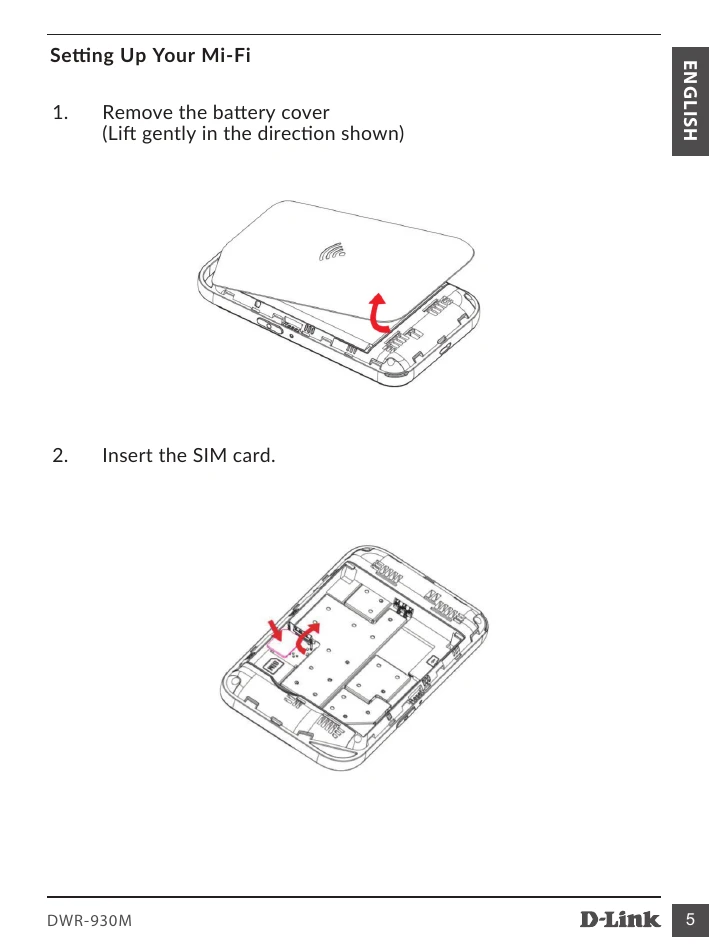
Setting Up Your Mi-Fi
- Remove the battery cover.
- Insert the SIM card.
- Insert the battery and attach the battery cover.
Charging Your Mi-Fi
Use the data cable to connect the travel charger to the Mi-Fi's micro USB port.
Connecting Your WIFI Device to Your MIFI
- Open web control on your Wi-Fi device.
- Search for the Wi-Fi network and connect.
- Open a browser and enter 192.168.0.1 to access the login page.
- Enter username 'admin' and password 'admin' to sign in.
Using the WPS
Follow prompts on your Wi-Fi device to complete WPS connection.
Managing Your Mi-Fi
Check Mi-Fi information like IP, IMEI, and network settings after login.