Brand: Dell
Category: Mobile Phone
Document Type: Manual
Language: EN
Brand: Dell
Category: Mobile Phone
Document Type: Manual
Language: EN
Uploaded: Sept. 12, 2025, 4:13 a.m.
Manual Publish Date: 2010-09-01
Refer to the Safety, Environmental, and Regulatory Information and Warranty and Support Information for details.
1. Package Contents: Check your package for phone, battery, guides, cable, charger, and headset. Regional variations may apply.
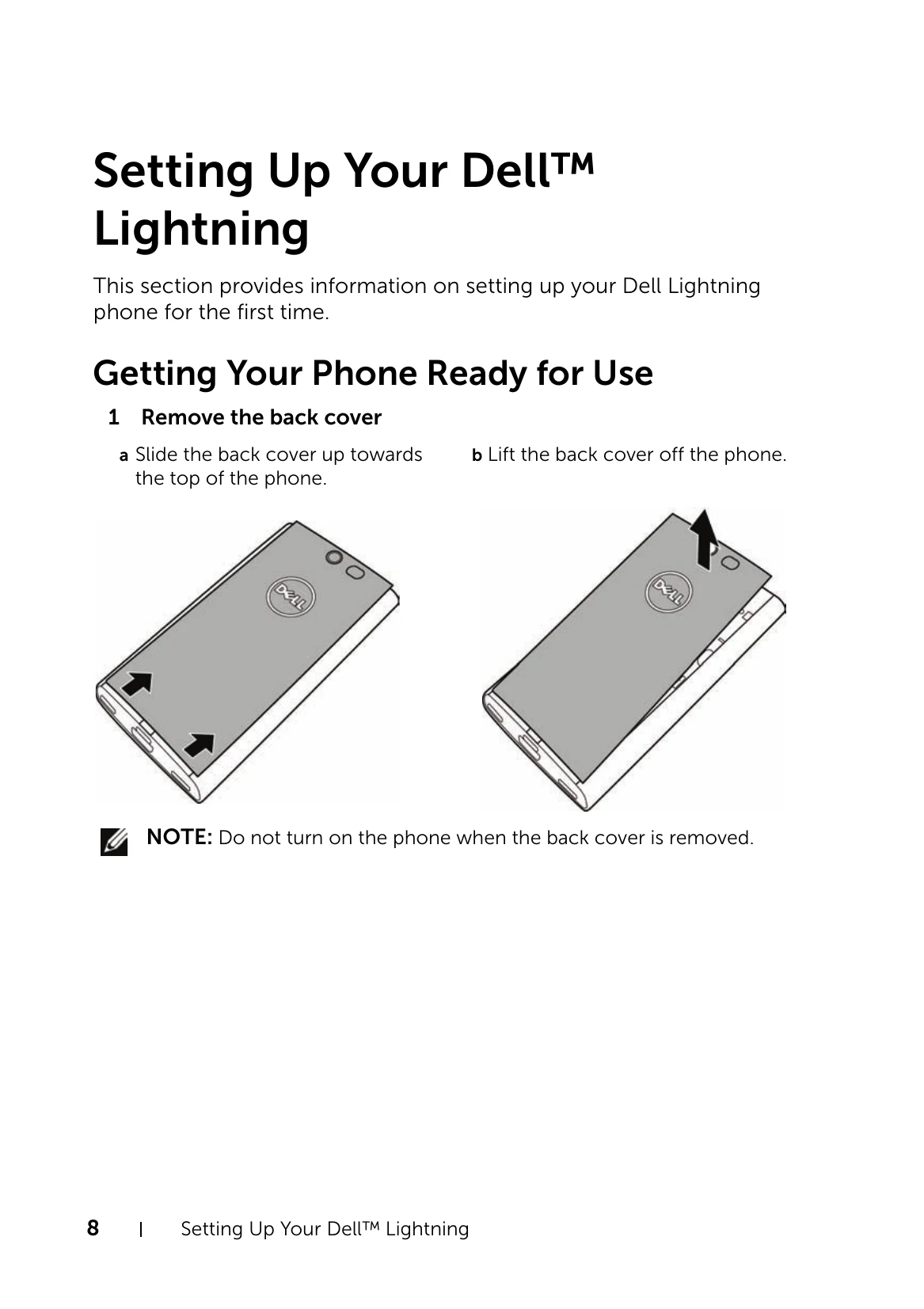
2. Setting Up: Remove the back cover, insert SIM and battery, then close the cover. Charge the phone using the provided adapter or a computer.
3. Powering On/Off: Press the power button to turn on. Press and hold to turn off.
4. First-Time Setup: Follow on-screen prompts to connect to the internet, set time zone, date, and time, and sign in to Windows Live.
| Problem | Possible causes | Possible solutions |
| Call-related problems | ||
| SIM card error | SIM card malfunction or damage. | Take the SIM card to your service provider for testing. |
| The SIM card is inserted improperly. | Insert the SIM card properly. | |
| Dirt or dust on the SIM card's metal contacts. | Use a soft, dry cloth to clean the SIM card's metal contacts. | |
| Poor reception | The network signal is too weak at your current location, for example, in a basement or near a tall building. Wireless transmissions can not effectively reach it. | Move to a location where you can receive proper network signal. |
| The network is busy at the current time (for example, during peak times, there may be too much network traffic to handle additional calls). | Avoid using the phone at such times, or try again after waiting a short time. | |
| You are too far away from a base station for your service provider. | You can request a service area map from your service provider. | |
| You cannot make outgoing calls | The SIM card is not installed. | Install a valid SIM card in your phone. |
| Poor signal. | Move to an open space, or if you are inside a building, move closer to a window. | |
| Your phone is in airplane mode with no wireless connectivity. | 1 Touch Start → Menu 2 Touch ⚙ Settings. 3 Under system, touch airplane mode. 4 Touch or drag the toggle switch to turn off the airplane mode. | |
| You cannot answer incoming calls | Poor signal. | Move to an open space, or if you are inside a building, move closer to a window. |
| Your phone is in airplane mode with no wireless connectivity. | 1 Touch Start → Menu 2 Touch ⚙ Settings. 3 Under system, touch airplane mode. 4 Touch or drag the toggle switch to turn off the airplane mode. | |
| Unable to add contacts to the phone | Memory for storing contacts is already full. | Delete unnecessary contact information from the phone. |
| Echo or noise | Poor network trunk quality on the part of your service provider, or poor local telephone line quality. | Hang up and dial again. You may be switched to a better-quality network trunk or phone line. |
| Noises during a call | You may be near a strong electromagnetic source (such as a TV, a microwave oven, etc.) during a call. | Move to another location to reduce the interference effects. |
| Call feature problems | ||
| You cannot enable certain call features | Your service provider does not support these features, or you have not applied for services that provide these features. | Contact your service provider. |
| PIN Code is blocked | You have entered an incorrect PIN code three consecutive times. | Contact your service provider. If the service provider provides the SIM card's PUK code, use the PUK code to unlock the SIM card. |
| System problems | ||
| Battery does not charge | The battery or battery charger is damaged. | Contact the dealer. |
| The phone's temperature is below 0°C or higher than 45°C. | Adjust the battery charging environment to avoid extreme temperatures. | |
| Poor contact between the battery and charger. | Check all connectors to ensure that all connections have been properly made. | |
| Unable to turn the phone on. | The battery is empty. | Charge the phone. |
| The back cover has come off. | Ensure that the back cover is firmly secured to the phone. | |
| Battery contacts are not clean. | Seek your dealer's help to clean the contacts. | |
| The phone turns off automatically | The back cover has come off. | Ensure that the back cover is firmly secured to the phone. |
| Shortened standby time | ||
| Shortened standby time | The length of standby time is affected by your service provider's system configuration. The same phone used with different service providers' systems does not have the same length of standby time. | If you are located in an area where the network signal is weak, temporarily turn off your phone. |
| The battery is depleted. In high-temperature environments, battery life will be shortened. | Use a new battery. | |
| If you are not able to connect to the network, the phone will continue to send out signals as it attempts to locate a base station. Doing this consumes battery power and consequently shortens standby time. | Change your location to one where the network is accessible, or temporarily turn off your phone. | |
| Messaging problems | ||
| Unable to send or receive text messages. | Your phone is in airplane mode with no wireless connectivity. | 1 Touch Start → Menu 2 Touch ⚙ Settings. 3 Under system, touch airplane mode. 4 Touch or drag the toggle switch to turn off the airplane mode. |
| The signal strength is not strong enough. | Try moving to a different location for better signal reception. | |
| Unable to send or receive multimedia messages. | Your phone is in airplane mode with no wireless connectivity. | 1 Touch Start → Menu 2 Touch ⚙ Settings. 3 Under system, touch airplane mode. 4 Touch or drag the toggle switch to turn off the airplane mode. |
| No MMS service is available. | Subscribe to the MMS service from your service provider. | |
| Your MMS settings are not configured properly. | Check your network connection, and confirm with your network service provider if your MMS settings are configured correctly. | |
| Not enough space left on your phone memory. | Check if there is enough space on your phone memory. Delete useless data to free space if necessary. | |
| Unable to send or receive e-mail. | The Internet connection or the e-mail setting is not configured properly. | Check your network connection, and confirm with your e-mail service provider if your e-mail setting has been configured correctly. |
| Internet problems | ||
| Unable to connect to the Internet. | Your phone is in airplane mode with no wireless connectivity. | 1 Touch Start → Menu 2 Touch ⚙ Settings. 3 Under system, touch airplane mode. 4 Touch or drag the toggle switch to turn off the airplane mode. |
| You are not within the network's service area. | Check the service area with your service provider. | |
| Poor signal. | Move to an open space or if you are inside a building, move closer to a window. | |
| Media problems | ||
| Windows Media Player on my computer cannot play the sounds of the video captured using the phone. | The phone records video sounds in amr format, but Windows Media Player does not support amr decoding. | Play the video using a video player with the amr decoder, such as QuickTime. |