Brand: Dell
Category: Mobile Phone
Document Type: Manual
Language: EN
Brand: Dell
Category: Mobile Phone
Document Type: Manual
Language: EN
Uploaded: Sept. 12, 2025, 4:26 a.m.
None
| Problem | Possible causes | Possible solutions |
|---|---|---|
| Call-related problems | ||
| SIM card error | SIM card malfunction or damage. | Take the SIM card to your service provider for testing. |
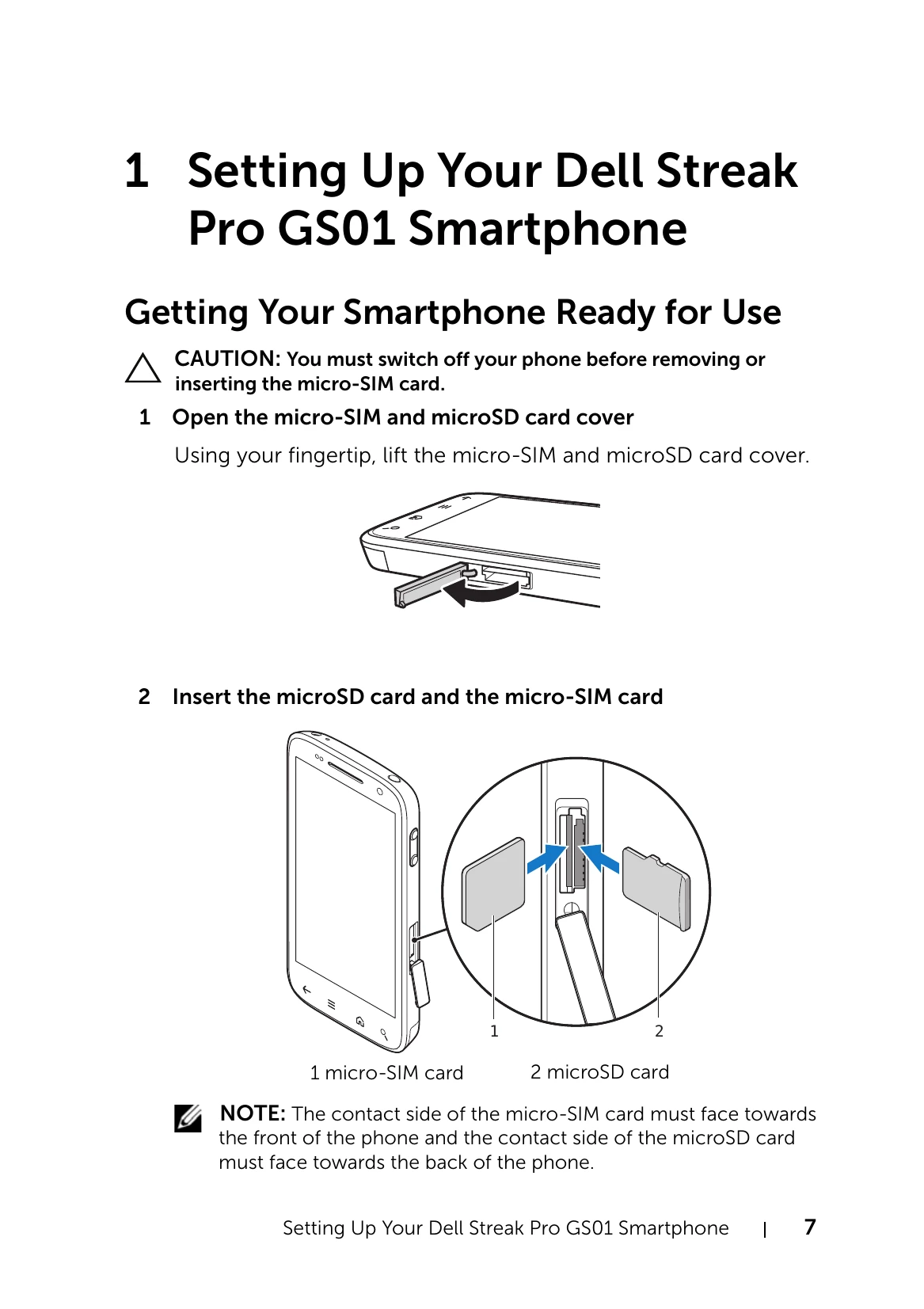
| The SIM card may be inserted improperly. | Insert the SIM card properly, see "Getting Your Smartphone Ready for Use" on page 7. | |
| The SIM card's metal contacts may have dirt or dust. | Use a soft, dry cloth to clean the SIM card's metal contacts. | |
| Poor reception | The network signal may be too weak at your current location. For example, network signals cannot reach effectively near tall buildings or in the basement. | Move to a location where the network signal can be received properly. |
| The network may be busy at present. For example, during peak network traffic, the network may not be able to handle additional calls. | Try calling again after waiting for a short duration. | |
| You may be too far away from a base station for your service provider. | You can request a service area map from your service provider. | |
| You cannot make outgoing calls | The SIM card may not be installed. | Install a valid SIM card in your smartphone. |
| Poor signal. | Move to an open space, or if you are inside a building, move closer to a window. | |
| Your smartphone is in Airplane mode with no wireless connectivity. | Press and hold the Power button and then touch the Airplane mode option to disable it. | |
| You have enabled Fixed Dialing Numbers. | Touch the Home button → → Menu button → Settings → Call settings → Call Feature Settings → Fixed Dialing Numbers. Disable Fixed Dialing Numbers (FDN). | |
| You cannot answer incoming calls | Poor signal. | Move to an open space, or if you are inside a building, move closer to a window. |
| Your smartphone is in Airplane mode with no wireless connectivity. | Press and hold the Power button and then touch the Airplane mode option to disable it. | |
| Unable to add contacts to the smartphone | Memory for storing contacts is already full. | Delete unnecessary contact information from the smartphone. |
| Echo or noise | Poor network trunk quality from your service provider, or poor local telephone line quality. | End the call and dial again. You may be switched to a better-quality network trunk or phone line. |
| Noises during a call | You may be near a strong electromagnetic source such as a TV, microwave oven, and so on during a call. | Move to another location to reduce the interference effects. |
| You cannot enable certain call features | Your service provider does not support these features, or you have not subscribed for services that provide these features. | Contact your service provider. |
| PIN Code is blocked | You have entered an incorrect PIN code in three consecutive attempts. | Contact your service provider. If the service provider provides the SIM card's PUK code, use the PUK code to unlock the SIM card. |
| System problems | ||
| Battery does not charge | The battery or battery charger is damaged. | Contact the dealer. |
| The smartphone's temperature is below 0°C or higher than 45°C. | Try charging the phone at temperatures ranging between 0°C and 45°C. | |
| Poor contact between the battery and charger. | Check to see if you have connected the USB cable and charging plug correctly. | |
| Unable to turn the smartphone on. | The battery is fully discharged. | Charge the smartphone. |
| The smartphone system is corrupted. | Reset the smartphone or start emergency software recovery. For instructions, see page 191. | |
| Battery contacts are not clean. | Seek your dealer's help to clean the contacts. | |
| Standby time is reduced. | The standby time is affected by your service provider's system configuration. | If you are located in an area where the network signal is weak, temporarily turn off your smartphone. |
| The battery is depleted. In high-temperature environments, battery life will be shortened. | Use a new battery. | |
| If you are not able to connect to the network, the smartphone will continue to send out signals as it attempts to locate a base station. Doing this consumes battery power and consequently shortens standby time. | Move to a location where the network is accessible, or temporarily turn off your smartphone. | |
| Messaging problems | ||
| Unable to send or receive text messages. | Your smartphone is in Airplane mode with no wireless connectivity. | Press and hold the Power button and then touch the Airplane mode option to disable it. |
| The signal strength is not strong enough. | Try moving to a different location for better signal reception. | |
| Unable to send or receive multimedia messages. | Your smartphone is in Airplane mode with no wireless connectivity. | Press and hold the Power button and then touch the Airplane mode option to disable it. |
| No MMS service is available. | Subscribe to the MMS service from your network service provider. | |
| Your MMS settings are not configured properly. | Check your network connection, and confirm with your network service provider if your MMS settings are configured correctly. | |
| Not enough space left on your smartphone memory. | Check if there is enough space on your smartphone memory. Delete data that you do not require to free space if necessary. | |
| Unable to send or receive e-mail. | The Internet connection or the e-mail setting is not configured properly. | Check your network connection, and confirm with your e-mail service provider if your e-mail setting has been configured correctly. |
| Internet problems | ||
| Unable to connect to the network. | Invalid SIM card. | Contact your service provider. |
| You are not within the network's service area. | Check the service area with your service provider. | |
| Poor signal. | Move to an open space or if you are inside a building, move closer to a window. | |
| Media problems | ||
| Windows Media Player on my computer cannot play the sounds of the video captured using the smartphone. | The smartphone records video sounds in amr format. Windows media player does not support the amr format. | Play the video using a video player with the amr decoder, such as QuickTime. |