Installation Guide for PowerStore 500T

Installation Guide for PowerStore 500T

Brand: Dell

Category: Networking Hardware

Document Type: Installation Guide

Language: EN
Uploaded: Sept. 12, 2025, 4:14 a.m.

Manual Publish Date: 2021-06-01

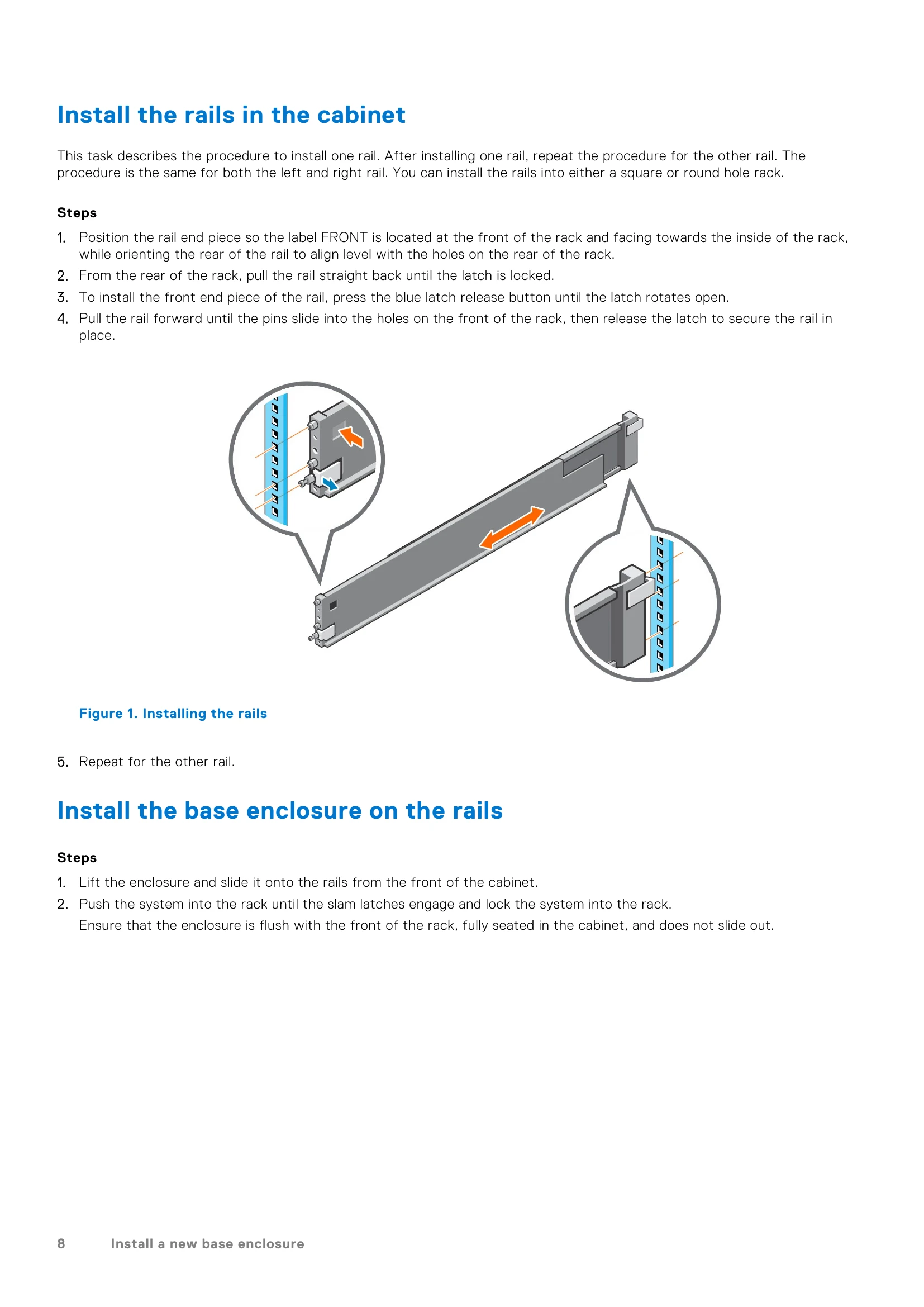
  • Installing a New Base Enclosure: Procedures cover choosing a location, unpacking, installing rails, mounting the enclosure, and connecting power and network cables.
  • Base Enclosure Service Procedures: Detailed instructions for replacing components like drives, power supplies, 4-port cards, SFPs, I/O modules, fan modules, DIMMs, and M.2 boot modules. Includes identification of faulted parts using PowerStore Manager and visual indicators (LEDs).
  • Power Control Procedures: Guidance on powering off, on, and rebooting PowerStore nodes, appliances, and clusters, with options for using PowerStore Manager or service scripts.
  • Data Collection: Steps for gathering support materials to aid in troubleshooting, including system logs and configuration details.
  • Support Notifications: Instructions for disabling and enabling support notifications during maintenance to avoid unnecessary alerts.
  • Reinitialize the System: Information on resetting the system to original, default factory settings using service scripts.
Privacy Policy