Introduction
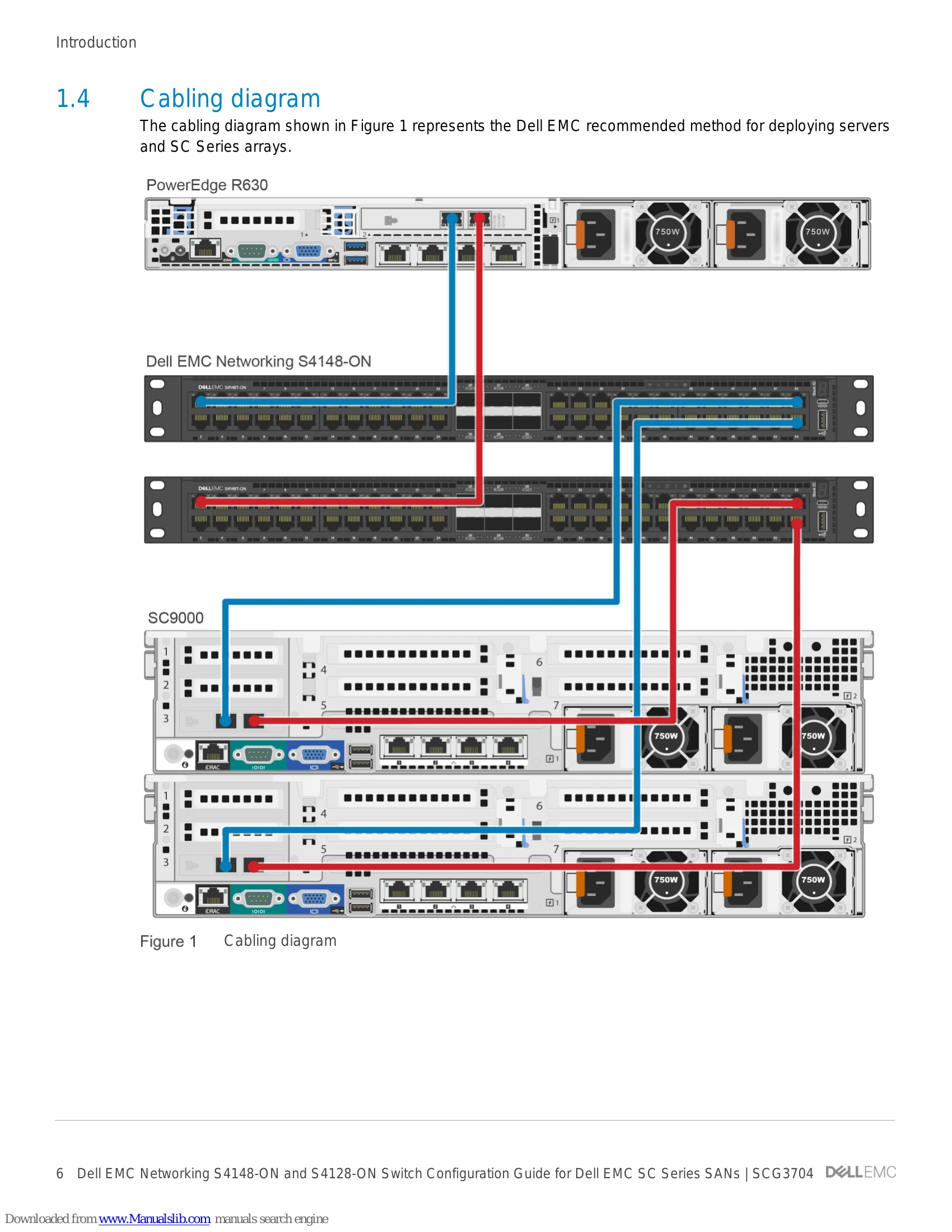
This document illustrates how to configure Dell EMC™ Networking S4148-ON and S4128-ON switches for use with Dell EMC SC Series storage using Dell EMC best practices. The host servers and storage controllers can be connected to the switches using the QSFP+ and QSFP28 ports with appropriate breakout cables. The switches are interconnected to each other using 40GbE cables or 100GbE cables. Optional steps are provided in section 3 to enable Data Center Bridging (DCB).
Dell EMC recommended switch configuration
The steps in this section show how to configure two Dell EMC Networking S4148-ON/S4128-ON switches in Dell SC series storage environment. This configuration is recommended when the switch is used as a dedicated SAN for iSCSI traffic.
Key configuration steps include:
- Hardware configuration
- Check firmware version
- Delete startup configuration
- Configure switch profiles and unified ports
- Configure out-of-band management port
- Configure login credentials
- Configure breakout ports
- Enable switch ports
- Enable iSCSI auto-detection
- Enable Jumbo frames and flow control (optional)
- Configure spanning tree on edge ports
- Save configuration
Configure Data Center Bridging (DCB) (optional)
To enable DCB mode on the switch, use the commands in this section. This is applicable only for environments with DCB-capable SC Series arrays.
Key configuration steps include:
- Disable iSCSI
- Disable 802.3x flow control
- Enable DCB
- Create tagged VLANs
- Create QoS policy maps and ETS policies
- Apply policies and VLAN ID to switch edge ports
- Enable iSCSI
- Save configuration
Reverting from DCB to non-DCB configuration (optional)
This section describes how to revert a DCB configured switch to a non-DCB configuration by deleting the current configuration or by unconfiguring DCB and enabling standard flow control.