Brand: Dell
Category: Printer
Document Type: Manual
Language: EN
Brand: Dell
Category: Printer
Document Type: Manual
Language: EN
Uploaded: Nov. 21, 2025, 9:11 p.m.
Manual Publish Date: 2017-02-01
Warranty and Return Policy information is available, including Recycling Information and how to contact Dell.
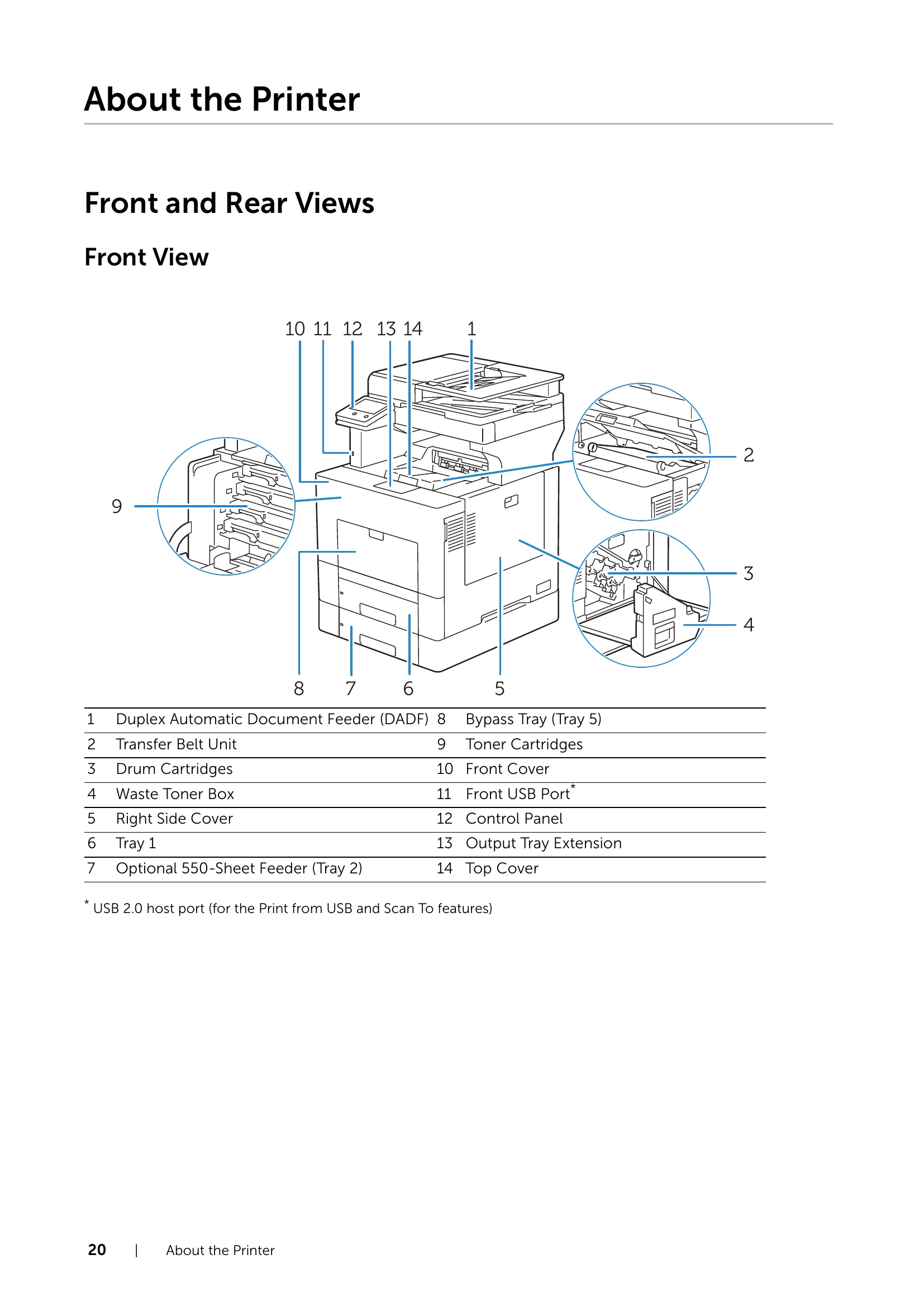
This section provides details about the printer's physical components, including front and rear views, the Duplex Automatic Document Feeder (DADF), and the control panel. It also outlines basic operations on the touch panel and device settings like language, notifications, paper trays, supplies, and connectivity.
This chapter covers the core functionalities of the printer: Printing, Copying, Scanning, and Faxing. It offers tips for successful printing, guides on sending jobs, canceling jobs, duplex printing, using stored print, and mobile printing options. For copying, it details loading paper and starting copy jobs. Scanning options include scanning to email, USB, or desktop. Faxing covers sending and receiving faxes, along with advanced features like delayed sending and broadcasting.
| Problem | Solution |
|---|---|
| Clearing Jams | Avoiding Jams, Identifying Jam Location, Clearing Jams from DADF, Bypass Tray, Tray 1, Rear Cover, Optional 550-Sheet Feeder. |
| Basic Printer Problems | Display Problems. |
| Printing Problems | Output too light, Toner smears, Blank output, Streaks, Part of output black/missing color, Repeating dots, Vertical voids, Ghosting, Light-induced fatigue, Fog, Bead-Carry-Out, Jagged characters, Banding, Auger mark, Wrinkled/Stained paper, Damage on leading edge. |
| Jam/Alignment Problems | Incorrect margins, Color registration, Skewed images, Misfeeds, Multi-feeds from various trays. |
| Noise | N/A |
| Copy and Scan Problems | Unable to Copy/Scan, Unexpected Copy/Scan Results. |
| Fax Problems | Sending and Receiving Problems. |
| Digital Certificate Problems | N/A |
| Network-related Problems | SMB, TCP/IP, E-mail Features, Internet/Intranet Connection, IPv4/IPv6 Connection. |
| Problems With Installed Optional Accessory | Wi-Fi Direct, Scanner Driver/Printer Utility Problems. |
| Other Problems | N/A |
| Contacting Service | N/A |