Congratulations on your purchase
Enjoy an elegant camera phone made simple, with convenient ways to communicate and enjoy access to e-mail and the Internet for staying connected everywhere. Share photos and listen to your favourite MP3 music or FM radio. Other practical features include weather, reminders, wake-up alarm, vibrating ringer and more. For more information about accessories or other Doro products please visit www.doro.com.
Get started
Insert SIM card, memory card and the battery
IMPORTANT!
Turn off the phone and disconnect the charger before removing the battery cover.
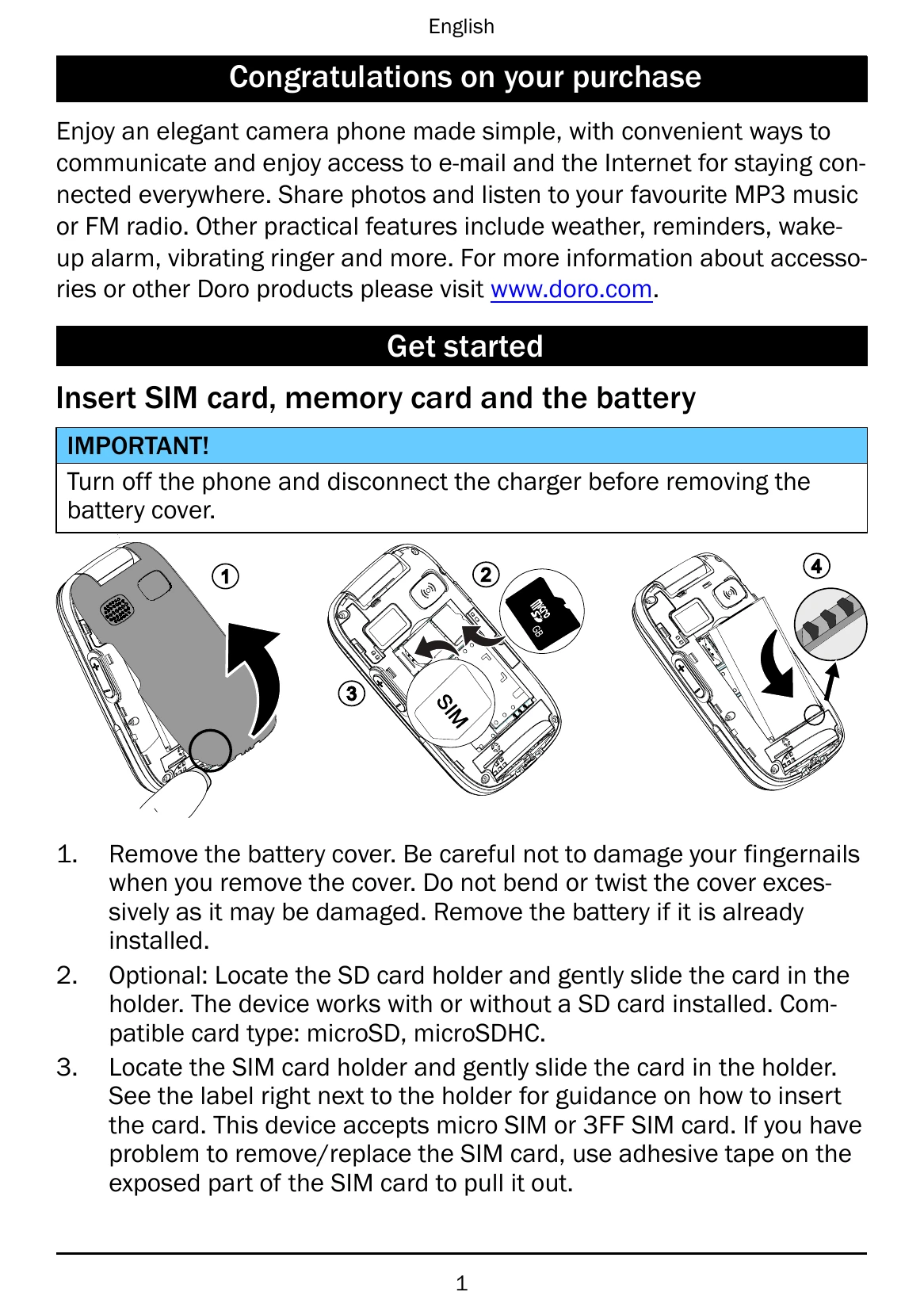
1. Remove the battery cover. Be careful not to damage your fingernails when you remove the cover. Do not bend or twist the cover excessively as it may be damaged. Remove the battery if it is already installed.
2. Optional: Locate the SD card holder and gently slide the card in the holder. The device works with or without a SD card installed. Compatible card type: microSD, microSDHC.
3. Locate the SIM card holder and gently slide the card in the holder. See the label right next to the holder for guidance on how to insert the card. This device accepts micro SIM or 3FF SIM card. If you have problem to remove/replace the SIM card, use adhesive tape on the exposed part of the SIM card to pull it out.
4. Insert the battery by sliding it into the battery compartment with the contacts facing downwards to the right. Replace the battery cover.
IMPORTANT!
This device accepts micro SIM or 3FF SIM card. Use of incompatible SIM cards may damage the card or the device, and may corrupt data stored on the card.
IMPORTANT!
Use only compatible memory cards for use with this device. Compatible card type: microSD, microSDHC.
Incompatible cards may damage the card itself, the device and corrupt data stored on the card. Depending on the market some phones may have a pre-installed memory card.
Charge the phone
CAUTION
Only use batteries, chargers and accessories that have been approved for use with this particular model. Connecting other accessories may be dangerous and may invalidate the phone's type approval and warranty.
When the battery is running low, is displayed and a warning signal is heard.
1. Connect the mains adapter to a wall socket and to the charging socket F. The battery charge indicator is animated while charging. It takes approximately 3 hours to fully charge the battery. When the charger is connected to the phone, is displayed briefly, and when it is disconnected.
is displayed on the screen.
2. When charging is completed,
If the phone is turned off when the charger is connected to the phone only the battery charge indicator will be shown on the display.
Note! To save power the LCD backlight goes off after a while. Press any button to illuminate the display. Full battery capacity will not be reached until the battery has been charged 3–4 times. Batteries degrade over time, which means that call time and standby time will normally decrease with regular use.
Save energy
When you have fully charged the battery and disconnected the charger from the device, unplug the charger from the wall socket.
Get to know your phone
Assistive functions
Use the symbols below to guide you through supporting sections in the manual.
Seeing
Hearing
Handling
Safety
Turn the phone on and off
1. Press and hold on the phone to turn it on or off. Confirm with Yes to power off.
2. If the SIM card is valid but protected with a PIN code (Personal Identification Number), PIN is displayed. Enter the PIN code and press OK (upper left corner of keypad). Delete with Clear (upper right corner of keypad).
Note! If PIN and PUK codes were not provided with your SIM card, please contact your service provider.
Attempts: # shows the number of PIN attempts left. When no more attempts remain, PIN blocked is displayed. The SIM card must then be unlocked with the PUK code (Personal Unblocking Key).
1. Enter the PUK code and confirm with OK.
2. Enter a new PIN code and confirm with OK.
3. Re-enter new PIN code and confirm with OK.
Start-up wizard
When starting the phone for the first time, you can use the Start-up wizard to set some basic settings.
• Press Yes to change or No if you do not want to change.
The default language is determined by the SIM card. See Phone settings, p.8 on how to change language, time and date.