Manual for EMS17256O

Manual for EMS17256O

Brand: Electrolux

Category: Oven

Document Type: Manual

Language: EN
Uploaded: Sept. 12, 2025, 4:31 a.m.

Warranty Information

Electrolux provides a 12-month guarantee covering defects due to faulty workmanship or materials, with certain conditions.

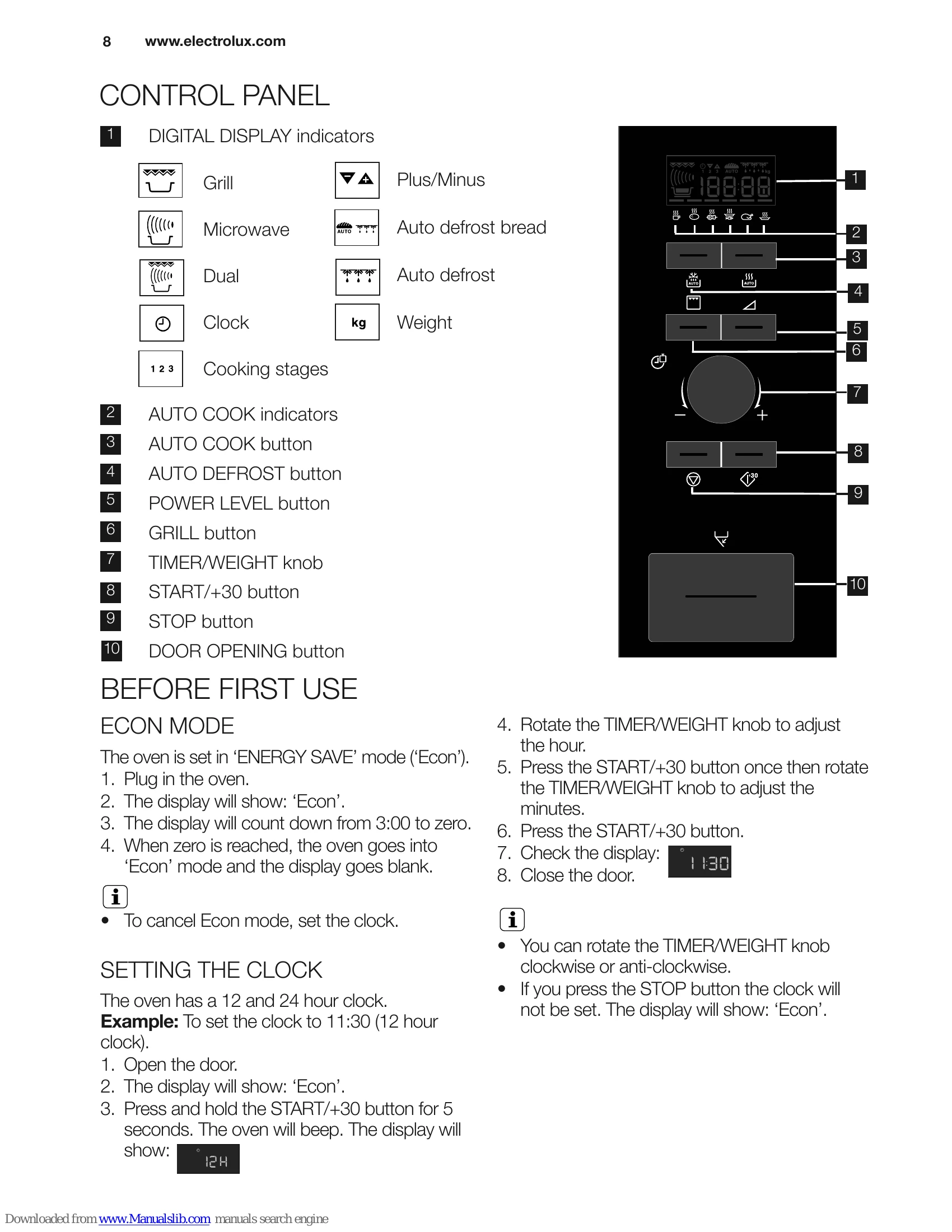
  • Econ Mode: Oven defaults to 'ENERGY SAVE' mode. Display shows 'Econ' and counts down to zero, then goes blank. To cancel, set the clock.
  • Setting the Clock: Supports 12 and 24-hour formats. Instructions provided for setting time using the START/+30 button and TIMER/WEIGHT knob.
  • Child Safety Lock: Prevents accidental oven operation. Activated by pressing and holding the STOP button for 5 seconds. Display shows 'LOC'. Cancelled by the same procedure.
  • Microwave Cooking Advice: Provides guidance on choosing cookware, understanding food characteristics (composition, density, quantity, size, shape, temperature), and cooking techniques (arrange, cover, pierce, stir/turn/rearrange, stand, shield).
  • Microwave Safe Cookware: Lists suitable and unsuitable cookware materials with comments.
  • Microwave Cooking: Oven can be programmed up to 90 minutes with variable time input units.
  • Manual Defrosting: Use 240 W power. Defrost symbol appears when power level is selected.
  • Microwave Power Levels: 6 power levels (800 W to 0 W) with suggested uses. Example provided for heating soup.
  • Kitchen Timer: Can be set using the POWER LEVEL button and TIMER/WEIGHT knob.
  • Add 30 Seconds: Direct Start function for 30 seconds at 800 W. Can extend cooking time by 30-second increments.
  • Plus and Minus: Function to adjust cooking time for automatic programmes.
  • Grill and Dual Grill Cooking: Two grill modes: Grill only and Dual Grill (grill with microwave). Examples provided for toast and grill skewers.
  • Multiple Sequence Cooking: Program up to 3 stages using Microwave, Grill, or Dual Grill.
  • Auto Cook and Auto Defrost: Automatic cooking and defrosting with pre-set menus.

Troubleshooting and error codes

Problem Check if...
The microwave appliance is not working properly?
  • The fuses in the fuse box are working.
  • There has not been a power outage.
  • If the fuses continue to blow, please contact a qualified electrician.
The microwave mode is not working?
  • The door is properly closed.
  • The door seals and their surfaces are clean.
  • The START/+30 button has been pressed.
The turntable is not turning?
  • The turntable support is correctly connected to the drive.
  • The ovenware does not extend beyond the turntable.
  • Food does not extend beyond the edge of the turntable preventing it from rotating.
  • There is nothing in the well beneath the turntable.
The microwave will not switch off?
  • Isolate the appliance from the fuse box.
  • Call your local Service Force Centre.
The interior light is not working?
  • Call your local Service Force Centre. The interior light bulb can be exchanged only by trained Service Force technicians.
The food is taking longer to heat through and cook than before?
  • Set a longer cooking time (double quantity = nearly double time) or
  • Set a higher power setting.
  • If the food is colder than usual, rotate or turn from time to time or
Privacy Policy