Manual for Ergorapido Lithium

Manual for Ergorapido Lithium

Brand: Electrolux

Category: Vacuum Cleaner

Document Type: Manual

Language: EN
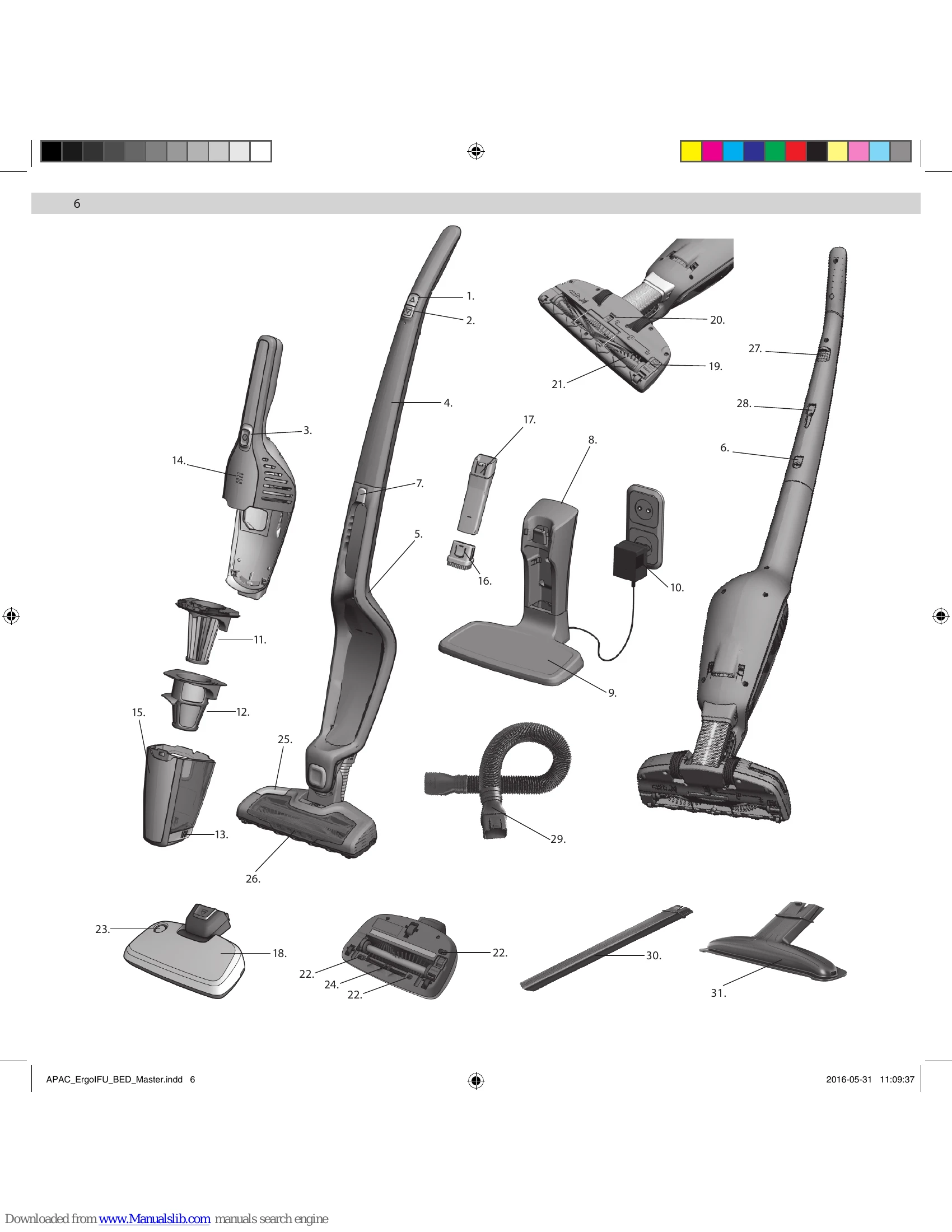
Uploaded: Nov. 21, 2025, 8:42 p.m.

Manual Publish Date: 2016-05-31

Warranty Information

Consult your warranty document for coverage of batteries and general terms.

Unpacking and Assembly: Fit and secure the handle to the main body using the locking screw.
Charging Station Setup: Insert the adapter and position the charging station on a stable, dry surface. Wind excess cable in the bottom.
Charging: The indicator light is orange when charging and blinks slowly when fully charged (approx. 4 hours). Keep the product on charge when not in use for optimal battery performance.
Bed Pro Power Nozzle: Connect to the hand unit. Press the lock button to remove.
UV Light Function: Press On/Off to start. Press UV Active button 'A' and place nozzle on bed. Blue LED indicates UV light is active. Sensors deactivate UV light when nozzle is lifted. Press UV Active again to turn off. Note: UV light may not activate on dark or patterned sheets.
Vacuuming: Check nozzle wheels and brush roll for debris before use. Start/stop with button A. Use button B to switch between high power and 'Silent mode' for longer runtime.
BRUSHROLLCLEAN® Technology: On hard surfaces, press the pedal with your foot while the cleaner is on, hold for 5 seconds to remove hair/fibers. Auto-stops after 30 seconds. Reset by placing back in charging stand. May not remove thick threads or wires.
Using Nozzles: Attach appropriate nozzle/hose to hand unit. Small crevice nozzle for furniture/corners. Brush nozzle for furniture with gap nozzle. Long crevice nozzle for difficult-to-reach gaps. Bed Pro Power nozzle for beds/mattresses. Upholstery nozzle for fabric products. Flexi hose for high or difficult places.
Bedding Vacuuming: Clean beds in a structured way. Hold pillows and push cleaner away. For sheets, use a straight line to prevent them from being sucked into the brushroll.
Emptying Dust Container: Press button A to open. Take out filters. Empty contents into dustbin. Never wash container or filters in dishwasher. Pull filter cleaning rod B 5 times.
Cleaning Filters: Take out both filters. Separate. Rinse under lukewarm water without detergent. Dry completely (min 12h).
Cleaning Hose & Air Channel: Loosen hose, remove blockages.
Cleaning Bed Pro Power Nozzle Sensors & Brush Roll: Clean sensors with cotton swabs. Push brush roll release button, remove, clean roll. Use scissors for threads. Reassemble.
Cleaning Wheels: Remove carefully with a flat screwdriver if jammed.
Indication Lights: Orange lights indicate battery level. Orange light when charging means it's charging. Blinking orange means fully charged.
Warning Lights: Orange blinking + stops means battery empty. Red blinking means brush roll jammed. Red + orange blinking means BRUSHROLLCLEAN® used too long. Red constant + stops means overheated.
Troubleshooting: UV light not activating: check button, contact with bed, sheet color, or dirty sensors.
Servicing/Repairs: Contact authorized Electrolux service center. Replace damaged cord/charger via service agent. Battery replacement may require service center.
Consumer Information: Product designed for environment, plastic parts marked for recycling. Conforms to EMC, Low Voltage, and CE directives.
Disposal: Do not treat as household waste. Contact local services for recycling.

Troubleshooting and error codes

Indication lights-normal operation What does it mean? What to do?
1-3 Orange lights during operation 3 lights = Battery capacity is still good > 75 % left
2 lights = Battery capacity is still good > 25 % left
1 light = ERGORAPIDO® will stop in a few minutes.
OK
OK
Finish cleaning + charge ERGORAPIDO®
Orange light when placed in the charging stand No problem - ERGORAPIDO® is being charged OK
Orange light blinks once every minute in the charging stand. No problem -ERGORAPIDO® is fully charged. We recommend to keep ERGORAPIDO® in the charging stand after using it.
Warning lights What is the problem What to do?
Orange light blinking + product stops Battery is empty Charge ERGORAPIDO®.
Red light - blinking The brush roll in floor nozzle or the Bed Pro Power nozzle is jammed with too much hairs or fibers. Remove the brush roll and clean it manually
Red + Orange light blinking + BRUSHROLLCLEAN® function does not work + headlights are turned OFF The BRUSHROLLCLEAN® function has been used for too long time. Place ERGORAPIDO® in the charging stand for 10 minutes to reset the function.
RED light - constant + ERGORAPIDO® stops ERGORAPIDO® is overheated Clean the filters. Check the hose and nozzle for blockages. If this does not help, please contact a service station.
Problem Possible cause What to do?
The UV-light in the Bed Pro Power nozzle does not activate. UV Active button not pressed ON.
Bed Pro Power nozzle is not in contact with bedding mattress.
The UV light may not always activate when the nozzle is in use on some darker colored or patterned bed sheets.
Sensors are dirty.
Press UV Active button.
Make sure Bed Pro Power nozzle has contact with bed.
Use on lighter bed sheets.
Clean sensors with cotton swabs, see cleaning and care.
Privacy Policy