Brand: EPSON
Category: Camera
Document Type: Manual
Language: EN
Brand: EPSON
Category: Camera
Document Type: Manual
Language: EN
Uploaded: Sept. 12, 2025, 4:17 a.m.
Camera has a 1-year limited warranty, while batteries and charger have a 90-day limited warranty.
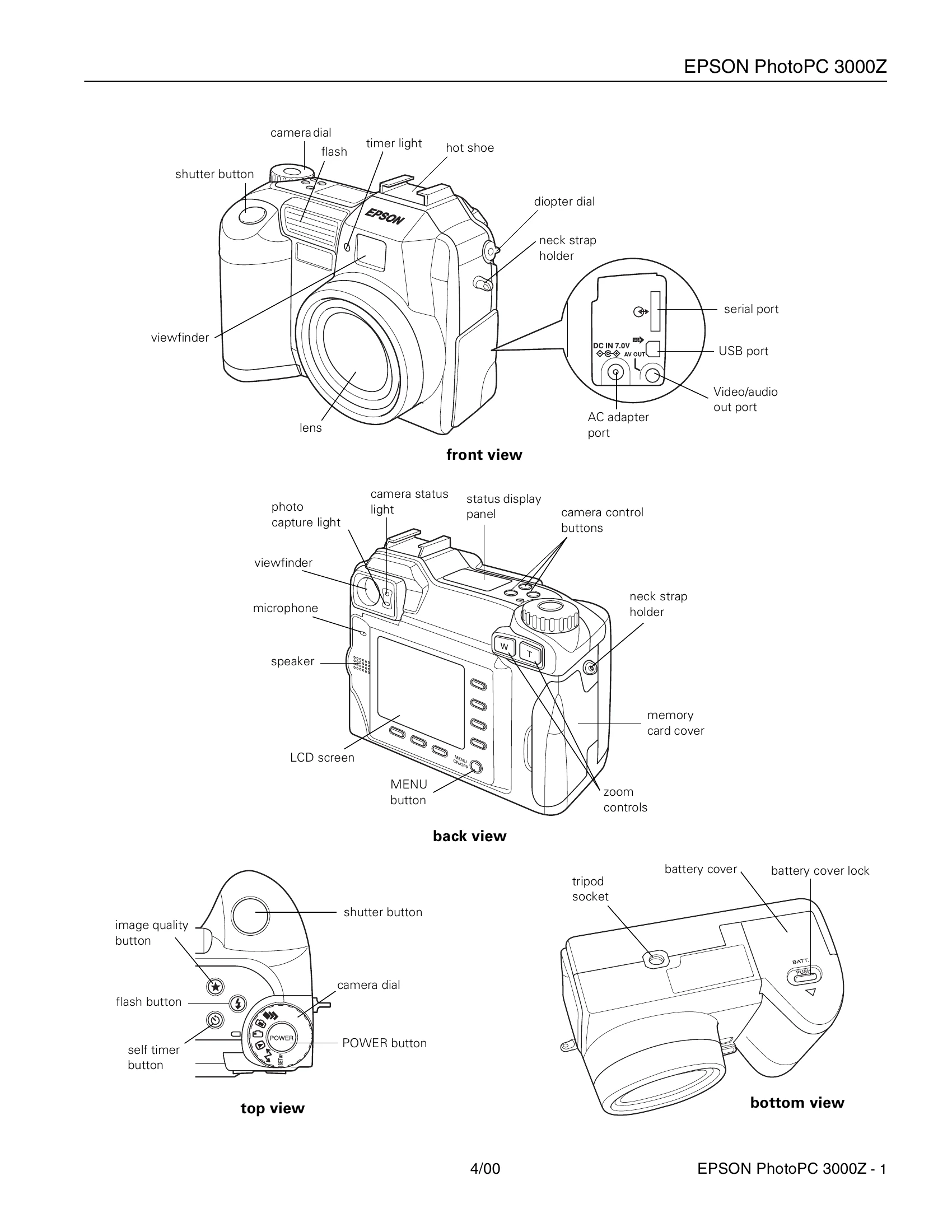
Turning On/Off: Press the POWER button. The camera automatically shuts off after a period of inactivity to conserve battery power.
Taking Photos: Select a user mode (Program, Manual, Full Auto). Use the camera dial to select the desired function (e.g., video, LCD preview, viewfinder, playback, setup). Point the camera, half-press the shutter button to focus and set exposure, then press fully to take the picture. The LCD screen shows a live preview in certain modes.
Settings: Use the camera dial and buttons to adjust image quality, flash modes, sensitivity, white balance, and other settings. The SETUP menu allows for deeper configuration.
Memory Card: Format the CompactFlash card before first use. The camera indicates when the card is full.
Battery Management: Charge NiMH batteries fully. Monitor the battery icon for low power. Replace all batteries simultaneously.
| Problem | Possible Cause | Solution |
| Camera does not turn on. | Batteries are depleted or not inserted correctly. | Recharge or replace batteries. Ensure batteries are inserted with correct polarity. |
| Photos are blurry. | Camera moved during exposure. Lens is dirty. | Hold the camera steady. Clean the lens gently. |
| No images can be taken. | Memory card is full or not formatted. | Format the memory card or delete existing images. |
| Flash does not fire. | Flash is set to Off. Batteries are low. | Set flash mode to Auto or Forced Flash. Recharge or replace batteries. |
| LCD screen is blank. | Camera is powered by batteries and connected to a video device. | Use the optional AC adapter to keep the LCD screen lit when connected to a video device. |