Brand: EPSON
Category: Computer
Document Type: Manual
Language: EN
Brand: EPSON
Category: Computer
Document Type: Manual
Language: EN
Uploaded: Nov. 21, 2025, 9:02 p.m.
The PX-8 is a portable computer with advanced features. This chapter introduces its general capabilities.
Upon unpacking, confirm the presence of the PX-8 unit, AC adapter, User's Manual, BASIC Reference Manual, Command Summary, End-User License Agreement, and Programmable Function-Key Label. Keep packing materials for returns.
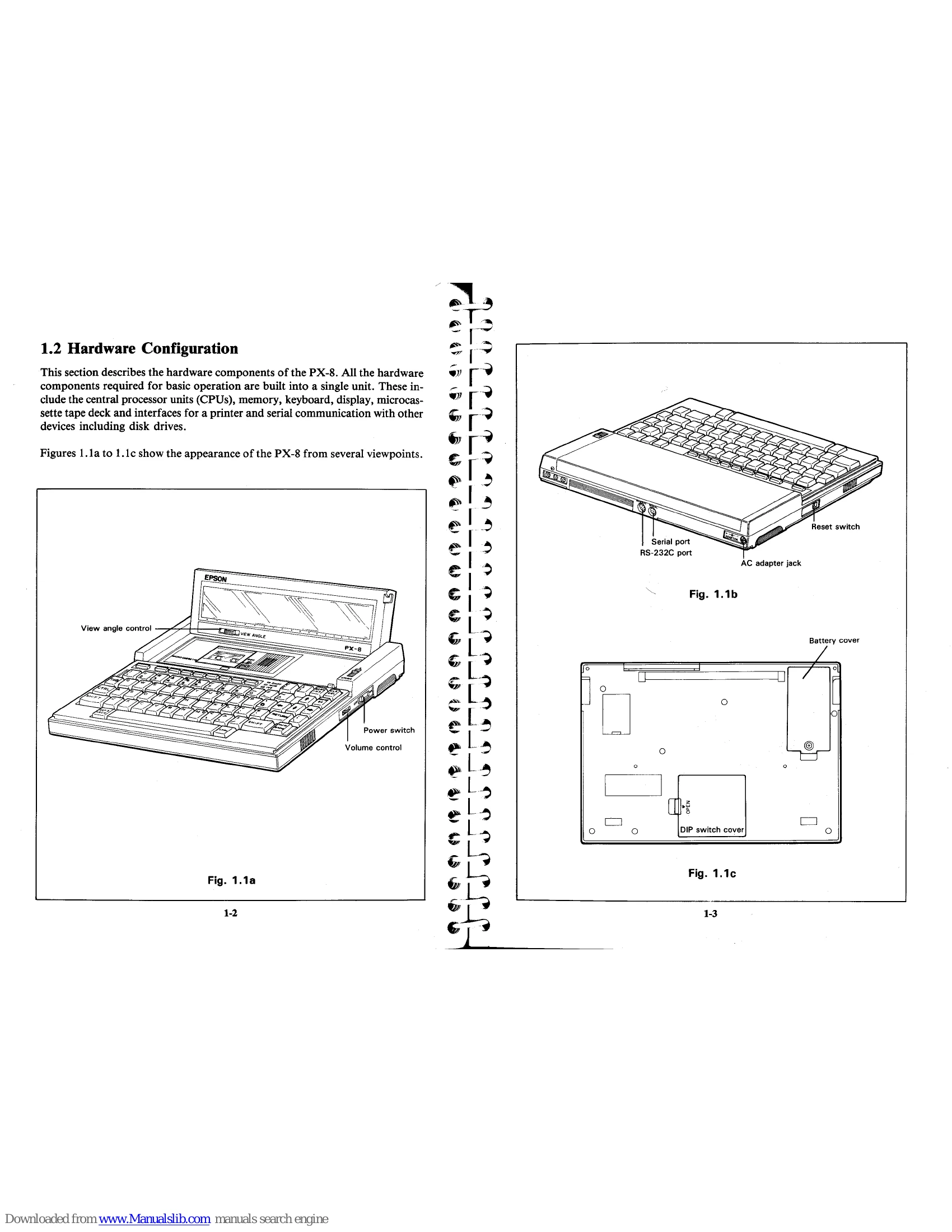
The PX-8 integrates CPUs, memory, keyboard, display, microcassette tape deck, and interfaces for printers and serial communication. Figures illustrate its appearance and connection points.
Shows various peripherals connected to the PX-8, including disk drive units, RAM disk units, acoustic couplers, and printers.
Explains how to extend and retract the carrying handle for briefcase-like portability.
Describes how to remove the protective cover and highlights features like folding legs for adjustable typing angles. It also lists available keyboard layouts.
Details the LCD display, its hinge mechanism for protection, and the view angle control for optimal contrast.
Explains the three CPUs (Z80 compatible main CPU, slave CPUs for I/O and interface control) and the memory configuration (RAM and ROM). RAM is backed up by batteries.
Describes the function of the microcassette tape deck for saving data and programs sequentially, noting a limitation of 12 files per cassette.
Introduces CP/M as the PX-8's operating system, an extended version with added Epson functions.
Discusses the PX-8's ability to use programs from ROM capsules, microcassette tape, or floppy disk. Mentions BASIC, Portable WordStar™, Portable Calc™, and Portable Scheduler™ as available utilities.
Advises on environmental conditions for the computer and the AC adapter, including avoiding direct sunlight, dampness, vibration, high temperatures, and shocks. Details on AC adapter usage and battery charging are provided.
Outlines essential procedures before the first power-on, including battery insertion and charging, and DIP switch settings for keyboard layouts.
Explains the process of system reset and initialization, including setting date, time, and RAM disk size.
Details the keyboard layout, special keys (switch keys, CTRL, SHIFT, CAPS LOCK, NUM GRAPH), and their functions.
Describes the power switch operation and the different power modes (restart and continue).
Lists and briefly describes the various operating system modules, such as System Display, Password, MENU, and Console Command Processor.
Explains how to access and use the System Display module to check and alter system parameters like RAM disk size and user BIOS settings.
| Message | Meaning |
|---|---|
| ? | This message has four possible meanings:
1) DDT does not understand the assembly language instruction. 2) The file cannot be opened. 3) A checksum error occurred in a HEX file. 4) The assembler/disassembler was overlayed. |
| ABORTED | You stopped a PIP operation by pressing a key. |
| ASM Error Messages | D Data error: data statement element cannot be plac-
ed in specified data area.
E Expression error: expression cannot be evaluated during assembly. L Label error: label cannot appear in this context (might be duplicate label). N Not implemented: unimplemented features, such as macros, are trapped. O Overflow: expression is too complex to evaluate. P Phase error: label value changes on two passes through assembly. R Register error: the value specified as a register is in- compatible with the code. S Syntax error: improperly formed expression. |
| BAD DELIMITER | U Underlined label: label used does not exist.
V Value error: improperly formed operand en- countered in an expression. |
| Bad Load | Check command line for typing errors. |
| Bdos Err On d: | CCP error message, or SAVE error message. |
| Bdos Err On d: Bad Sector | Basic Disk Operating System Error on the designated
drive: CP/M replaces d: with the drive specification of
the drive where the error occurred. This message is
followed by one of the four phrases in the situations
described below.
This message appears when CP/M finds no disk in the drive, when the disk is improperly formatted, when the drive latch is open, or when power to the drive is off. Check for one of these situations and try again. This could also indicate a hardware problem or a worn or im- properly formatted disk. Press CTRL-C to terminate the program and return to CP/M, or press the return key to ignore the error. |
| Bdos Err On d: File R/O | You tried to erase, rename, or set file attributes on a Read-Only file. The file should first be set to Ready- Write (RW) with the command: "STAT filespec $R/W." |
| Bdos Err On d: R/O | Drive has been assigned Read Only status with a STAT command, or the disk in the drive has been changed without being initialized with a CTRL-C. CP/M ter- minates the current program as soon as you press any key. |
| Bdos Err on d: Select | CP/M received a command line specifying a nonexistent drive. CP/M terminates the current program as soon as you press any key. Press return key or CTRL-C to recover. |
| Break "x" at c | "x" is one of the symbols described below and c is
the command letter being executed when the error
occurred.
# Search failure. ED cannot find the string specified in an F, S, or N command. ? Unrecognized command letter c. ED does not recognize the indicated command letter, or an E, H, Q, or O command is not alone on its command line. O The file specified in an R command cannot be found. |
| CANNOT CLOSE DESTINATION FILE- {filespec} | > Buffer full. ED cannot put any more characters in
the memory buffer, or the string specified in an F,
N, or S command is too long.
E Command aborted. A keystroke at the console aborted command execution. F Disk or directory full. This error is followed by either the disk or directory full message. Refer to the recovery procedures listed under these messages. |
| Cannot close, R/O CANNOT CLOSE FILES | An output file cannot be closed. You should take appropriate action after checking to see if the correct disk is in the drive and that the disk is not write pro- tected. |
| CANNOT READ | CP/M cannot write to the file. This usually occurs because the disk is write-protected. |
| CANNOT WRITE | An output file cannot be closed. This is a fatal error that terminates ASM execution. Check to see that the disk is in the drive, and that the disk is not write- protected. |
| Checksum error | The disk file written by a W command cannot be clos- ed. This is a fatal error that terminates DDT execution. Check if the correct disk is in the drive and that the disk is not write-protected. |
| CHECKSUM ERROR LOAD ADDRESS hhhh ERROR ADDRESS hhhh BYTES READ: hhhh: | This error can occur during SUBMIT file processing. Check if the correct system disk is in the A drive and that the disk is not write-protected. The SUBMIT job can be restarted after rebooting CP/M. |
| Command Buffer Overflow | PIP cannot read the specified source. Reader may not be implemented. |
| Command too long | The destination specified in the PIP command is illegal. You probably specified an input device as a destination. |
| CORRECT ERROR, TYPE RETURN OR CTRL-Z | A hex record checksum error was encountered during the transfer of a hex file. The hex file with the checksum error should be corrected, probably by recreating the hex file. |
| DESTINATION IS R/O, DELETE (Y/N)? | The destination file specified in a PIP command already exists and it is Read Only. If you type Y, the destination file is deleted before the file copy is done. |
| Directory full | There is not enough directory space for file being writ- ten to the destination disk. You can use the OX filespec command to erase any unnecessary files on the disk without leaving the editor. |
| Disk full | There is not enough directory space to write the $$$.SUB file used for processing SUBMITs. Erase some files or select a new disk and retry. |
| DISK READ ERROR- {filespec} | There is not enough disk space for the output file. This error can occur on the W, E, H, or X commands. If it occurs with X command, you can repeat the command prefixing the filename with a different drive. |
| DISK WRITE ERROR- {filespec} | The input disk file specified in a PIP command cannot be read properly. This is usually the result of an unex- pected end-of-file. Correct the problem in your file. |
| ERROR: BAD PARAMETER | A disk write operation cannot be successfully perform- ed during a W command, probably due to a full disk. You should either erase some unnecessary files or get another disk with more space. |
| ERROR: CANNOT OPEN SOURCE, LOAD ADDRESS hhhh | A disk write operation cannot be successfully perform- ed during a PIP command, probably due to a full disk. You should either erase some unnecessary files or get another disk with more space and execute PIP again. |
| ERROR: CANNOT CLOSE FILE, LOAD ADDRESS hhhh | The SUBMIT program cannot write the $$$.SUB file to the disk. Erase some files, or select a new disk and try again. |
| ERROR: CANNOT OPEN SOURCE, LOAD ADDRESS hhhh | You entered an illegal parameter in a PIP command. Retype the entry correctly. |
| ERROR: DISK READ, LOAD ADDRESS hhhh | Displayed if LOAD cannot find the specified file or if no filename is specified. |
| ERROR: DISK WRITE, LOAD ADDRESS hhhh | Caused by an error code returned by a BDOS function call. Disk may be write protected. |
| ERROR: INVERTED LOAD ADDRESS, LOAD ADDRESS hhhh | Cannot find source file. Check disk directory. |
| ERROR: NO MORE DIRECTORY SPACE, LOAD ADDRESS hhhh | Caused by an error code returned by a BDOS function call. |
| Error on line nnn message | Destination Disk is full. |
| FILE ERROR | The address of a record was too far from the address of the previously-processed record. This is an internal limitation of LOAD, but it can be circumvented. Use DDT to read the hexfile into memory, then use a SAVE command to store the memory image file on disk. |
| FILE EXISTS | The SUBMIT program displays its messages in the for- mat shown above, where nnn represents the line number of the SUBMIT file. Refer to the message following the line number. |