Brand: EPSON
Category: Document Camera
Document Type: Manual
Language: EN
Brand: EPSON
Category: Document Camera
Document Type: Manual
Language: EN
Uploaded: Sept. 12, 2025, 4:13 a.m.
No warranty period information is available in the provided pages.
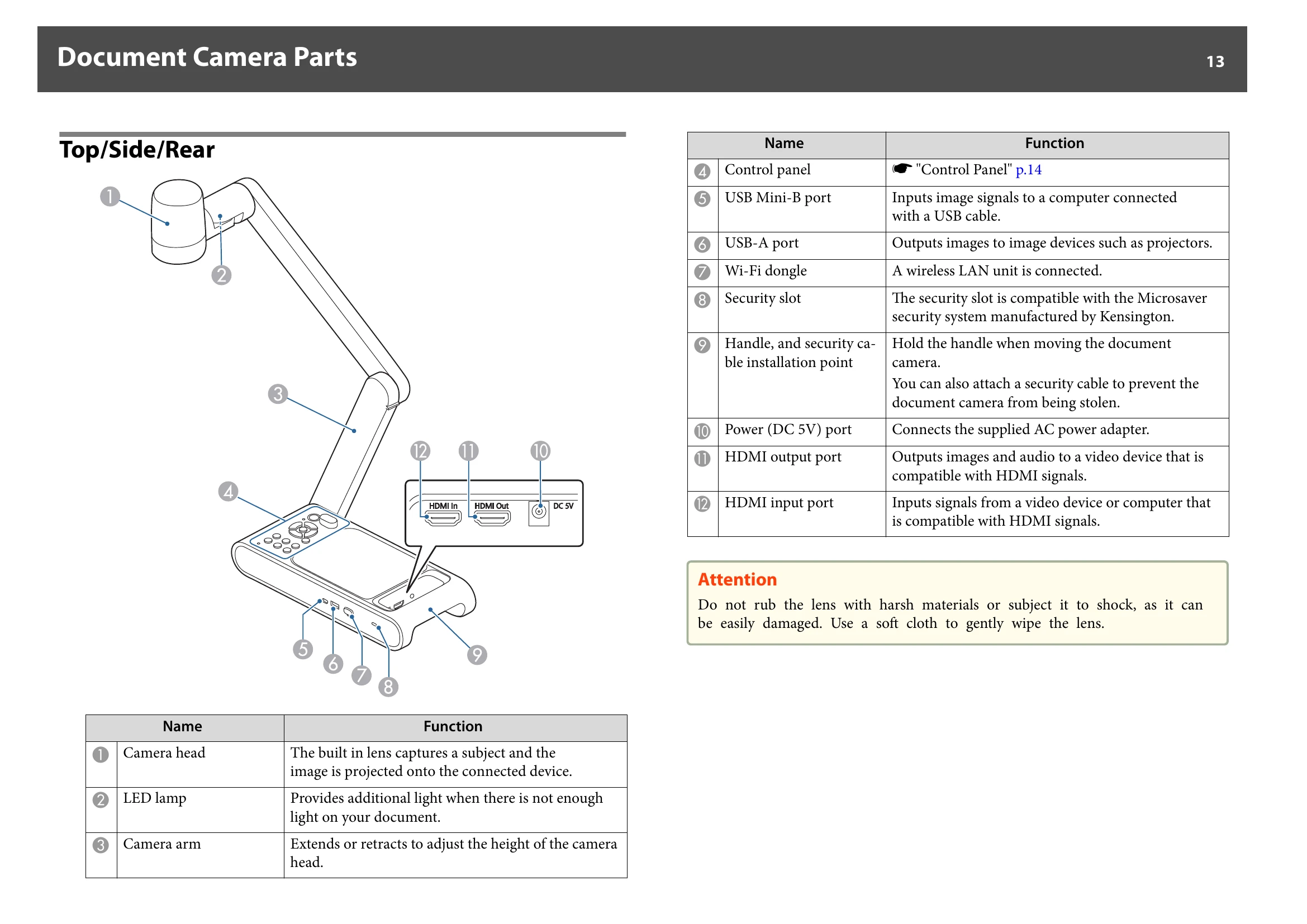
Connect the document camera directly to a projector, external monitor, or other video device using the HDMI cable. It can also be connected via Miracast.
Connecting Using the HDMI Cable: Connect the HDMI Out port on the document camera to a projector using the included HDMI cable. Images from the document camera are output from the projector.
Connecting to a Projector via Miracast: Make sure the document camera and projector are not connected with a USB cable. Turn on the HDMI monitor, then turn on the document camera. Press the menu button to display the on-screen menu. Open the Miracast menu and select Connect to view a list of devices. Select the projector from the list and press Enter.
| Problems and Solutions | Page |
|---|---|
| Operation Problems | 47 |
| Image Quality Problems | 47 |
| Problems related to USB Flash Drive | 48 |
| Miracast Problems | 48 |
| Remote Control Problems | 48 |