Brand: EPSON
Category: Other
Document Type: Installation Guide
Language: EN
Brand: EPSON
Category: Other
Document Type: Installation Guide
Language: EN
Uploaded: Nov. 21, 2025, 6:22 p.m.
None
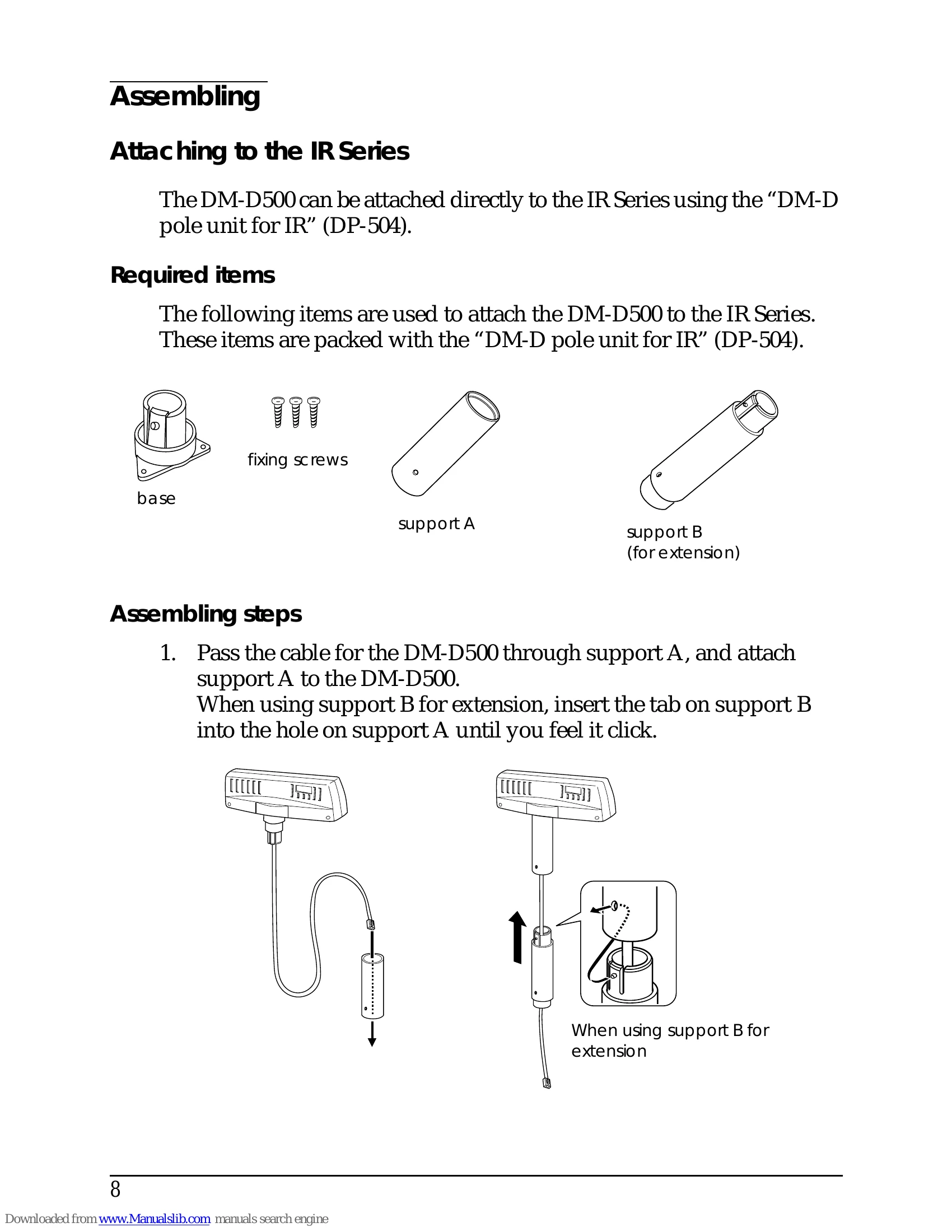
This manual guides the user through the installation of the EPSON DM-D500 Customer Display.
It covers unpacking, handling precautions, and detailed instructions for attaching the display to various EPSON printer series (IR Series, TM-H5000II/TM-J8000, TM-U375/TM-U950, TM-H6000/TM-U675, and other TM printers), as well as mounting it on a DM-D stand.
The manual also details part names and functions, DIP switch settings for configuration, turning and tilting mechanisms, self-test procedures, and technical specifications.
| Problem | Possible Cause | Solution |
|---|---|---|
| No display | Power is off. | Turn on the power switch. |
| Cable is disconnected. | Connect the cable securely. | |
| DIP switch settings are incorrect. | Check the DIP switch settings. | |
| Display is abnormal (e.g., garbled characters, flickering). | Cable is disconnected or damaged. | Check or replace the cable. |
| Interference from other devices. | Move the display away from other electronic devices. | |
| Internal malfunction. | Contact your dealer. | |
| Self test does not display correctly. | Internal malfunction. | Contact your dealer. |