Brand: EPSON
Category: Other
Document Type: Manual
Language: EN
Brand: EPSON
Category: Other
Document Type: Manual
Language: EN
Uploaded: Sept. 12, 2025, 4:22 a.m.
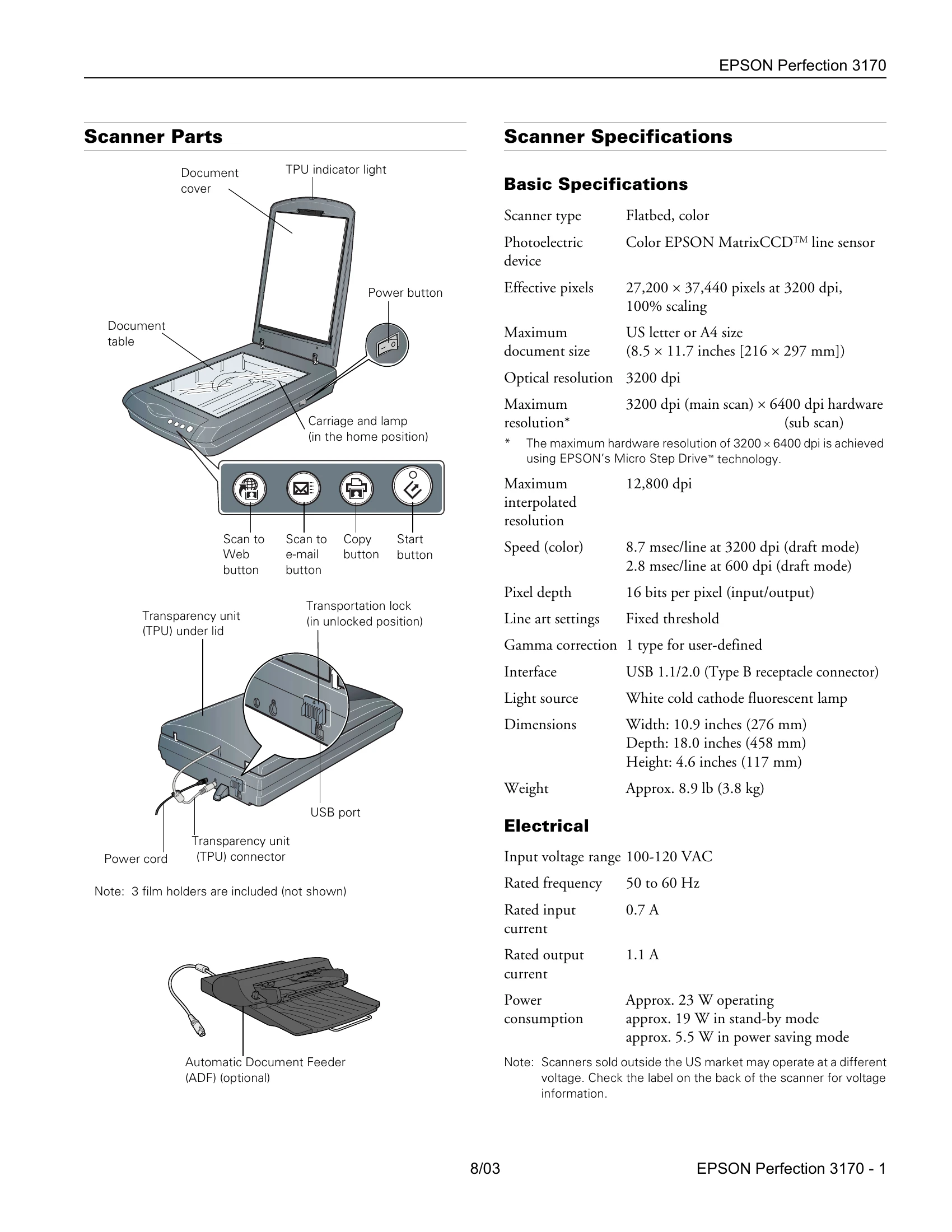
The scanner includes a document table, cover with TPU indicator light, power button, carriage and lamp, and a USB port.
Key features include a flatbed color scanner with a Color EPSON MatrixCCDTM line sensor, optical resolution up to 3200 dpi, and interpolated resolution up to 12,800 dpi. It supports USB 1.1/2.0 interface and uses a white cold cathode fluorescent lamp. Dimensions are 10.9 x 18.0 x 4.6 inches, weighing approx. 8.9 lb.
Input voltage range is 100-120 VAC, 50-60 Hz, with a rated input current of 0.7 A. Power consumption is approx. 23 W operating, 19 W in stand-by, and 5.5 W in power saving mode.
Operating temperature is 41 to 95 °F (5 to 35 °C), and humidity is 10% to 80% (non-condensing). Storage temperature is -13 to 140 °F (-25 to 60 °C), and humidity is 10% to 85% (non-condensing).
Includes UL 60950 and CSA C22.2 No. 60950 safety approvals, and FCC part 15 subpart B class B and CSA C108.8 class B EMC approvals.
Supports Universal Serial Bus Specification Revision 2.0, with one Type B receptacle connector, operating in Full Speed (12 Mbps) and High Speed (480 Mbps) modes.
Input: 100-120 VAC, 50 to 60 Hz. Output: 24.0-26.4 VDC, 1.1 A.
Built into the scanner lid, supports positive or negative film in 35 mm strips, 35 mm slides, and 120/220 (6 x 9-cm) film.
Press the Start button to open EPSON Smart Panel. Place document face down, align, close cover, and press Start. Select scan type and save location.
Scans can be started via scanner buttons (Web, Email, Copy, Start), the Smart Panel icon on the desktop, or from TWAIN-compliant programs like Adobe Photoshop Elements.
EPSON Scan offers four modes: Full Auto, Home, Office, and Professional. Settings can be adjusted within each mode.
Use the Color Restoration setting in Smart Panel (RePrint Photo) or EPSON Scan to improve faded photos or negatives.
Remove the document mat, connect the film adapter cable, and insert film into the appropriate holder. Ensure the white triangle on the holder points to the upper-right corner of the scanner. Select the correct Document Type in EPSON Scan.
Status indications: Green (ready), Flashing Green (initializing/busy), Flashing Red (error), Off (unplugged/off).
Includes Photo Start Here poster, Scanner Software CD-ROM, and Notices booklet/Reference Guide.
| Light | Color | Status |
|---|---|---|
| On | Green | The scanner is ready to scan images. |
| Flashing | Green | The scanner is initializing (warming up) or is busy scanning. |
| Flashing | Red |
Check the following, then turn your scanner off and back on to reset it:
|
| Off | The scanner is unplugged or turned off. |