Manual for ET-2760

Manual for ET-2760

Brand: EPSON

Category: Printer

Document Type: Manual

Language: EN
Uploaded: Sept. 12, 2025, 4:21 a.m.

Warranty Information

None

Product Basics

Explore the fundamental features of your ET-2760 printer. This section covers essential information such as:

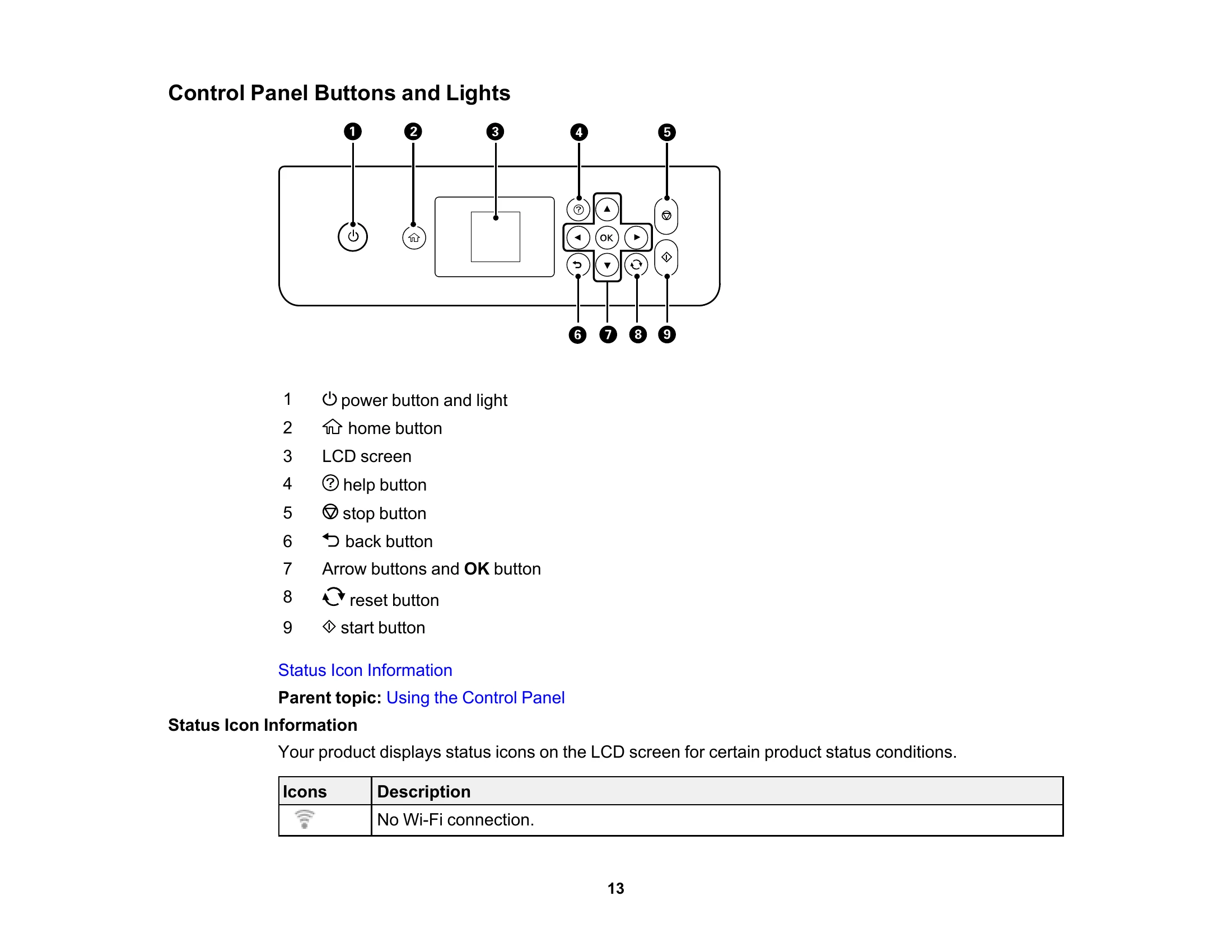
  • Control Panel: Learn to navigate and operate the printer using its control panel, including understanding buttons, lights, and status icons.
  • Product Parts: Identify the various components of your printer, both externally and internally.
  • Software Updates: Discover how to check for and install updates for your printer's software to ensure optimal performance.
  • Power Saving: Configure settings to reduce energy consumption, such as sleep timer and auto power-off options.
  • Epson Connect Solutions: Explore various cloud-based printing and scanning services for smartphones, tablets, and computers, including Epson Email Print, Epson iPrint, AirPrint, and Google Cloud Print.

Using the Control Panel

Familiarize yourself with the control panel's functions:

  • Buttons and Lights: Understand the purpose of each button and indicator light.
  • Entering Characters: Learn how to input text, such as passwords, using the LCD screen.
  • LCD Screen Language: Customize the display language of the control panel.

Troubleshooting and error codes

Icons Description
Wi-Fi icon No Wi-Fi connection.
Wi-Fi signal icon A Wi-Fi network error has occurred or the product is searching for a connection.
Wi-Fi connected icon A Wi-Fi connection is established. The number of bars indicates the connection's signal strength.
Wi-Fi Direct icon No Wi-Fi Direct connection.
Wi-Fi Direct connected icon A Wi-Fi Direct connection is established.
Privacy Policy