Brand: EPSON
Category: Printer
Document Type: Manual
Language: EN
Brand: EPSON
Category: Printer
Document Type: Manual
Language: EN
Uploaded: Nov. 21, 2025, 7:44 p.m.
No warranty information found in the provided pages.
This section covers the fundamental features of your Epson product.
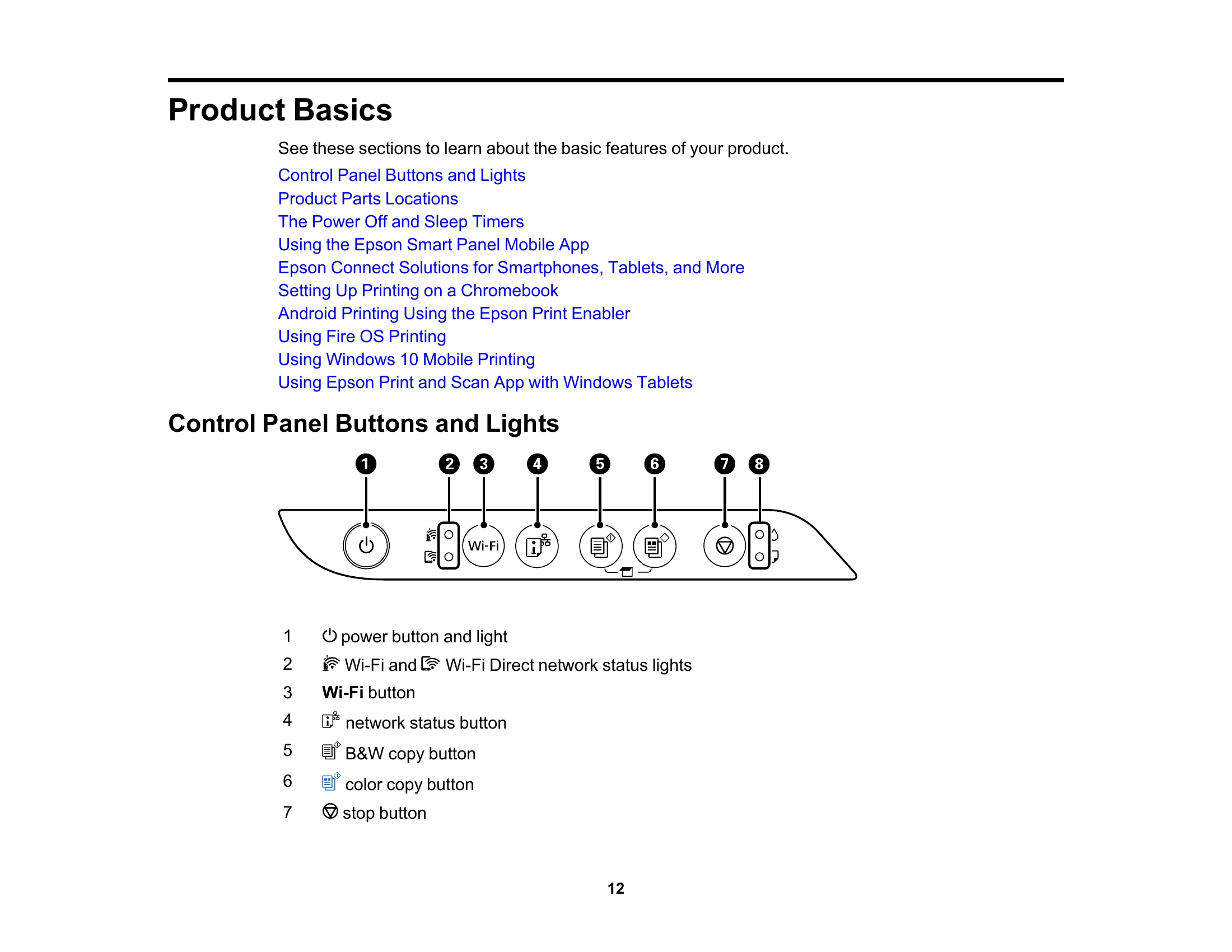
Familiarize yourself with the buttons and indicator lights on the control panel for basic operations.
Identify the various parts of your product, including front, inside, and back components.
Understand how the product enters sleep mode or turns off automatically and how to adjust these settings for power management.
Utilize the Epson Smart Panel app on your smartphone or tablet for setup, printing, copying, and scanning.
Explore Epson Connect solutions for printing and scanning from various devices and locations, including Epson Email Print and Epson Remote Print.
| Light status | Condition/solution |
|---|---|
| Power light is on | The product is turned on. |
| Wi-Fi light is on | The product is connected to a wireless network. |
| Wi-Fi Direct light is on | The product is connected to a device using Wi-Fi Direct. |