Brand: EPSON
Category: Projector
Document Type: Manual
Language: EN
Brand: EPSON
Category: Projector
Document Type: Manual
Language: EN
Uploaded: Nov. 21, 2025, 6:01 p.m.
Your projector comes with a basic warranty. Refer to the warranty brochure for details.
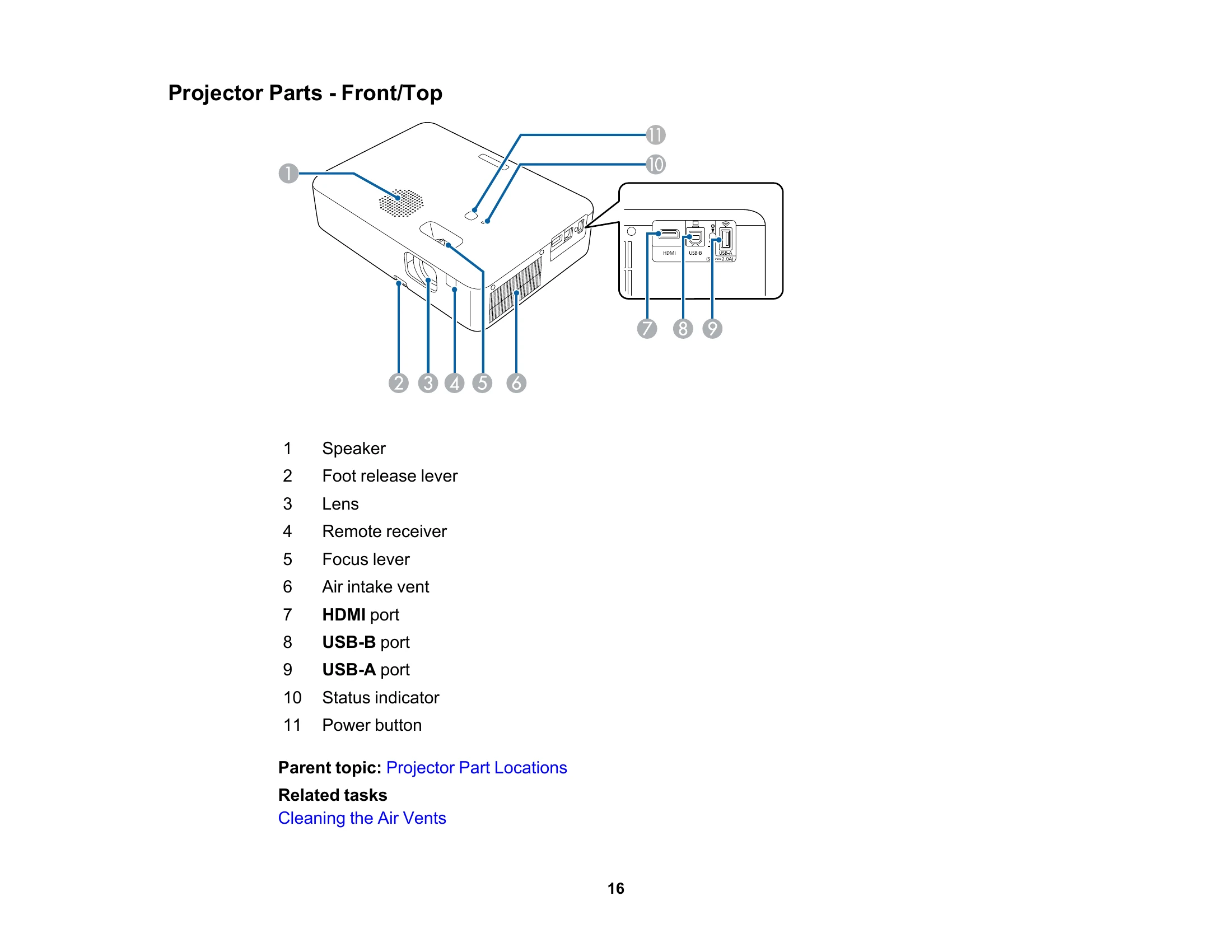
This manual covers the setup, operation, and maintenance of the Epson CO-W01 projector.
| Problem | Possible Cause | Solution |
|---|---|---|
| No Image Appears | Projector is not turned on. | Press the power button. |
| No signal from the source device. | Check the cable connections. Select the correct input source. | |
| Lamp is not working. | Contact customer support. | |
| "No Signal" Message Appears | Incorrect input source selected. | Press the Source Search button to cycle through sources. |
| Cable connection issue. | Ensure the cable is securely connected at both ends. Try a different cable. | |
| Image is Fuzzy or Blurry | Focus is not set correctly. | Adjust the focus lever. |
| Projector is too close or too far from the screen. | Adjust the projection distance. | |
| Image is Flickering | Source signal issue. | Check the source device and its output settings. |
| Interference. | Ensure no strong sources of electromagnetic interference are nearby. | |
| Sound Problems | Volume is muted or set too low. | Adjust the volume using the remote control. Check the mute button. |
| Audio cable connection issue. | Ensure audio cables are properly connected. |