Brand: EPSON
Category: Projector
Document Type: Manual
Language: EN
Brand: EPSON
Category: Projector
Document Type: Manual
Language: EN
Uploaded: Nov. 21, 2025, 8:50 p.m.
Manual Publish Date: 2009-02-01
| Cause | Remedy |
|---|---|
| Is the projector connected to the network correctly? | Check that the network cable has been connected correctly. If the cable is not connected correctly, reconnect it. |
| Has the projector been set up correctly for connection to the network? | Check the settings for the Network configuration menu command. Projector User's Guide |
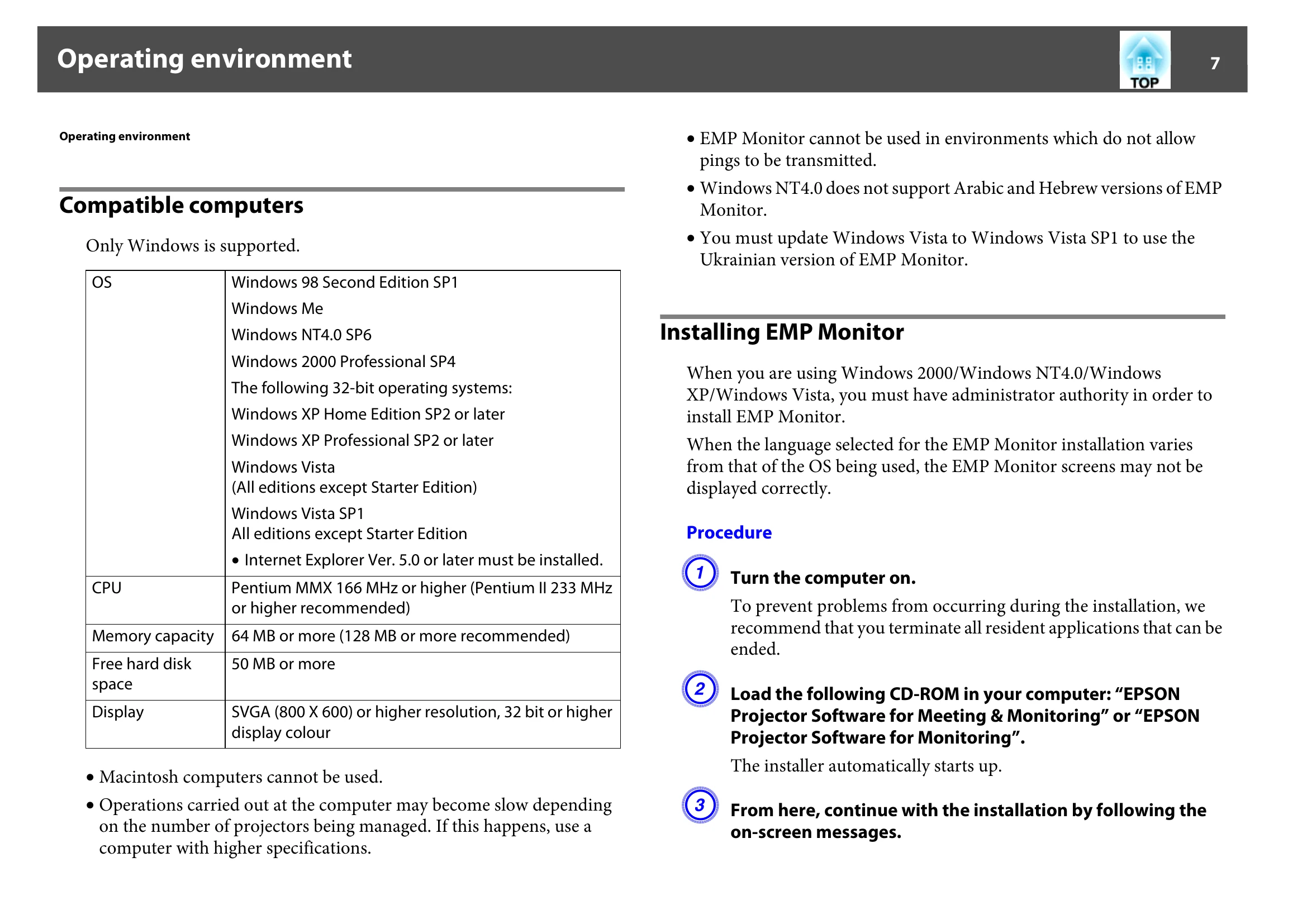
| Has EMP Monitor been installed on the computer correctly? | Uninstall EMP Monitor and then re-install it. p.7 |
| Are all the projectors that you want to control or monitor registered? | Register the projectors. p.10 |
| Is the projector's Network Monitoring or Standby Mode configuration menu set to ON or Network ON? | In order to use EMP Monitor to monitor and control the projector when it is in standby mode, the projector's Network Monitoring or Standby Mode configuration menu must be set to ON or Network ON. Projector User's Guide |