Manual for PowerLite 600p/800p/810p

Manual for PowerLite 600p/800p/810p

Brand: EPSON

Category: Projector

Document Type: Manual

Language: EN
Uploaded: Nov. 21, 2025, 7:55 p.m.

Manual Publish Date: 2010-03-22

Setting Up the Projector

  1. Place the projector on a stable surface 3-40 feet from the screen.
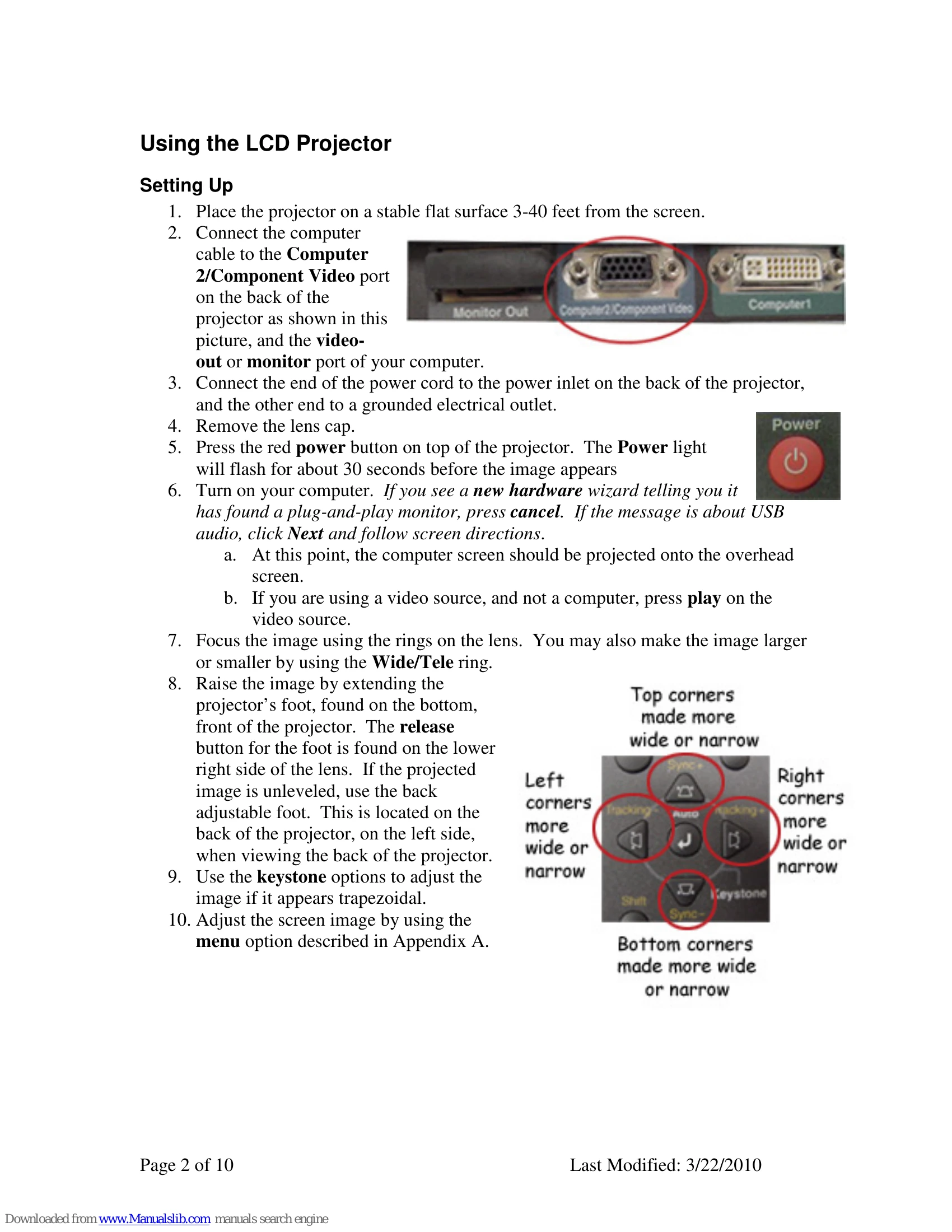
  2. Connect the computer cable to the projector's Computer 2/Component Video port and your computer's monitor out port. Connect the power cord to a grounded outlet.
  3. Remove the lens cap.
  4. Press the red power button. The Power light will flash for about 30 seconds.
  5. Turn on your computer. If a new hardware wizard appears, press cancel.
  6. The computer screen should be projected. If using a video source, press play.
  7. Focus the image using the rings on the lens. Adjust size with the Wide/Tele ring.
  8. Use the projector's foot to raise the image. Use the back adjustable foot for leveling.
  9. Use keystone options to correct trapezoidal images.
  10. Adjust the screen image using the menu option.

Using the Control Panel Options

The control panel allows full control of the projector.

  • Power: Press red button to turn on/off.
  • Help: Access help for image, sound, or language selection.
  • Computer/YCbCr: Switch between computer and video sources.
  • Video: Switch between standard and S-Video.
  • Menu: Display the 8 menu items.
  • Esc: Return to main menu or exit menu.
  • Keystone: Adjusts vertical (Sync) and horizontal (Tracking) image for trapezoidal correction.
  • Auto: Select menu item or reset tracking/sync/position.
  • Shift: Eliminates vertical stripes or adjusts sharpness.
  • Resize: Compresses or pans image, switches aspect ratio (4:3/16:9), or returns to original size.
  • A/V Mute: Turns off picture or mutes volume.
  • Volume: Adjusts volume.

Focus and Changing Image Size

Use the lens rings to focus and adjust image size.

Additional Audio and Video Devices

Connect external devices via the various ports on the back of the projector.

Shutting Down the LCD Projector

  1. Press the red Power button (confirmation message appears).
  2. Press Power again to turn off.
  3. Wait for the fan to turn off before unplugging.

Warning Lights

  • Lamp Warning Light: Lamp needs changing.
  • Temperature Status Light: Flashing orange (clean air filter); flashing red (turn off immediately).

Troubleshooting and error codes

Warning Light Indication Action
Lamp Warning Light Flashing Notify the ITRC that the lamp needs to be changed.
Temperature Status Light Flashing orange Notify the ITRC to clean the air filter.
Temperature Status Light Flashing red Turn off the lamp immediately and allow the fan to run to cool down the temperature.
Privacy Policy