Brand: ESSER
Category: Fire Alarm Systems
Document Type: Installation Guide
Language: EN
Brand: ESSER
Category: Fire Alarm Systems
Document Type: Installation Guide
Language: EN
Uploaded: Nov. 21, 2025, 8:49 p.m.
Manual Publish Date: 2007-09-01
None
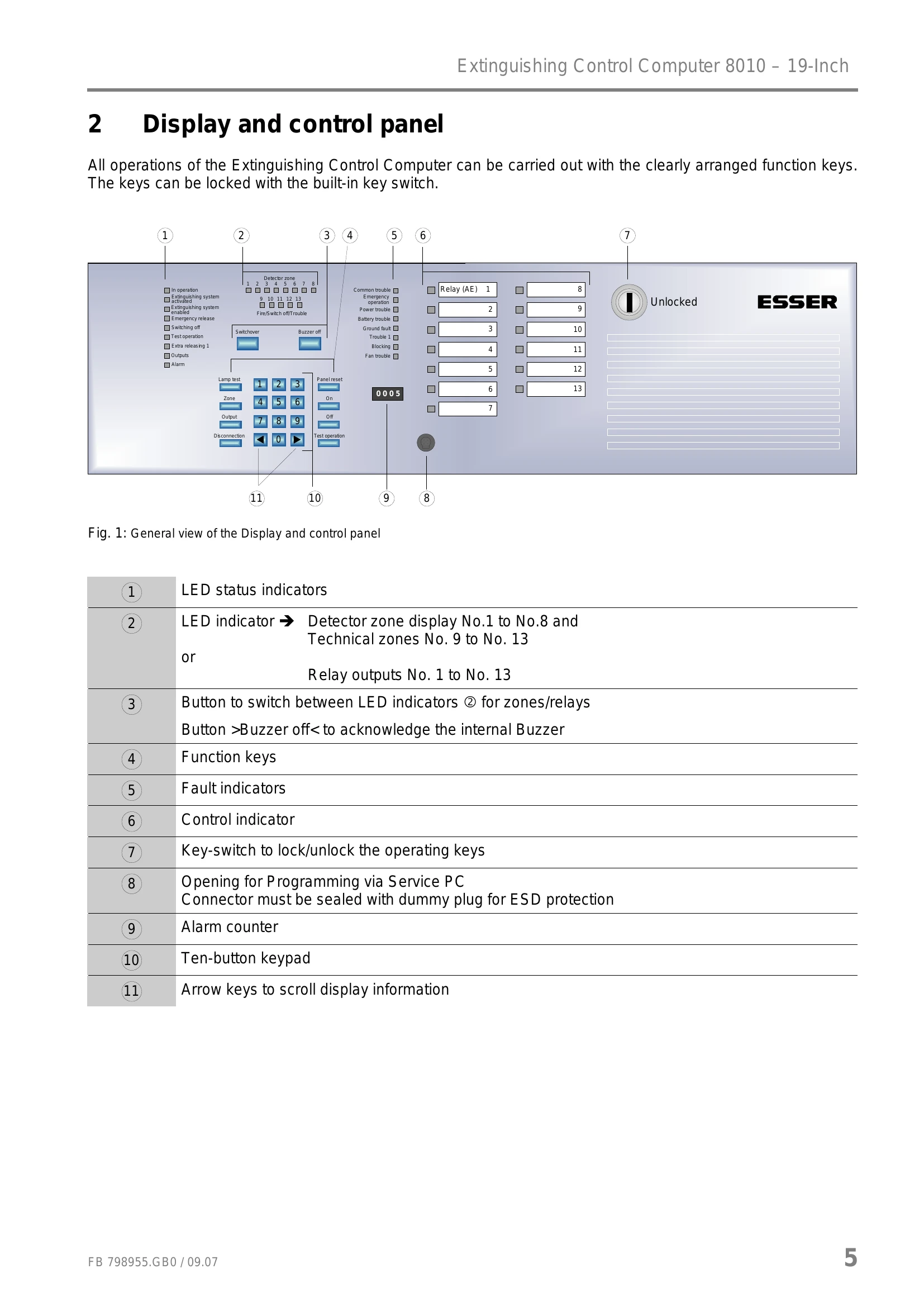
All operations are performed using the control panel keypad. Pressing a key is acknowledged by a short buzzer tone. The keys can be locked with a key switch for unauthorized operation.
Detector zones (1-8) and technical zones (9-13) can be switched on/off using function keys and the keypad. Deactivated zones will not trigger alarms.
Relay outputs (1-13) can be switched on/off via function keys and the keypad. Deactivated outputs will not notify alarms.
Automatic zones 1-8 can be switched to Test mode. The zone status is indicated by a yellow/red flashing LED.
Revision mode has priority over test mode. When activated, outputs programmed with the status function 'Revision' remain activated.
The panel can be reset using a function key. This restarts the system and resets internal panel status and visual displays.
The lamp test activates all visual displays and the control panel buzzer until the key is released.
| Trouble | Yellow LED | Description |
|---|---|---|
| Common trouble | On | At least one failure in the panel has been identified. |
| Emergency Operation | On | System is in emergency operation due to CPU-failure, functioning only to a limited extent. Call maintenance-service immediately. |
| Mains trouble | On | Mains voltage failure identified. |
| Battery trouble | On | Battery voltage failure identified. |
| Ground trouble | On | Earth fault in communication or supply wiring. |
| Trouble | On | Input >Trouble, extinguishing system< is activated, indicating a failure in a connected extinguishing system. |
| Blocking | On | Input >Blocking< is activated, indicating a failure from a mechanical switch contact. |
| Fan trouble | On | Integrated fan reports a fault or is out of order, potentially causing heat accumulation. Call maintenance-service immediately. |