Manual for ffcm1155us

Manual for ffcm1155us

Brand: FRIGIDAIRE

Category: Microwave Oven

Document Type: Manual

Language: EN
Uploaded: Nov. 21, 2025, 8:35 p.m.

Warranty Information

One year limited warranty covering defects in materials or workmanship.

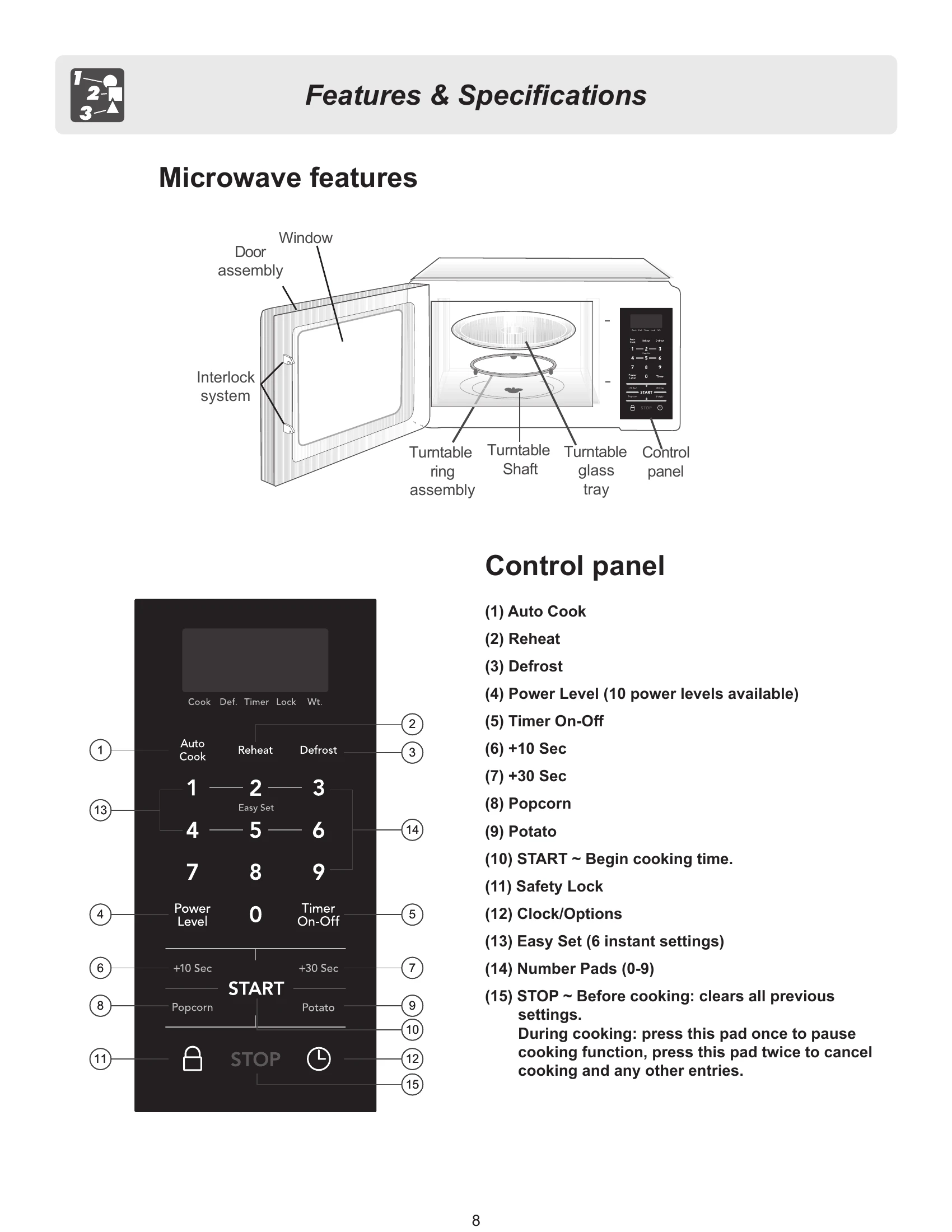
Microwave operation involves basic controls for heating, defrosting, and convenience features. The control panel includes pads for Auto Cook, Reheat, Defrost, Power Level, Timer, and specific food items like Popcorn and Potato. Users can set cooking time and power levels manually. Convenience features like Popcorn, Potato, Bacon, Meat, Frozen Entree, Seafood, Dinner Plate, Pizza, Soup, and Auto Cook offer pre-programmed settings for common food items. Clock and Options settings allow for customizing display, sound, and weight units. The manual also details safety precautions, cleaning instructions, and troubleshooting tips.

Troubleshooting and error codes

Problem Possible Solutions
Neither the microwave's display or oven operates
  • Properly insert the plug into a grounded power outlet.
  • Remove the plug from the outlet, wait 10 seconds, then plug the microwave in again.
  • Reset the household circuit breaker or replace any blown fuses.
  • Plug a different appliance into the power outlet. If the other appliance will not operate, have a qualified electrician repair the outlet.
  • Plug the microwave into a different power outlet.
The oven display works, but the oven will not operate
  • Make sure the oven door is closed securely and completely.
  • Check to see if packing material or other materials are stuck to the door seal.
  • Check for damage to the oven door.
  • Press the STOP pad twice and attempt to re-enter cooking instructions.
  • Plug a different appliance into the power outlet. If the other appliance will not operate, have a qualified electrician repair the outlet.
  • Plug the microwave into a different power outlet.
The power goes off before the cook time has elapsed
  • If there has been a power interruption, remove the plug from the outlet; wait 10 seconds, then plug the microwave in again. If there was a power outage, the time indicator in the display will show 00:00.
  • Reset the clock and any cooking instructions.
  • Reset the household circuit breaker or replace any blown fuses.
  • Press the STOP pad twice and attempt to re-enter cooking instructions.
  • Plug a different appliance into the power outlet. If the other appliance will not operate, have a qualified electrician repair the outlet.
  • Plug the microwave into a different power outlet.
Food is cooking too slowly
  • Make sure the oven is on a separate 20 amp circuit line. Operating another appliance on the same circuit can cause a voltage drop. If necessary, move the microwave to its own circuit.
You see sparks or arcing
  • Remove any metallic utensils, cookware or metal ties from the oven cavity. If using aluminum foil, use only narrow strips and allow at least one inch between the foil and the interior oven walls.
The turntable makes noises or sticks
  • Clean the turntable, roller ring and oven cavity bottom.
  • Make sure the turntable and roller ring are positioned correctly.
Using your microwave causes TV or radio interference
  • This is similar to the interference caused by other small appliances, such as hair dryers. Move your microwave further away from other appliances, like your TV or radio.
Privacy Policy