Search
Manual for 35-SE
Brand:
FUJI
Category:
Camera
Document Type:
Language:
EN
Uploaded:
Aug. 9, 2025, 11:48 p.m.
Warranty Information
None
Download Manual
Loading Film:
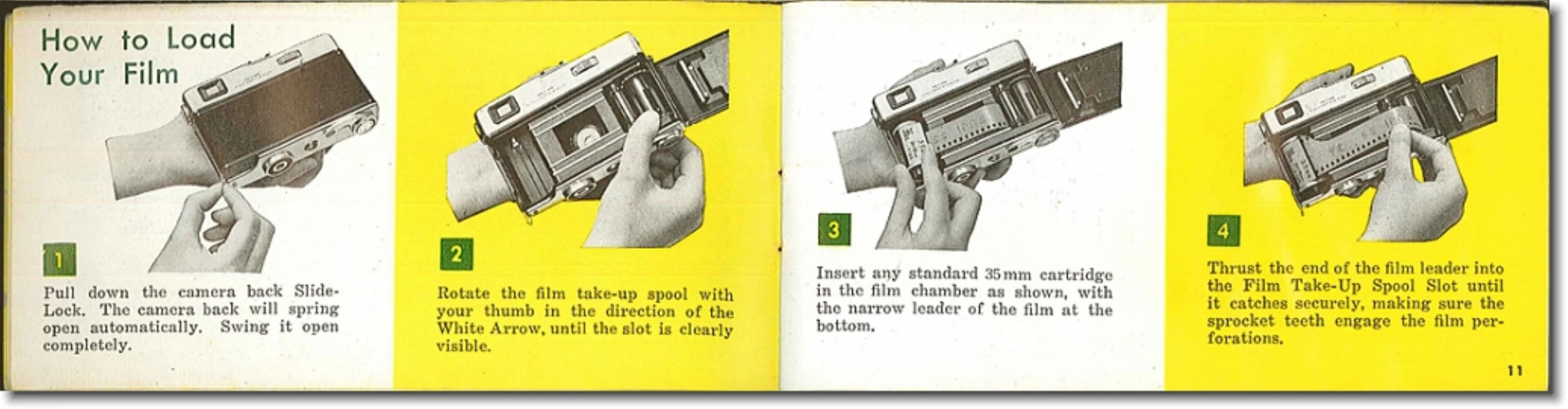
Pull down the back slide-lock to open the camera back.
Rotate the film take-up spool until the slot is visible.
Insert a 35mm film cartridge with the leader at the bottom.
Insert the film leader into the take-up spool slot, ensuring sprocket teeth engage the perforations.
Hold the cartridge, press the shutter release, and advance the film trigger.
Close the camera back by pushing up the slide-lock.
Advance the film with the rapid wind trigger until '1' appears in the exposure counter window.
Set the ASA film speed on the indicator.
Using the Light Meter:
Set the film's ASA number on Ring A, aligning it with the white dot by pulling and releasing button B. This locks Rings A and C.
Set the desired shutter speed using Ring D.
Rotate Ring A until the red needle in the exposure meter window is centered over the black rectangle for a correct exposure.
If the needle is too far right, set a slower speed. If too far left, set a faster speed.
Color film: Center the needle over the red or yellow rectangle for ASA 10 or 32, respectively.
To uncouple the meter, push up button 14 and set aperture and speed manually.
Focusing:
Look through the eyepiece. You will see two images if the subject is out-of-focus.
Rotate the focusing wheel on the back of the camera until the two images merge into one sharp image.
Unloading Film:
Press the Rewind Release Button on the camera base.
Open the Film Rewind Crank and turn it in the direction of the arrow until the button stops turning, indicating the film is rewound.
Open the camera back and remove the film.
Troubleshooting and error codes
No specific troubleshooting table found.
Privacy Policy