Brand: Fujifilm
Category: Camera
Document Type:
Language: EN
Brand: Fujifilm
Category: Camera
Document Type:
Language: EN
Uploaded: Aug. 9, 2025, 11:51 p.m.
FUJIFILM warrants that the Media is free from defects in material and workmanship for ninety (90) days from the date of receipt.
| Camera Q & A | Key phrase | See page |
|---|---|---|
| How do I set the camera clock? | Date and time | 12 |
| Can I set the clock to local time when I travel? | Time difference | 89 |
| How do I keep the display from turning off automatically? | Auto power off | 88 |
| How do I make the display brighter or darker? | LCD brightness | 87 |
| How do I stop the camera beeping and clicking? | Operation and shutter volume | 84 |
| Can I change the sound the shutter makes? | Shutter sound | 84 |
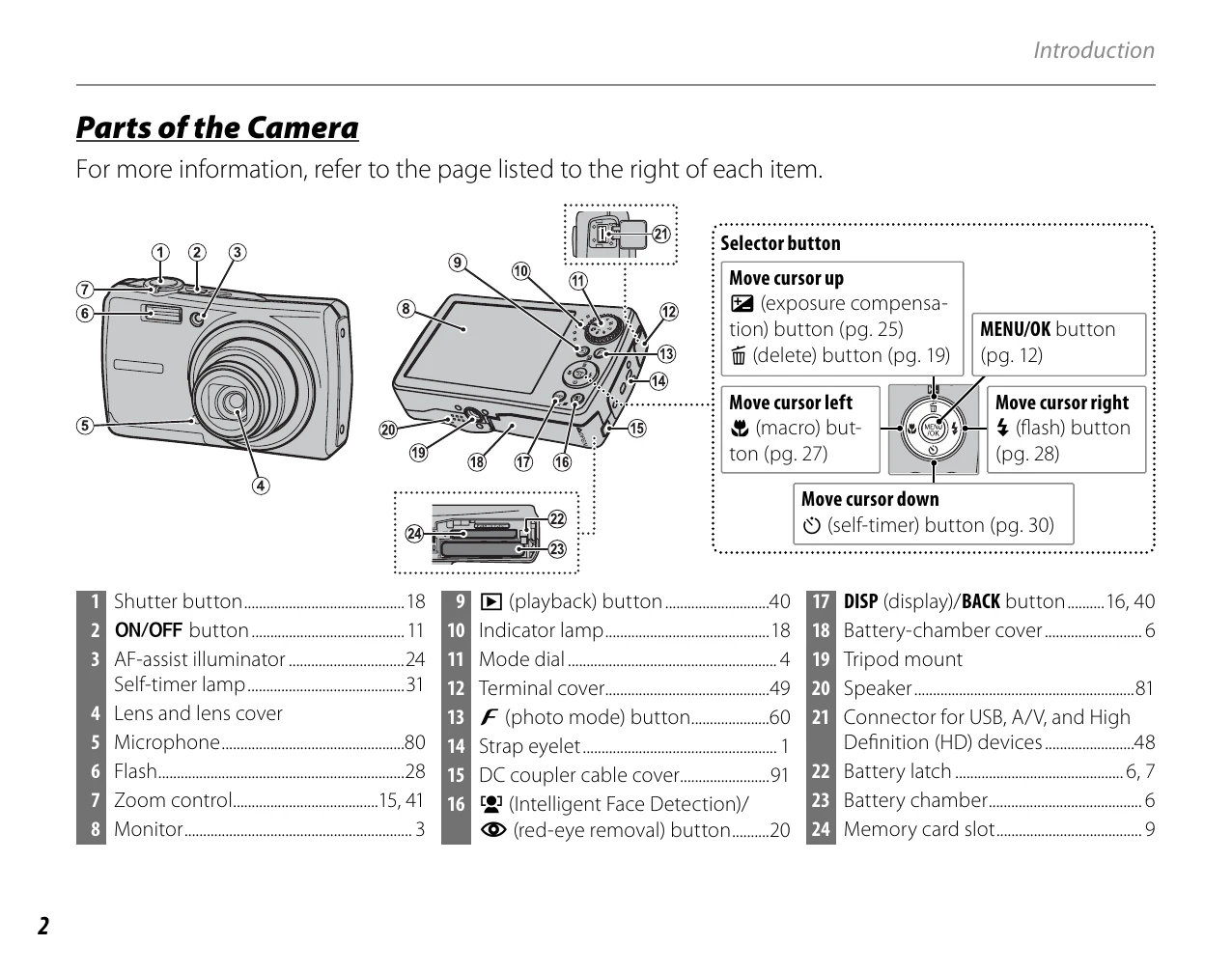
| What are the parts of the camera called? | Parts of the camera | 2 |
| What do the icons in the display mean? | Displays | 3 |
| How do I use the menus? | Menus | 60 |
| What's behind that flashing icon or error message? | Messages and displays | 101 |
| How much charge is left in the battery? | Battery level | 14 |
| Can I print pictures on my home printer? | Printing pictures | 49 |
| Can I copy my pictures to my computer? | Viewing pictures on a computer | 54 |