Manual for FINEPIX S6800 Series

Manual for FINEPIX S6800 Series

Brand: FUJIFILM

Category: Camera

Document Type:

Language: EN
Uploaded: Aug. 9, 2025, 11:50 p.m.

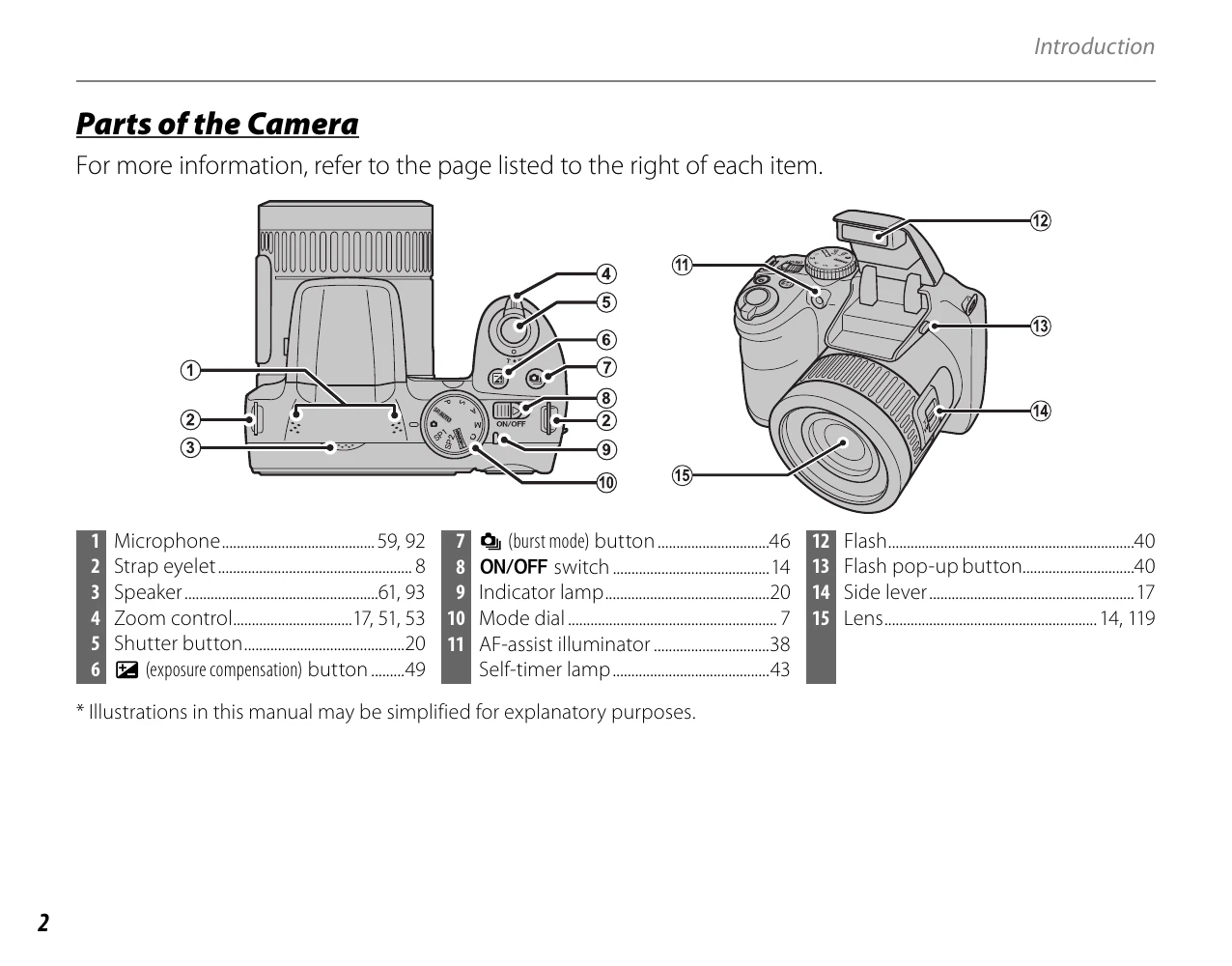
  • Introduction: Familiarize yourself with symbols, conventions, supplied accessories, parts of the camera, displays, and the mode dial.
  • First Steps: Learn how to attach the strap and lens cap, insert batteries, and format memory cards.
  • Basic Photography and Playback: Understand shooting modes, focus, flash, self-timers, and how to view images.
  • More on Photography: Explore advanced shooting modes, exposure compensation, and macro photography.
  • More on Playback: Discover playback options like zoom, multi-frame viewing, and image organization.
  • Movies: Learn how to record and view movies.
  • Connections: Connect your camera to a TV or computer for viewing and printing.
  • Menus: Navigate through shooting, playback, and setup menus to customize camera settings.
  • Technical Notes: Find information on accessories, care, and troubleshooting.
  • Appendix: Review specifications, memory card capacity, and other technical details.

Troubleshooting and error codes

The camera turns off automatically. The battery is depleted. Replace the battery or recharge it.
No pictures can be taken. The memory card is full or not inserted. Replace the memory card or insert a new one.
The screen is blank. The camera is off or the monitor is set to "Off". Turn the camera on or press the DISP/BACK button to turn the monitor on.
Blurry images. Camera shake or subject movement. Hold the camera steady, use a tripod, or increase the shutter speed.
Incorrect exposure. Lighting conditions or incorrect camera settings. Adjust exposure compensation or change the shooting mode.
Privacy Policy