Brand: Fujifilm
Category: Camera
Document Type:
Language: EN
Brand: Fujifilm
Category: Camera
Document Type:
Language: EN
Uploaded: Aug. 9, 2025, 11:50 p.m.
Charging the Battery: Ensure the battery is fully charged before first use. Place the NP-45A battery into the BC-45B charger, ensuring correct orientation. Plug the charger into a power outlet. Charging indicator will light up. Remove the battery once charging is complete.
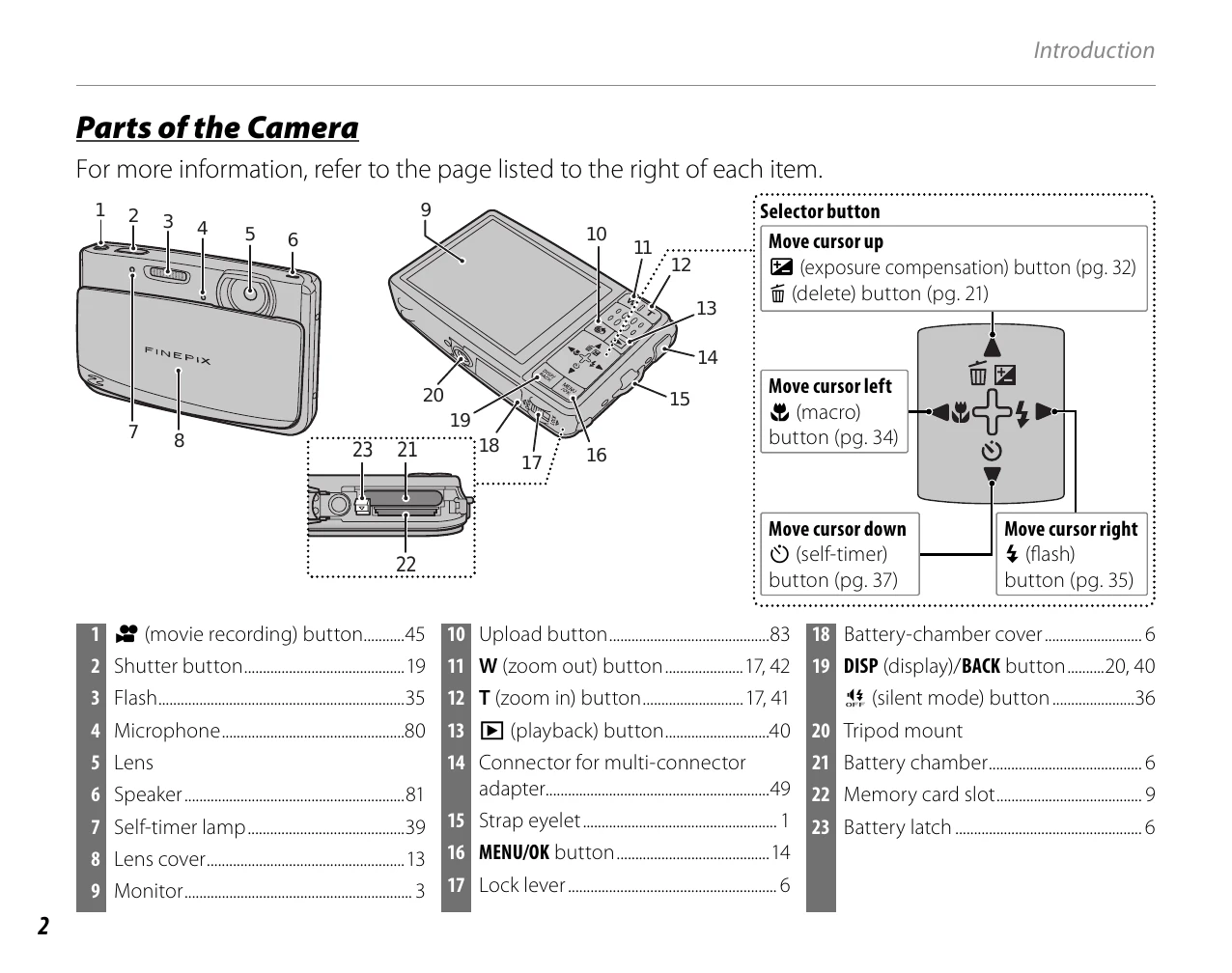
Inserting the Battery: Open the battery-chamber cover by sliding the lock lever. Insert the charged NP-45A battery with the gold terminals facing downwards, aligning the orange stripe with the battery latch. Slide the battery in until it clicks. Close the cover.
Inserting a Memory Card: Ensure the camera is off. Open the battery-chamber cover. Insert an SD or SDHC memory card into the slot, holding it correctly, and push until it clicks. Close the cover.
Turning the Camera On/Off: Press the power button to turn the camera on or off.
| Question | Key phrase | See page |
| How do I set the camera clock? | Date and time | 14 |
| Can I set the clock to local time when I travel? | Time difference | 86 |
| How do I keep the monitor from turning off automatically? | Auto power off | 89 |
| How do I make the monitor brighter or darker? | LCD brightness | 89 |
| How do I stop the camera beeping and clicking? | Silent mode | 36 |
| What are the parts of the camera called? | Parts of the camera | 2 |
| What do the icons in the monitor mean? | Monitor | 3 |
| How do I use the menus? | Menus | 61 |
| What's behind that flashing icon or error message in the monitor? | Messages and displays | 100 |
| How much charge is left in the battery? | Battery level | 16 |