Manual for FinePix Z5fd

Manual for FinePix Z5fd

Brand: Fujifilm

Category: Digital Camera

Document Type:

Language: EN
Uploaded: Aug. 9, 2025, 11:52 p.m.

Warranty Information

Fujifilm warrants the media free from material and workmanship defects for ninety (90) days from receipt.

Getting Ready

  • Loading the Battery: Insert the NP-40 rechargeable battery into the camera. Ensure it is charged before use.
  • Charging the Battery: Connect the AC power adapter to the camera and then to a power outlet. Charging takes about 2 hours.
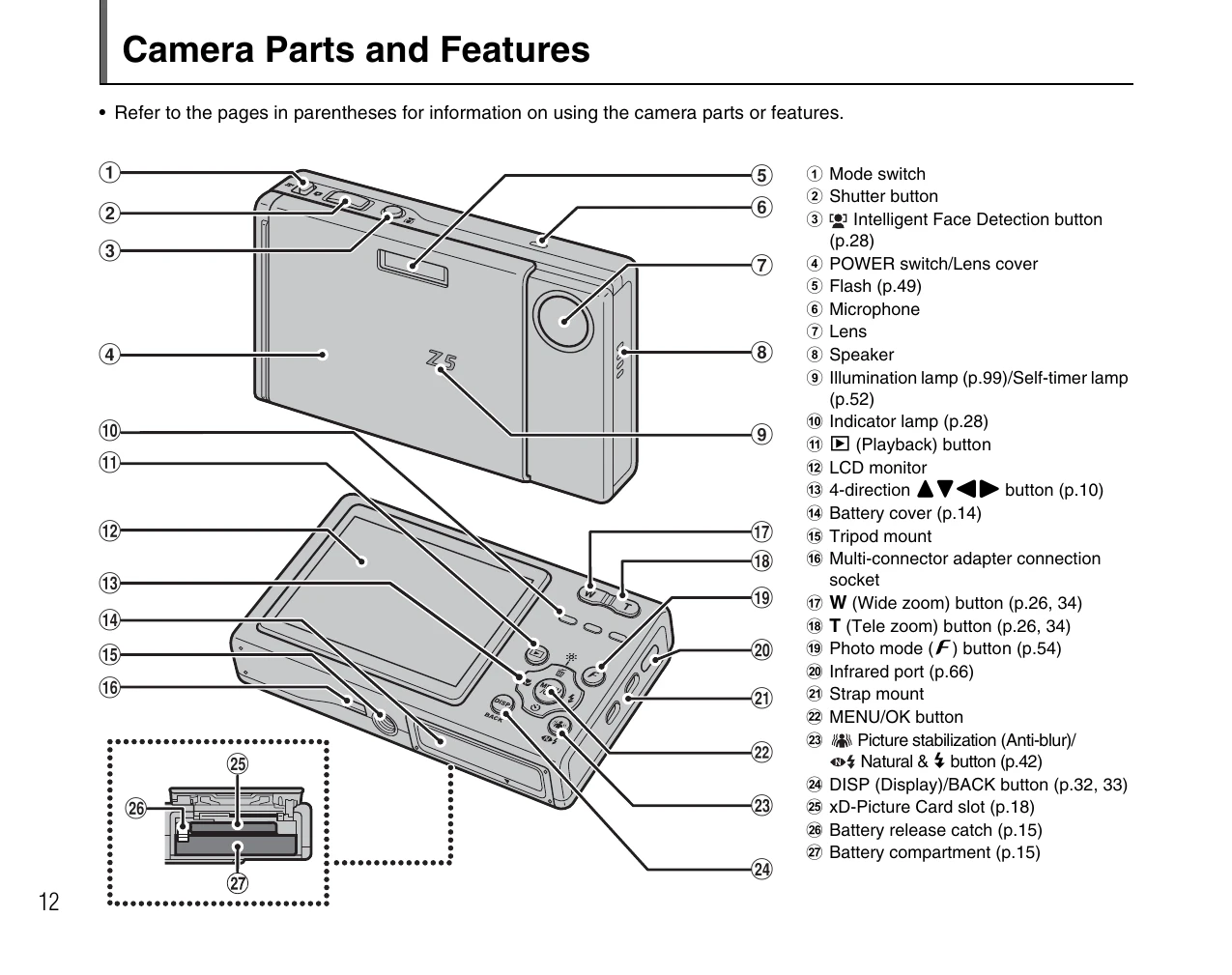
  • Loading the xD-Picture Card: Open the battery cover and insert an xD-Picture Card into the slot, aligning the gold marking.
  • Turning On/Off: Open the lens cover completely to turn on the camera in shooting mode. Close it to turn off. In playback mode, close the lens cover and press the 'F' button to turn on/off.
  • Setting Language, Date, and Time: Upon first use, set the language and date/time. Follow on-screen prompts using the 4-direction buttons and MENU/OK button.

Using the Camera

  • Taking Pictures (AUTO Mode): Use the camera in AUTO mode for automatic settings.
  • Intelligent Face Detection: The camera automatically detects faces for optimal focus and exposure.
  • View/Erase Images: Use the 'F' button to enter playback mode, navigate images, and erase them.

Troubleshooting and error codes

Problem Possible Cause Solution
Camera does not turn on Battery is depleted. Charge the battery or replace it with a fully charged one.
Cannot take pictures xD-Picture Card is full or not inserted. Insert an xD-Picture Card or delete images. Check if internal memory is full.
Images are blurry Camera shake. Hold the camera steady, use a tripod, or use the Picture Stabilization feature.
Flash does not fire Flash is charging or disabled. Wait for the flash to charge or enable flash in the settings.
Cannot connect to PC USB cable not connected properly or driver issue. Ensure the USB cable is securely connected. Install the necessary drivers.
Privacy Policy