Brand: Fujitsu
Category: Computers
Document Type: Manual
Language: EN
Brand: Fujitsu
Category: Computers
Document Type: Manual
Language: EN
Uploaded: Nov. 21, 2025, 9:15 p.m.
Manual Publish Date: 2009-03-01
Refer to the separate warranty document for specific warranty information.
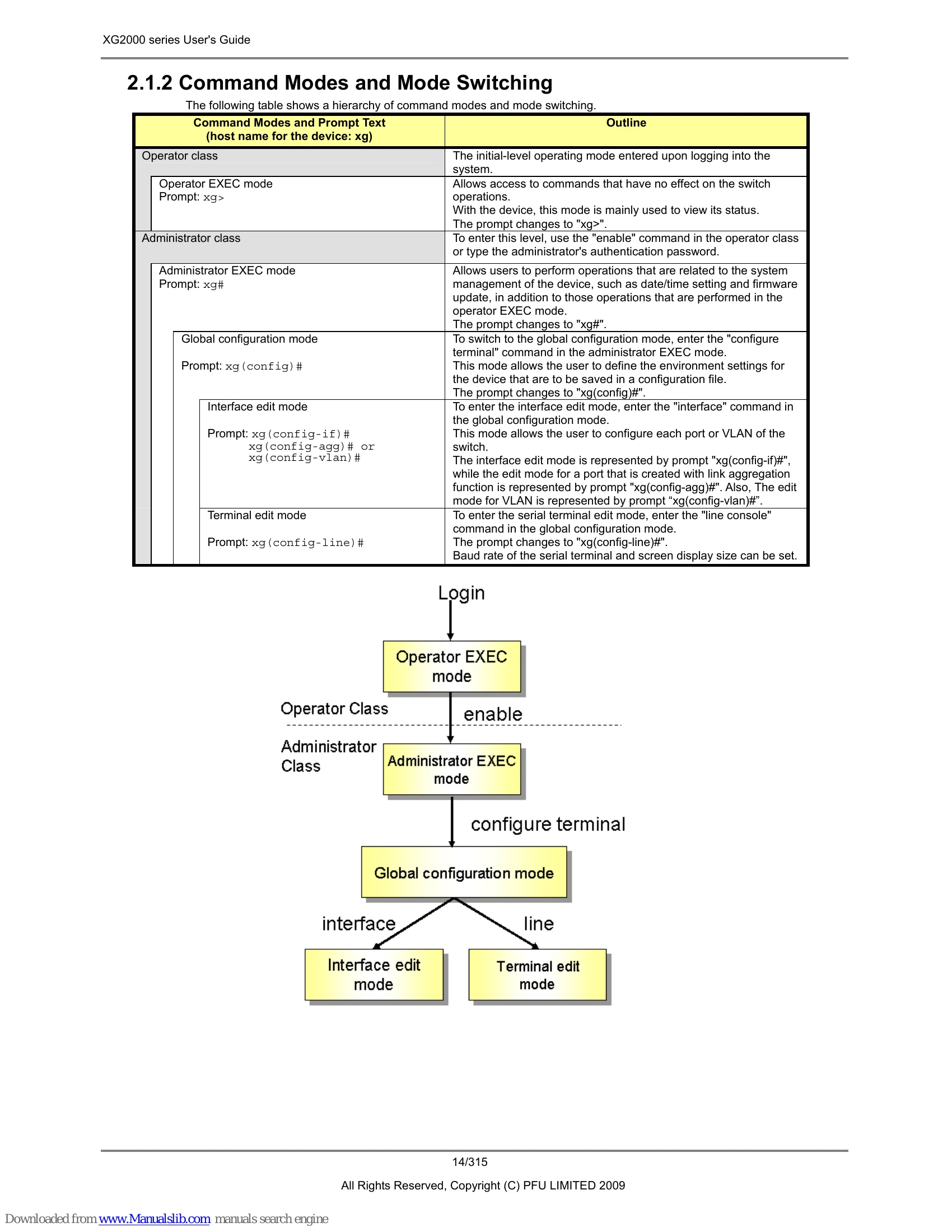
This manual guides users through the operation and management of the XG2000 series Layer 2 switch. It covers features, installation, command-line interface (CLI) usage, configuration settings, and troubleshooting. The CLI allows for detailed control of the device through various command modes, including Operator EXEC, Administrator EXEC, Global Configuration, Interface Edit, and Terminal Edit. Users can manage network settings, ports, VLANs, QoS, and more. The manual also details file management for configurations and firmware updates, as well as system monitoring and maintenance procedures.
| Error Message | Explanation |
|---|---|
| % Ambiguous command: "co t" | Insufficient characters were entered for the CLI to recognize the command. Re-enter the correct command string. |
| % Incomplete command. | All of the options or values required by this command were not entered. Enter all necessary options and values. |
| % Invalid input detected at ^ marker | The command incorrectly entered. A caret symbol (^) indicates the incorrect entry. Correct the entries and execute the command again. |
| % Unrecognized command | Part of the command was incorrectly entered. Re-enter the correct command string. |