Brand: Fujitsu
Category: Scanners
Document Type: Manual
Language: EN
Brand: Fujitsu
Category: Scanners
Document Type: Manual
Language: EN
Uploaded: Nov. 21, 2025, 7:28 p.m.
Manual Publish Date: 2017-01-01
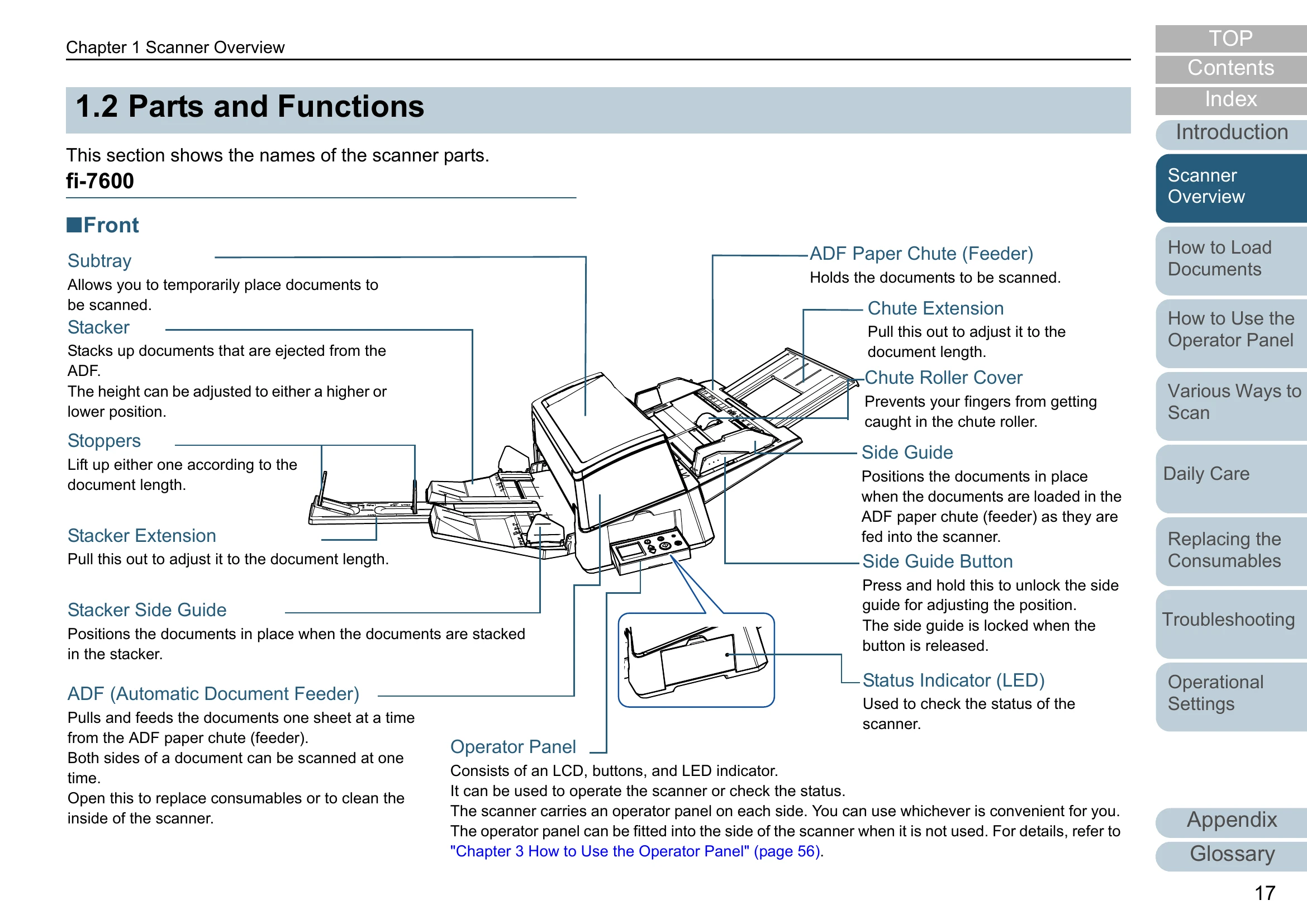
Scanner Overview: Explains the names and functions of parts, and basic scanner operation. Covers how to load documents, use the operator panel, and various scanning methods.
Daily Care & Maintenance: Details how to clean the scanner's exterior and interior, and how to replace consumables.
Troubleshooting: Provides guidance on resolving common issues such as paper jams, error indications, poor image quality, and multifeed errors.
Operational Settings: Covers starting up the software operation panel, password settings, and configuration items for scanning, multifeed detection, waiting times, and maintenance.
| Issue | Page |
|---|---|
| Paper Jam | 124 |
| Error Indications on Operator Panel | 125 |
| Scanner cannot be powered ON. | 135 |
| The LCD or the [Power] button light or both switch OFF. | 136 |
| Scanning does not start. | 137 |
| Scanning takes a long time. | 138 |
| Image quality is poor. | 139 |
| Quality of scanned text or lines is unsatisfactory. | 140 |
| Images are distorted or not clear. | 141 |
| Vertical streaks appear on the scanned image. | 142 |
| An error (error code "U0:10", "U4:40" or "U5:4A") is already displayed in the LCD after power-on. | 143 |
| Multifeed error occurs frequently. | 144 |
| Situation in which the document is not fed into the ADF occurs frequently. | 146 |
| Paper protection is set off frequently. | 147 |
| Paper jams/pick errors occur frequently. | 148 |
| Scanned images turn out elongated. | 149 |
| A shadow appears at the top or the bottom of the scanned image. | 150 |
| There are black traces on the document. | 151 |