Introduction
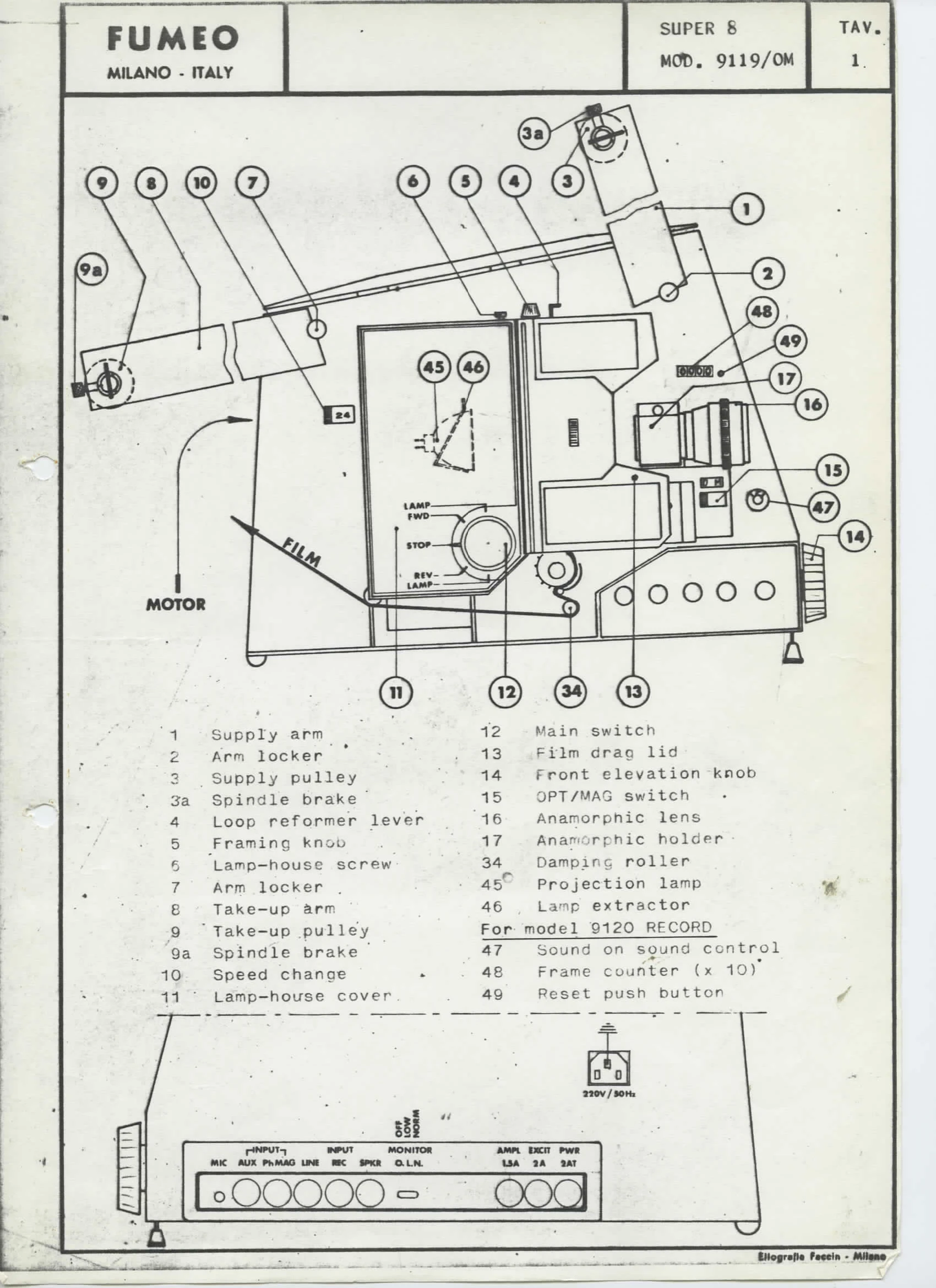
The Fumeo projector model 9119/OM is a super 8 mm professional projector for OPTICAL and MAGNETIC films, equipped with a 200 watt/24 volts projection lamp with dichroic reflector. It offers rugged construction and high technological level. The arms accept reels up to 750 mt (2500 ft) of film, allowing for approximately 2 hours and 30 minutes of continuous projection. Film threading is manual, and the projector can run in both forward and reverse directions.
Sound System
The optical sound track is read directly on a sound drum. The projector features a professional amplifier with a power output of 25 watt r.m.s. and an adjustable presence filter to improve intelligibility. Bass and high frequencies can also be adjusted.
Operation
Preparation
Place the projector on a stable surface, fold out the arms, ensure the main switch is at STOP, and connect the power cord to a suitable mains outlet. Turn the main knob to FWD to start the motor and set the speed lever (10) for 24 fps or 18 fps.
Projection
Turn the main knob (12) to LAMP to light the projection lamp. Open the film drag lid (13). Focus the image using knob (22). Adjust the image size with the zoom lens if equipped. For front elevation, use knob (14). Select OPTICAL or MAGNETIC sound using lever (15) and set the amplifier MODE knob accordingly. Connect an external speaker if desired.
Film Threading
Follow the threading diagram inside lid (13). Place the film reel on arm (1), unroll about 1 meter of film, and thread it through the sprockets and gate, ensuring perforations engage correctly. Tie the film leader to the take-up reel on arm (8). Manually rotate the motor knob to check threading.
Projection
Turn knob (12) to FWD, then to LAMP. Focus the image with knob (22) and readjust the zoom lens if necessary. Use knob (5) to position the film frameline. For sound, adjust LEVEL, BASS, TREBLE, and FILTER controls.
Rewinding
Tie the end of the film to the core of the reel on the supply arm and turn knob (12) to REVerse. The supply reel will rotate counter-clockwise.